Write Your Own Chat Data With AWEL
In this guide, we will show you how to write your own Chat Data with AWEL, just
link the scene of Chat Data in DB-GPT.
This guide is a little bit advanced, may take you some time to understand it. If you have any questions, please feel free to ask in the DB-GPT issues.
Introduction
Chat Data is chat with your database. Its goal is to interact with the database
through natural language, it includes the following steps:
- Build knowledge base: parse the database schema and other information to build a knowledge base.
- Chat with database: chat with the database through natural language.
There are some steps of Chat with database:
- Retrieve relevant information: retrieve the relevant information from the database according to the user's query.
- Generate response: pass relevant information and user query to the LLM, and then generate a response which includes some SQL and other information.
- Execute SQL: execute the SQL to get the final result.
- Visualize result: visualize the result and return it to the user.
In this guide, we mainly focus on step 1, 2, and 3.
Install Dependencies
First, you need to install the dbgpt library.
pip install "dbgpt[rag, agent, client, simple_framework]>=0.7.0" "dbgpt_ext>=0.7.0" -U
pip install openai
Build Knowledge Base
Prepare Embedding Model
First, you need to prepare the embedding model, you can provide an embedding model according Prepare Embedding Model.
Here we use OpenAI's embedding model.
from dbgpt.rag.embedding import DefaultEmbeddingFactory

embeddings = DefaultEmbeddingFactory.openai()
Prepare Database
Here we create a simple SQLite database.
from dbgpt_ext.datasource.rdbms.conn_sqlite import SQLiteTempConnector

db_conn = SQLiteTempConnector.create_temporary_db()
db_conn.create_temp_tables(
    {
        "user": {
            "columns": {
                "id": "INTEGER PRIMARY KEY",
                "name": "TEXT",
                "age": "INTEGER",
            },
            "data": [
                (1, "Tom", 10),
                (2, "Jerry", 16),
                (3, "Jack", 18),
                (4, "Alice", 20),
                (5, "Bob", 22),
            ],
        }
    }
)
Store Database Schema To Vector Store
import asyncio
import shutil
from dbgpt.core.awel import DAG, InputOperator
from dbgpt_ext.rag import ChunkParameters
from dbgpt_ext.rag.operators.db_schema import DBSchemaAssemblerOperator
from dbgpt_ext.storage.vector_store.chroma_store import ChromaVectorConfig, ChromaStore

# Delete old vector store directory(/tmp/awel_with_data_vector_store)
shutil.rmtree("/tmp/awel_with_data_vector_store", ignore_errors=True)

vector_store = ChromaStore(
    ChromaVectorConfig(
        persist_path="/tmp/tmp_ltm_vector_store",
    ),
    name="ltm_vector_store",
    embedding_fn=embeddings,
)

with DAG("load_schema_dag") as load_schema_dag:
    input_task = InputOperator.dummy_input()
    # Load database schema to vector store
    assembler_task = DBSchemaAssemblerOperator(
        connector=db_conn,
        table_vector_store_connector=vector_store,
        chunk_parameters=ChunkParameters(chunk_strategy="CHUNK_BY_SIZE")
    )
    input_task >> assembler_task

chunks = asyncio.run(assembler_task.call())
print(chunks)
Retrieve Database Schema From Vector Store
from dbgpt.core.awel import InputSource
from dbgpt_ext.rag.operators.db_schema import DBSchemaRetrieverOperator

with DAG("retrieve_schema_dag") as retrieve_schema_dag:
    input_task = InputOperator(input_source=InputSource.from_callable())
    # Retrieve database schema from vector store
    retriever_task = DBSchemaRetrieverOperator(
        top_k=1,
        table_vector_store_connector=vector_store,
        field_vector_store_connector=vector_store
    )
    input_task >> retriever_task

chunks = asyncio.run(retriever_task.call("Query the name and age of users younger than 18 years old"))
print("Retrieved schema:\n", chunks)
Chat With Database
Prepare LLM
We use LLM to generate SQL queries. Here we use OpenAI's LLM model, you can replace it with other models according to Prepare LLM.
from dbgpt.model.proxy import OpenAILLMClient

llm_client = OpenAILLMClient()
Prepare Some Decisions
Sometimes, we hope LLM can make some decisions, here we provide some decisions which are chart types.
antv_charts = [
    {"response_line_chart": "used to display comparative trend analysis data"},
    {
        "response_pie_chart": "suitable for scenarios such as proportion and distribution statistics"
    },
    {
        "response_table": "suitable for display with many display columns or non-numeric columns"
    },
    # {"response_data_text":" the default display method, suitable for single-line or simple content display"},
    {
        "response_scatter_plot": "Suitable for exploring relationships between variables, detecting outliers, etc."
    },
    {
        "response_bubble_chart": "Suitable for relationships between multiple variables, highlighting outliers or special situations, etc."
    },
    {
        "response_donut_chart": "Suitable for hierarchical structure representation, category proportion display and highlighting key categories, etc."
    },
    {
        "response_area_chart": "Suitable for visualization of time series data, comparison of multiple groups of data, analysis of data change trends, etc."
    },
    {
        "response_heatmap": "Suitable for visual analysis of time series data, large-scale data sets, distribution of classified data, etc."
    },
]
display_type = "\n".join(
    f"{key}:{value}" for dict_item in antv_charts for key, value in dict_item.items()
)
Generate SQL
Now, let's pass the user query and database schema to LLM to generate SQL.
import asyncio
import json

from dbgpt.core import (
    ChatPromptTemplate,
    HumanPromptTemplate,
    SystemPromptTemplate,
    SQLOutputParser
)
from dbgpt.core.awel import DAG, InputOperator, InputSource, MapOperator, JoinOperator
from dbgpt.core.operators import PromptBuilderOperator, RequestBuilderOperator
from dbgpt_ext.rag.operators.db_schema import DBSchemaRetrieverOperator
from dbgpt.model.operators import LLMOperator

system_prompt = """You are a database expert. Please answer the user's question based on the database selected by the user and some of the available table structure definitions of the database.
Database name:
    {db_name}
Table structure definition:
    {table_info}

Constraint:
1.Please understand the user's intention based on the user's question, and use the given table structure definition to create a grammatically correct {dialect} sql. If sql is not required, answer the user's question directly..
2.Always limit the query to a maximum of {top_k} results unless the user specifies in the question the specific number of rows of data he wishes to obtain.
3.You can only use the tables provided in the table structure information to generate sql. If you cannot generate sql based on the provided table structure, please say: "The table structure information provided is not enough to generate sql queries." It is prohibited to fabricate information at will.
4.Please be careful not to mistake the relationship between tables and columns when generating SQL.
5.Please check the correctness of the SQL and ensure that the query performance is optimized under correct conditions.
6.Please choose the best one from the display methods given below for data rendering, and put the type name into the name parameter value that returns the required format. If you cannot find the most suitable one, use 'Table' as the display method.
the available data display methods are as follows: {display_type}

User Question:
    {user_input}
Please think step by step and respond according to the following JSON format:
    {response}
Ensure the response is correct json and can be parsed by Python json.loads.
"""

RESPONSE_FORMAT_SIMPLE = {
    "thoughts": "thoughts summary to say to user",
    "sql": "SQL Query to run",
    "display_type": "Data display method",
}

prompt = ChatPromptTemplate(
    messages=[
        SystemPromptTemplate.from_template(
            system_prompt,
            response_format=json.dumps(
                RESPONSE_FORMAT_SIMPLE, ensure_ascii=False, indent=4
            ),
        ),
        HumanPromptTemplate.from_template("{user_input}"),
    ]
)


with DAG("chat_data_dag") as chat_data_dag:
    input_task = InputOperator(input_source=InputSource.from_callable())
    retriever_task = DBSchemaRetrieverOperator(
        top_k=1,
        index_store=vector_store,
    )
    content_task = MapOperator(lambda cks: [c.content for c in cks])
    merge_task = JoinOperator(lambda table_info, ext_dict: {"table_info": table_info, **ext_dict})
    prompt_task = PromptBuilderOperator(prompt)
    req_build_task = RequestBuilderOperator(model="gpt-3.5-turbo")
    llm_task = LLMOperator(llm_client=llm_client)
    # Parse the pure json response, then transform it to the python dict
    sql_parse_task = SQLOutputParser()

    input_task >> MapOperator(lambda x: x["user_input"]) >> retriever_task >> content_task >> merge_task
    input_task >> merge_task
    merge_task >> prompt_task >> req_build_task >> llm_task >> sql_parse_task


result = asyncio.run(sql_parse_task.call({
    "user_input": "Query the name and age of users younger than 18 years old",
    "db_name": "user_management",
    "dialect": "SQLite",
    "top_k": 1,
    "display_type": display_type,
    "response": json.dumps(RESPONSE_FORMAT_SIMPLE, ensure_ascii=False, indent=4)
}))

print("Result:\n", result)
The output will be like this:
un_stream ai response: {
    "thoughts": "The user wants to retrieve the name and age of users who are younger than 18 years old from the 'user_management' database.",
    "sql": "SELECT name, age FROM user WHERE age < 18",
    "display_type": "response_table"
}
Result:
 {'thoughts': "The user wants to retrieve the name and age of users who are younger than 18 years old from the 'user_management' database.", 'sql': 'SELECT name, age FROM user WHERE age < 18', 'display_type': 'response_table'}
Execute SQL
Let's add an operator to execute the SQL on previous generated SQL.
from dbgpt.datasource.operators import DatasourceOperator

    # previous code ...
    db_query_task = DatasourceOperator(connector=db_conn)
    sql_parse_task >> MapOperator(lambda x: x["sql"]) >> db_query_task

    db_result = asyncio.run(db_query_task.call({
        "user_input": "Query the name and age of users younger than 18 years old",
        "db_name": "user_management",
        "dialect": "SQLite",
        "top_k": 1,
        "display_type": display_type,
        "response": json.dumps(RESPONSE_FORMAT_SIMPLE, ensure_ascii=False, indent=4)
    }))
    print("The result of the query is:")
    print(db_result)
The output will be like this:
un_stream ai response: {
    "thoughts": "The user wants to retrieve the names and ages of users who are younger than 18 years old from the 'user' table.",
    "sql": "SELECT name, age FROM user WHERE age < 18",
    "display_type": "response_table"
}
The result of the query is:
    name  age
0    Tom   10
1  Jerry   16
Write Your Custom Process Logic After SQL Execution
Sometimes, you may want to add some custom logic after SQL execution, here we provide an example with some custom operator.
import pandas as pd

from dbgpt.core.awel import MapOperator, BranchOperator, JoinOperator, is_empty_data


class TwoSumOperator(MapOperator[pd.DataFrame, int]):
    def __init__(self, **kwargs):
        super().__init__(**kwargs)

    async def map(self, df: pd.DataFrame) -> int:
        return await self.blocking_func_to_async(self._two_sum, df)

    def _two_sum(self, df: pd.DataFrame) -> int:
        return df['age'].sum()

def branch_even(x: int) -> bool:
    return x % 2 == 0

def branch_odd(x: int) -> bool:
    return not branch_even(x)

class DataDecisionOperator(BranchOperator[int, int]):
    def __init__(self, odd_task_name: str, even_task_name: str, **kwargs):
        super().__init__(**kwargs)
        self.odd_task_name = odd_task_name
        self.even_task_name = even_task_name

    async def branches(self):
        return {
            branch_even: self.even_task_name,
            branch_odd: self.odd_task_name
        }

class OddOperator(MapOperator[int, str]):
    def __init__(self, **kwargs):
        super().__init__(**kwargs)
    async def map(self, x: int) -> str:
        print(f"{x} is odd")
        return f"{x} is odd"

class EvenOperator(MapOperator[int, str]):
    def __init__(self, **kwargs):
        super().__init__(**kwargs)
    async def map(self, x: int) -> str:
        print(f"{x} is even")
        return f"{x} is even"

class MergeOperator(JoinOperator[str]):
    def __init__(self, **kwargs):
        super().__init__(combine_function=self.merge_func, **kwargs)

    async def merge_func(self, odd: str, even: str) -> str:
        return odd if not is_empty_data(odd) else even
Let's add these operators to the DAG.
    # previous code ...
    two_sum_task = TwoSumOperator()
    decision_task = DataDecisionOperator(odd_task_name="odd_task", even_task_name="even_task")
    odd_task = OddOperator(task_name="odd_task")
    even_task = EvenOperator(task_name="even_task")
    merge_task = MergeOperator()

    db_query_task >> two_sum_task >> decision_task
    decision_task >> odd_task >> merge_task
    decision_task >> even_task >> merge_task


final_result = asyncio.run(merge_task.call({
    "user_input": "Query the name and age of users younger than 18 years old",
    "db_name": "user_management",
    "dialect": "SQLite",
    "top_k": 1,
    "display_type": display_type,
    "response": json.dumps(RESPONSE_FORMAT_SIMPLE, ensure_ascii=False, indent=4)
}))
print("The final result is:")
print(final_result)
The output will be like this:
un_stream ai response: {
    "thoughts": "The user wants to retrieve the names and ages of users who are younger than 18 years old from the 'user' table.",
    "sql": "SELECT name, age FROM user WHERE age < 18",
    "display_type": "response_table"
}
26 is even
The final result is:
26 is even
Congratulations! You have successfully written your own Chat Data with AWEL.
Full Code
In the end, let's see the full code:
import asyncio
import json
import shutil

import pandas as pd

from dbgpt.core import (
    ChatPromptTemplate,
    HumanPromptTemplate,
    SQLOutputParser,
    SystemPromptTemplate,
)
from dbgpt.core.awel import (
    DAG,
    BranchOperator,
    InputOperator,
    InputSource,
    JoinOperator,
    MapOperator,
    is_empty_data,
)
from dbgpt.core.operators import PromptBuilderOperator, RequestBuilderOperator
from dbgpt.datasource.operators import DatasourceOperator
from dbgpt_ext.datasource.rdbms.conn_sqlite import SQLiteTempConnector
from dbgpt.model.operators import LLMOperator
from dbgpt.model.proxy import OpenAILLMClient
from dbgpt_ext.rag import ChunkParameters
from dbgpt.rag.embedding import DefaultEmbeddingFactory
from dbgpt_ext.rag.operators.db_schema import DBSchemaAssemblerOperator, DBSchemaRetrieverOperator
from dbgpt_ext.storage.vector_store.chroma_store import ChromaVectorConfig, ChromaStore

# Delete old vector store directory(/tmp/awel_with_data_vector_store)
shutil.rmtree("/tmp/awel_with_data_vector_store", ignore_errors=True)

embeddings = DefaultEmbeddingFactory.openai()

# Here we use the openai LLM model, if you want to use other models, you can replace
# it according to the previous example.
llm_client = OpenAILLMClient()

db_conn = SQLiteTempConnector.create_temporary_db()
db_conn.create_temp_tables(
    {
        "user": {
            "columns": {
                "id": "INTEGER PRIMARY KEY",
                "name": "TEXT",
                "age": "INTEGER",
            },
            "data": [
                (1, "Tom", 10),
                (2, "Jerry", 16),
                (3, "Jack", 18),
                (4, "Alice", 20),
                (5, "Bob", 22),
            ],
        }
    }
)

vector_store = ChromaStore(
    ChromaVectorConfig(
        persist_path="/tmp/awel_with_data_vector_store",
    ),
    embedding_fn=embeddings,
    name="db_schema_vector_store",
)

antv_charts = [
    {"response_line_chart": "used to display comparative trend analysis data"},
    {
        "response_pie_chart": "suitable for scenarios such as proportion and distribution statistics"
    },
    {
        "response_table": "suitable for display with many display columns or non-numeric columns"
    },
    # {"response_data_text":" the default display method, suitable for single-line or simple content display"},
    {
        "response_scatter_plot": "Suitable for exploring relationships between variables, detecting outliers, etc."
    },
    {
        "response_bubble_chart": "Suitable for relationships between multiple variables, highlighting outliers or special situations, etc."
    },
    {
        "response_donut_chart": "Suitable for hierarchical structure representation, category proportion display and highlighting key categories, etc."
    },
    {
        "response_area_chart": "Suitable for visualization of time series data, comparison of multiple groups of data, analysis of data change trends, etc."
    },
    {
        "response_heatmap": "Suitable for visual analysis of time series data, large-scale data sets, distribution of classified data, etc."
    },
]
display_type = "\n".join(
    f"{key}:{value}" for dict_item in antv_charts for key, value in dict_item.items()
)

system_prompt = """You are a database expert. Please answer the user's question based on the database selected by the user and some of the available table structure definitions of the database.
Database name:
    {db_name}
Table structure definition:
    {table_info}

Constraint:
1.Please understand the user's intention based on the user's question, and use the given table structure definition to create a grammatically correct {dialect} sql. If sql is not required, answer the user's question directly..
2.Always limit the query to a maximum of {top_k} results unless the user specifies in the question the specific number of rows of data he wishes to obtain.
3.You can only use the tables provided in the table structure information to generate sql. If you cannot generate sql based on the provided table structure, please say: "The table structure information provided is not enough to generate sql queries." It is prohibited to fabricate information at will.
4.Please be careful not to mistake the relationship between tables and columns when generating SQL.
5.Please check the correctness of the SQL and ensure that the query performance is optimized under correct conditions.
6.Please choose the best one from the display methods given below for data rendering, and put the type name into the name parameter value that returns the required format. If you cannot find the most suitable one, use 'Table' as the display method.
the available data display methods are as follows: {display_type}

User Question:
    {user_input}
Please think step by step and respond according to the following JSON format:
    {response}
Ensure the response is correct json and can be parsed by Python json.loads.
"""

RESPONSE_FORMAT_SIMPLE = {
    "thoughts": "thoughts summary to say to user",
    "sql": "SQL Query to run",
    "display_type": "Data display method",
}

prompt = ChatPromptTemplate(
    messages=[
        SystemPromptTemplate.from_template(
            system_prompt,
            response_format=json.dumps(
                RESPONSE_FORMAT_SIMPLE, ensure_ascii=False, indent=4
            ),
        ),
        HumanPromptTemplate.from_template("{user_input}"),
    ]
)


class TwoSumOperator(MapOperator[pd.DataFrame, int]):
    def __init__(self, **kwargs):
        super().__init__(**kwargs)

    async def map(self, df: pd.DataFrame) -> int:
        return await self.blocking_func_to_async(self._two_sum, df)

    def _two_sum(self, df: pd.DataFrame) -> int:
        return df["age"].sum()


def branch_even(x: int) -> bool:
    return x % 2 == 0


def branch_odd(x: int) -> bool:
    return not branch_even(x)


class DataDecisionOperator(BranchOperator[int, int]):
    def __init__(self, odd_task_name: str, even_task_name: str, **kwargs):
        super().__init__(**kwargs)
        self.odd_task_name = odd_task_name
        self.even_task_name = even_task_name

    async def branches(self):
        return {branch_even: self.even_task_name, branch_odd: self.odd_task_name}


class OddOperator(MapOperator[int, str]):
    def __init__(self, **kwargs):
        super().__init__(**kwargs)

    async def map(self, x: int) -> str:
        print(f"{x} is odd")
        return f"{x} is odd"


class EvenOperator(MapOperator[int, str]):
    def __init__(self, **kwargs):
        super().__init__(**kwargs)

    async def map(self, x: int) -> str:
        print(f"{x} is even")
        return f"{x} is even"


class MergeOperator(JoinOperator[str]):
    def __init__(self, **kwargs):
        super().__init__(combine_function=self.merge_func, **kwargs)

    async def merge_func(self, odd: str, even: str) -> str:
        return odd if not is_empty_data(odd) else even


with DAG("load_schema_dag") as load_schema_dag:
    input_task = InputOperator.dummy_input()
    # Load database schema to vector store
    assembler_task = DBSchemaAssemblerOperator(
        connector=db_conn,
        table_vector_store_connector=vector_store,
        chunk_parameters=ChunkParameters(chunk_strategy="CHUNK_BY_SIZE"),
    )
    input_task >> assembler_task

chunks = asyncio.run(assembler_task.call())
print(chunks)

with DAG("chat_data_dag") as chat_data_dag:
    input_task = InputOperator(input_source=InputSource.from_callable())
    retriever_task = DBSchemaRetrieverOperator(
        top_k=1,
        index_store=vector_store,
    )
    content_task = MapOperator(lambda cks: [c.content for c in cks])
    merge_task = JoinOperator(
        lambda table_info, ext_dict: {"table_info": table_info, **ext_dict}
    )
    prompt_task = PromptBuilderOperator(prompt)
    req_build_task = RequestBuilderOperator(model="gpt-3.5-turbo")
    llm_task = LLMOperator(llm_client=llm_client)
    sql_parse_task = SQLOutputParser()
    db_query_task = DatasourceOperator(connector=db_conn)

    (
            input_task
            >> MapOperator(lambda x: x["user_input"])
            >> retriever_task
            >> content_task
            >> merge_task
    )
    input_task >> merge_task
    merge_task >> prompt_task >> req_build_task >> llm_task >> sql_parse_task
    sql_parse_task >> MapOperator(lambda x: x["sql"]) >> db_query_task

    two_sum_task = TwoSumOperator()
    decision_task = DataDecisionOperator(
        odd_task_name="odd_task", even_task_name="even_task"
    )
    odd_task = OddOperator(task_name="odd_task")
    even_task = EvenOperator(task_name="even_task")
    merge_task = MergeOperator()

    db_query_task >> two_sum_task >> decision_task
    decision_task >> odd_task >> merge_task
    decision_task >> even_task >> merge_task

final_result = asyncio.run(
    merge_task.call(
        {
            "user_input": "Query the name and age of users younger than 18 years old",
            "db_name": "user_management",
            "dialect": "SQLite",
            "top_k": 1,
            "display_type": display_type,
            "response": json.dumps(
                RESPONSE_FORMAT_SIMPLE, ensure_ascii=False, indent=4
            ),
        }
    )
)
print("The final result is:")
print(final_result)
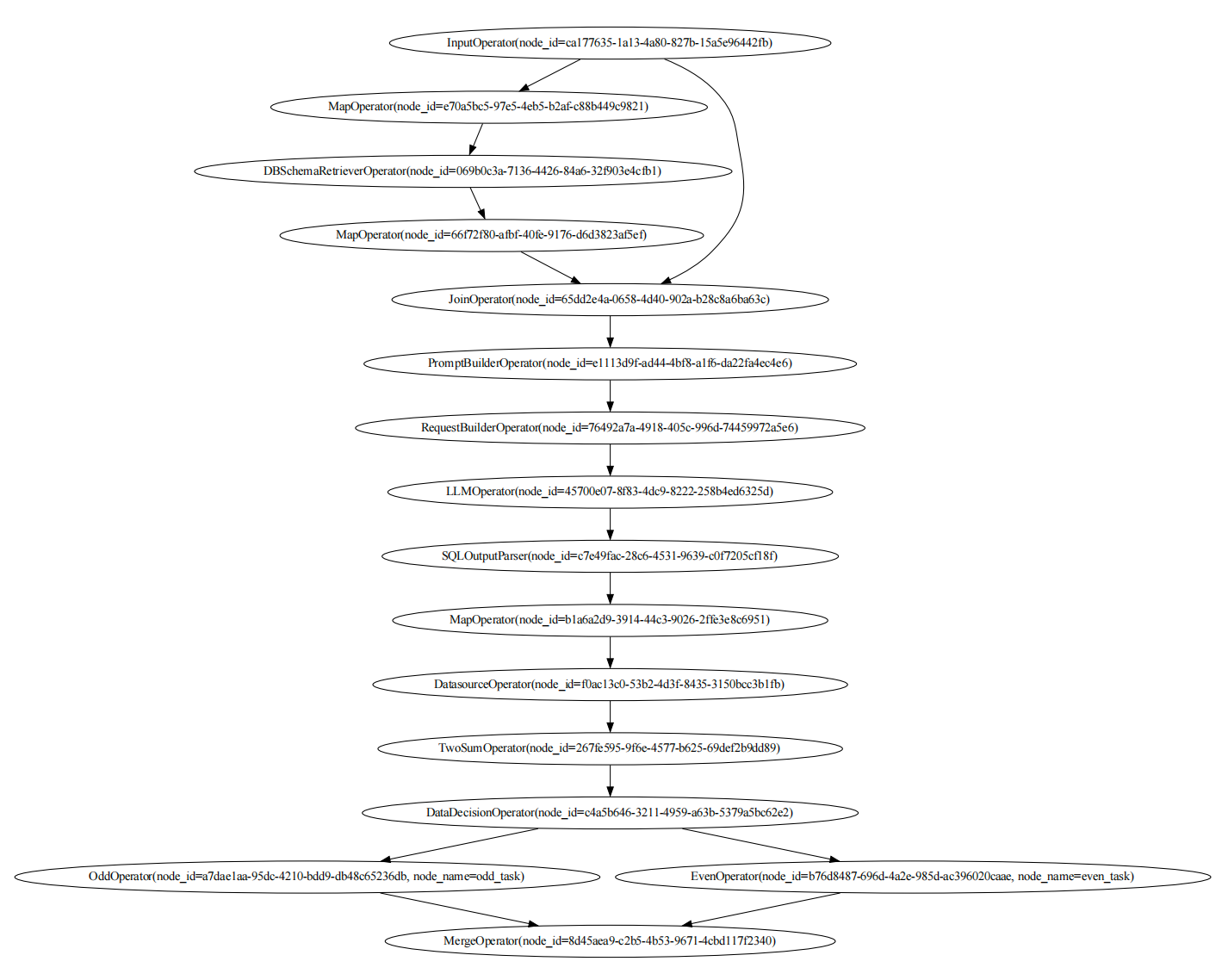
Visualize DAGs
And we can visualize the DAGs with the following code:
load_schema_dag.visualize_dag()
chat_data_dag.visualize_dag()
If you execute the code in Jupyter Notebook, you can see the DAGs in the notebook.
display(load_schema_dag)
display(chat_data_dag)
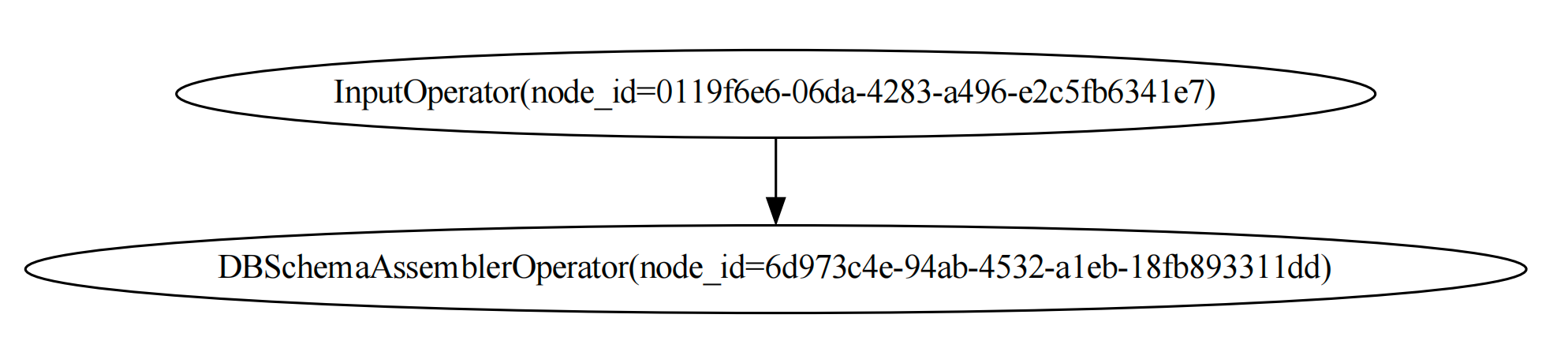
The graph of the load_schema_dag is like this:
And the graph of the chat_data_dag is: