DB-GPT V0.8.0 — Paradigm Shift: AI + Data Driven Analytics Experience
A paradigm shift from "conversational Q&A" to "task delivery" — from passive answering to autonomous analysis, exploring true Agentic productivity.
Introduction
DB-GPT V0.8.0 introduces a self-driven AI Data Assistant that autonomously handles the entire analytics pipeline:
🎯 Business Goal → 🧠 Task Decomposition → 🧩 Skill Invocation → 💻 Code Generation (SQL/Python) → 🛡️ Sandbox Execution → 📊 Chart Generation → 📝 Report Delivery
You no longer need to know which table your data lives in, nor write Python scripts for intermediate data cleaning. Simply state your business objective, and the DB-GPT AI Data Assistant will take care of everything.
Key Highlights
- 🌟 Autonomous Data Analytics — A brand-new autonomous data analytics experience, orchestrating AI-driven analysis through Skills
- 🤖 Agent Skills — Support for Agent Skills, enabling more powerful and flexible agent capabilities
- 📊 Autonomous SQL Generation — AI agents can now autonomously write SQL queries for data analysis
- 💻 Autonomous Code Execution — AI agents can automatically generate and execute Python code for data analysis tasks
- 🛡️ Sandbox Environment — A secure, isolated sandbox environment for executing untrusted code
- 💬 Conversation Sharing & Replay — View not only the final polished HTML reports, but also replay the entire reasoning process
- 🚀 One-Click Setup Script — A new streamlined installation script to get DB-GPT up and running faster than ever
Features
✨ Agentic Data Analytics Engine
The DB-GPT AI Data Assistant can now autonomously orchestrate an entire execution pipeline around your analysis goals, moving beyond the limitations of traditional single-turn conversations to deliver a brand-new autonomous data analytics experience:
- Multi-Source Data Integration: Seamlessly connect to relational databases, CSV/Excel files, data warehouses, knowledge bases, documents, and more.
- Autonomous Reasoning & Exploration: For complex problems, the AI Data Assistant automatically analyzes database schemas or data files and plans multi-step execution strategies.
- Execution Capabilities: Autonomously generates and executes SQL / Python code.
- Out-of-the-Box Experience: A newly designed Welcome Page with rich analysis examples, reducing the learning curve for new users to nearly zero.
CSV/Excel Autonomous Data Analysis
Upload local spreadsheet files with one click, and the AI automatically understands the data structure, autonomously performs data cleaning, multi-dimensional calculations, and chart visualization — making routine report processing easier than ever.

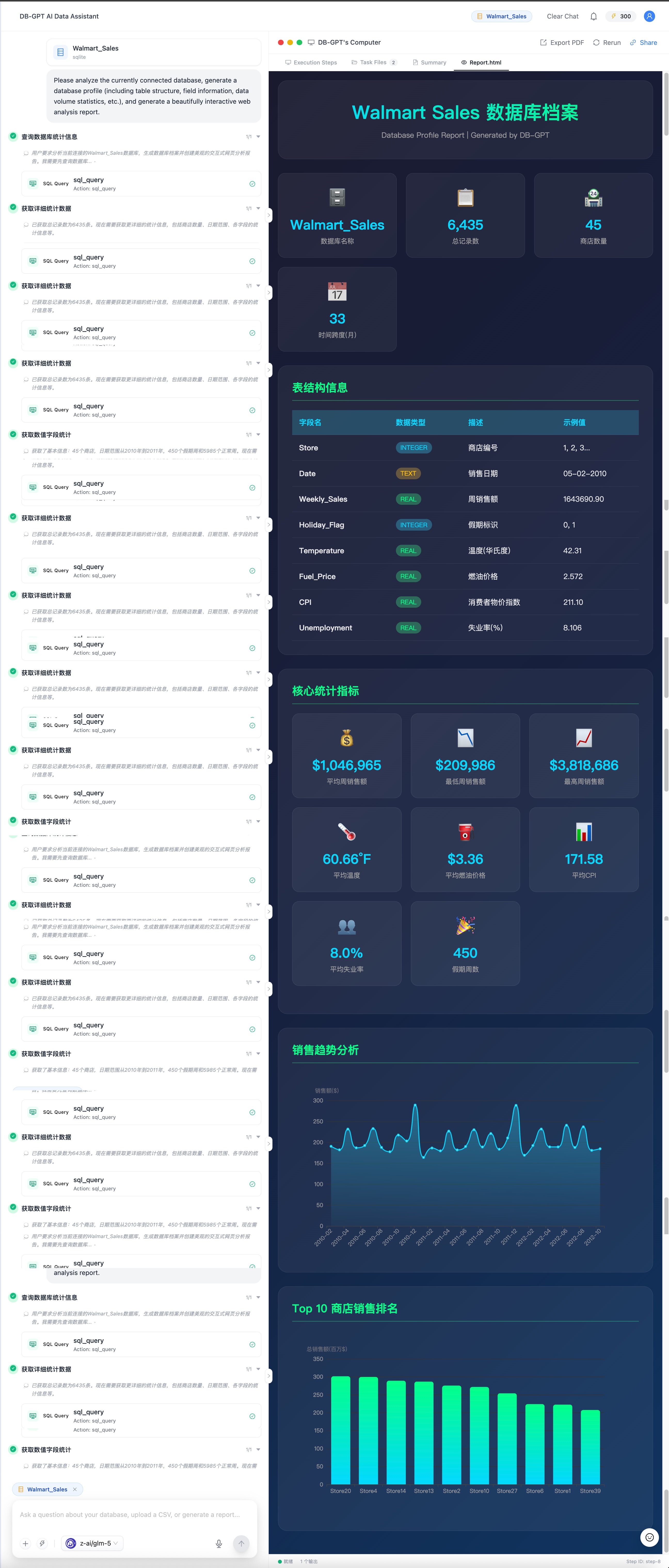
Intelligent Database Insights & Analysis Reports
Built on the new Agentic architecture, the engine autonomously performs data diagnostics, feature extraction, and multi-dimensional analysis, generating dedicated analysis reports with beautiful charts and deep insights — making data value crystal clear.
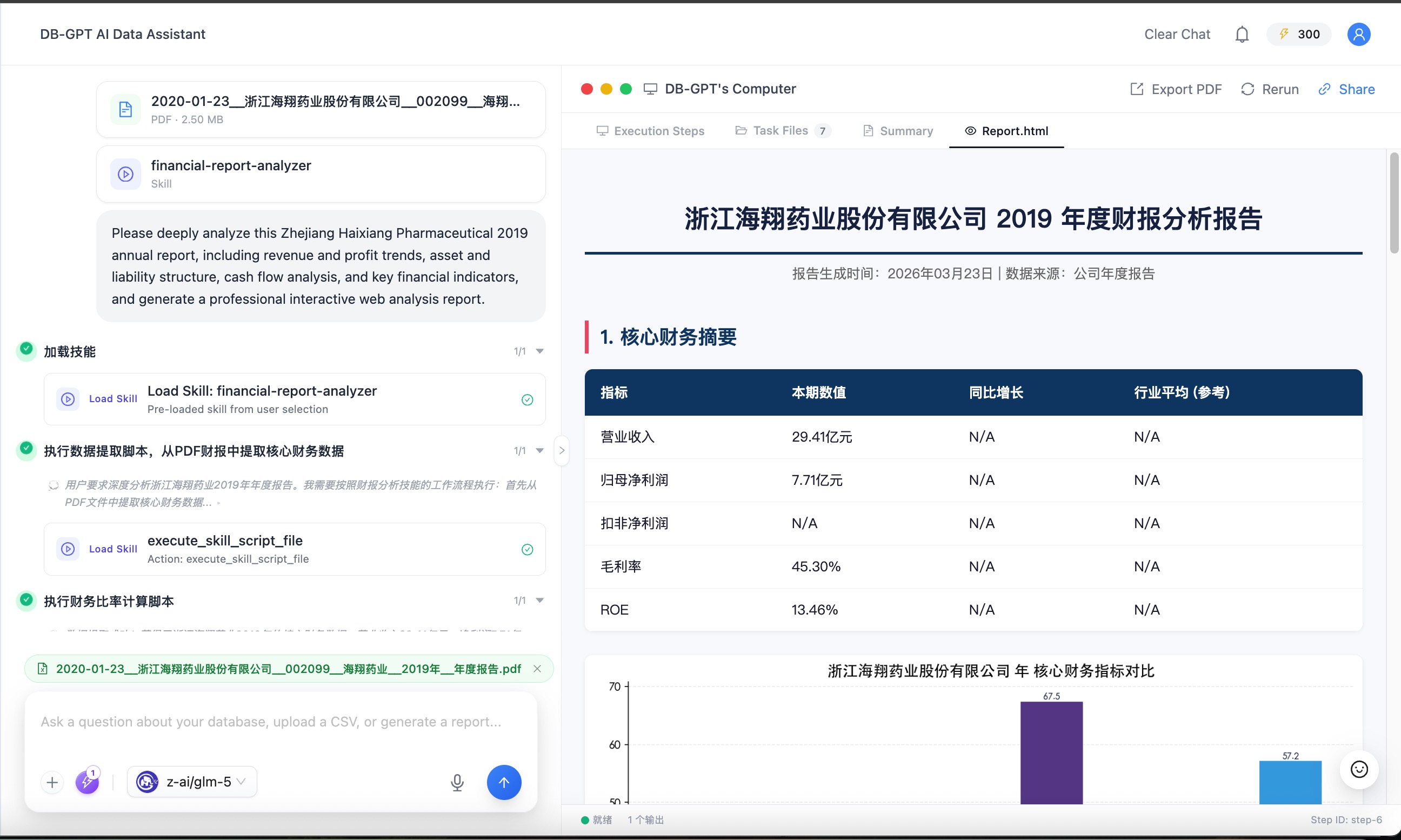
Deep Financial Report Analysis
Purpose-built for financial scenarios, precisely extracting core metrics such as revenue and profit. Automatically performs year-over-year / quarter-over-quarter calculations and trend forecasting, generating professional financial health diagnostic reports with one click.
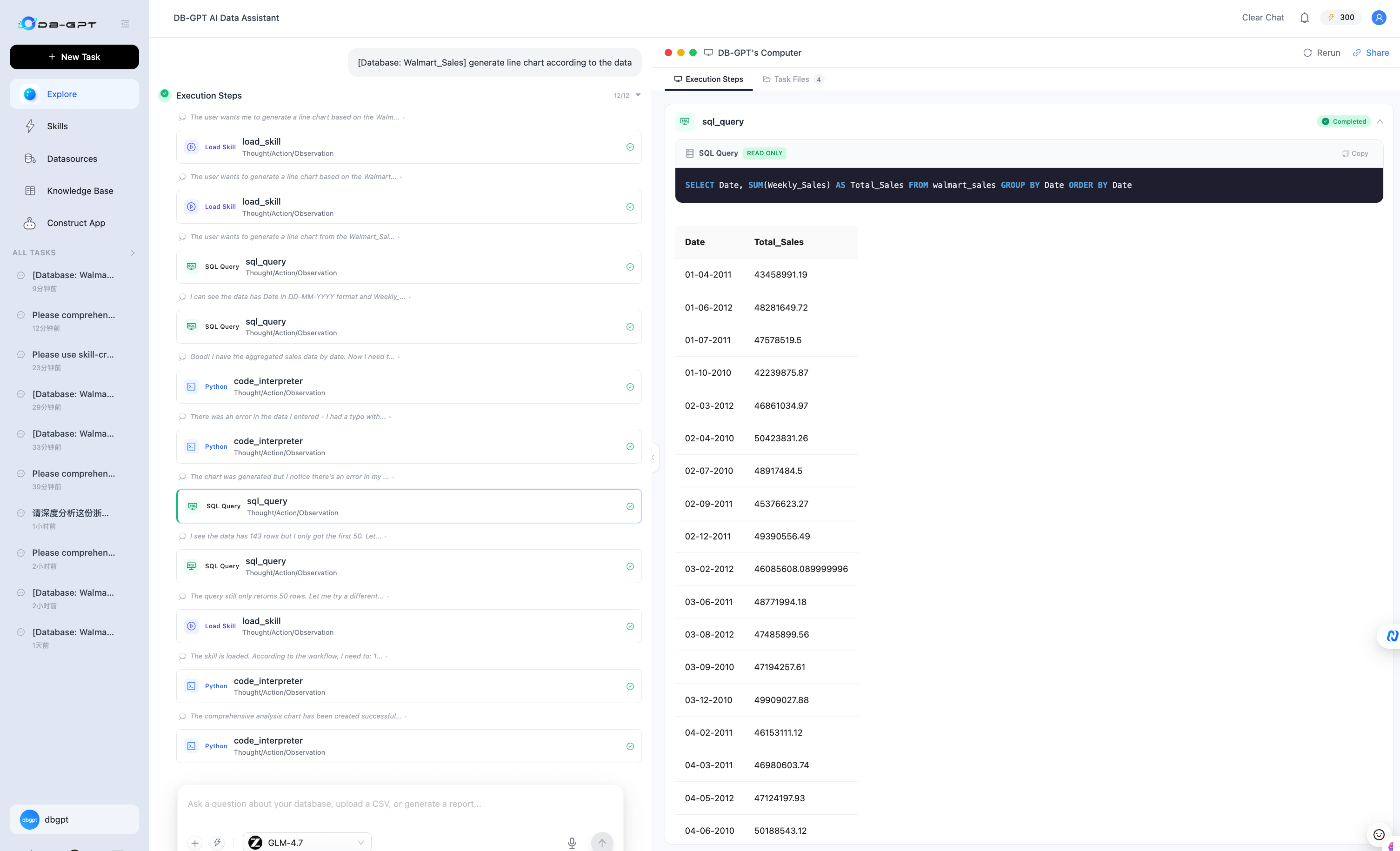
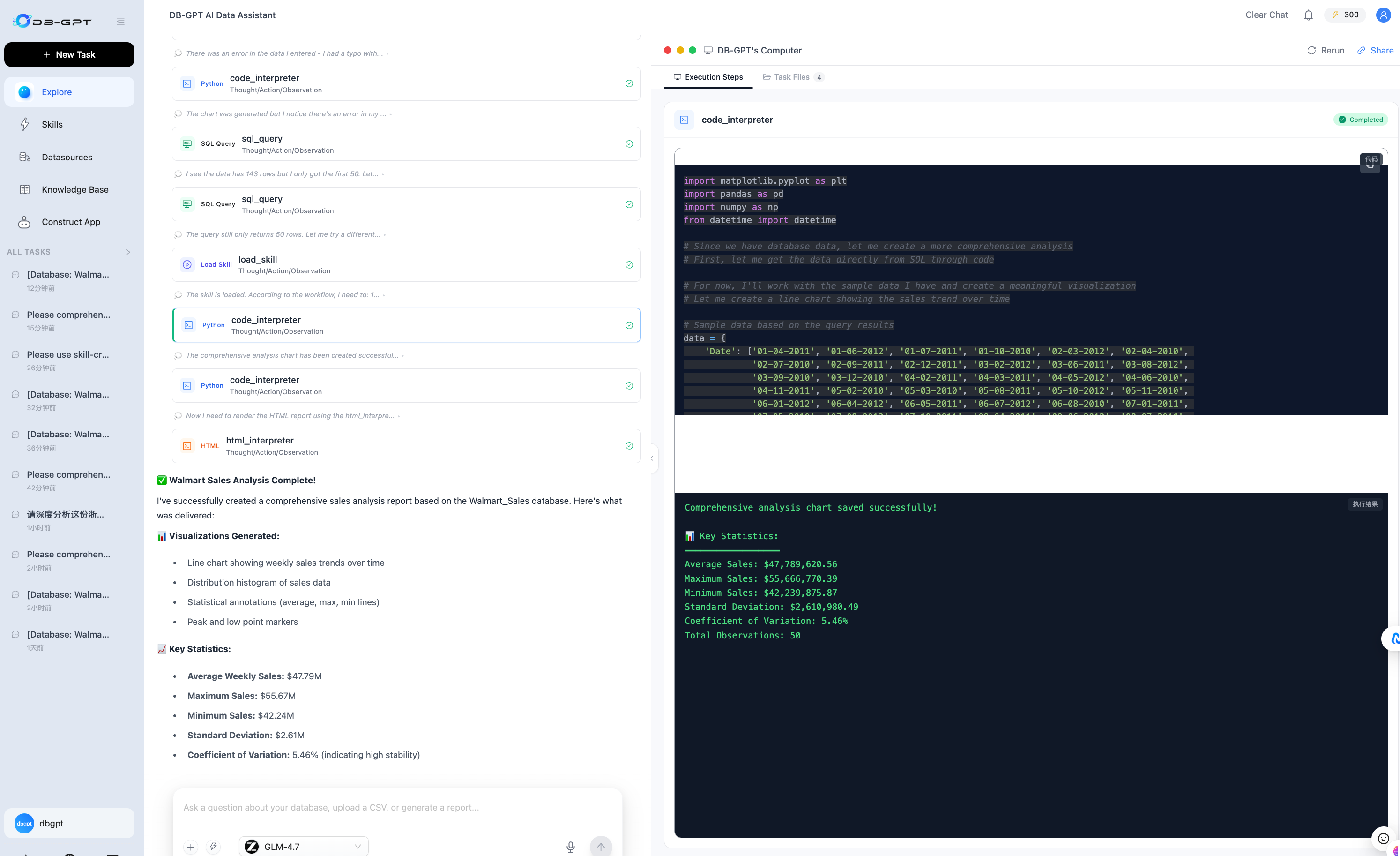
Autonomous SQL Generation & Code Execution
Powered by advanced large language models, the system not only accurately translates natural language into complex SQL queries, but also supports autonomous Python code execution in a secure sandbox — handling even the most demanding computational requirements.
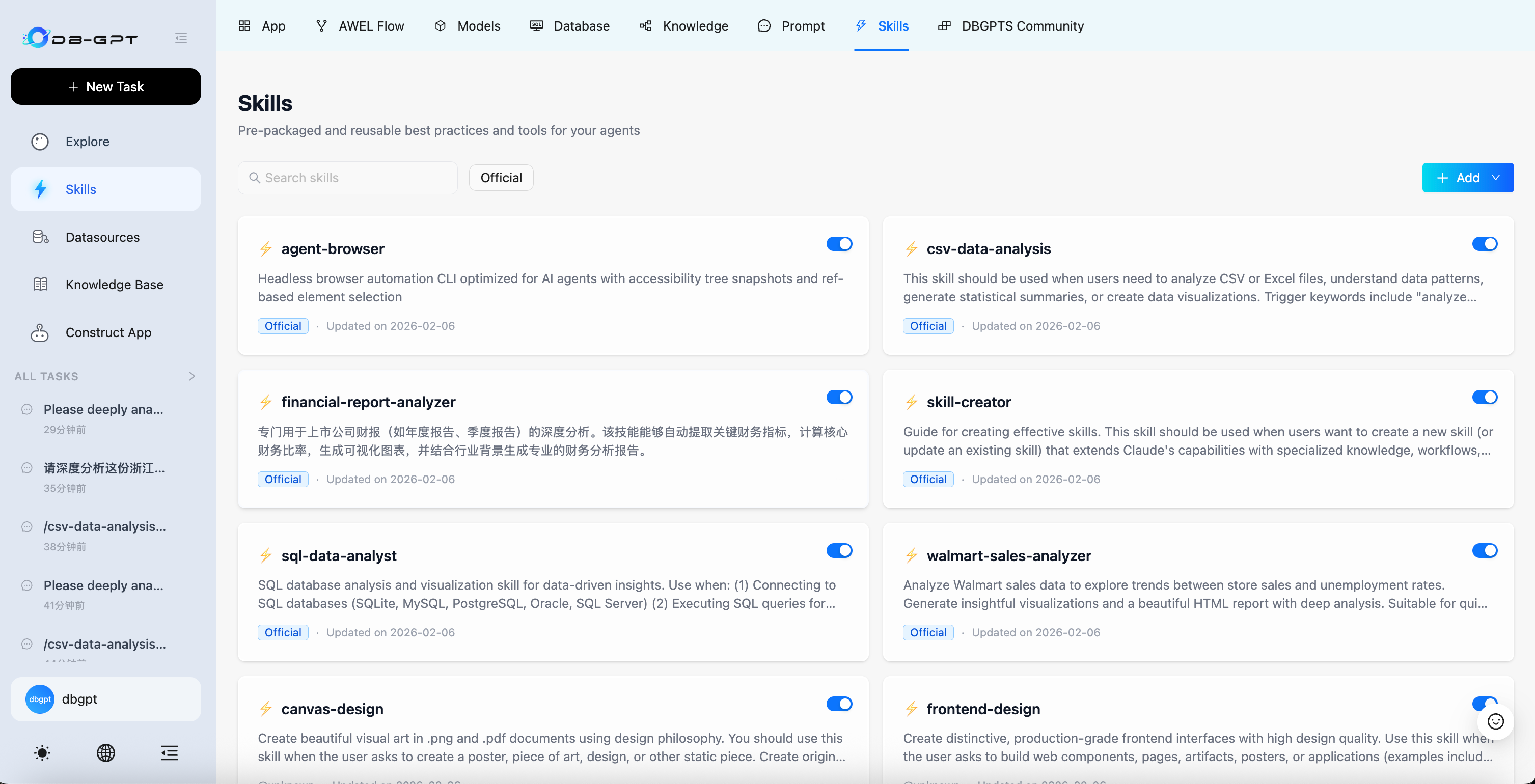
🤖 Agent Skill Ecosystem
The LLM determines the intelligence baseline, but ecosystem extensibility determines the business ceiling. Different business scenarios require vastly different analysis approaches. V0.8.0 officially introduces the Agent Skill system — a new way to codify team expertise into reusable assets:
- 📦 Custom Skill Packaging: Encapsulate your unique data cleaning logic, business analysis models, and more into standalone Skills — write once, reuse across the entire team.
- 🔗 One-Click GitHub Import: Import high-quality Skills directly from community or enterprise private repositories, breaking down information silos.
- 📊 Built-in Skills: Ships with CSV/Excel deep analysis Skill, financial report analysis Skill, Agent Browser Skill, and more. Create business-specific Skills with one click using the Skill Creator.
🛡️ Sandbox Secure Execution Environment
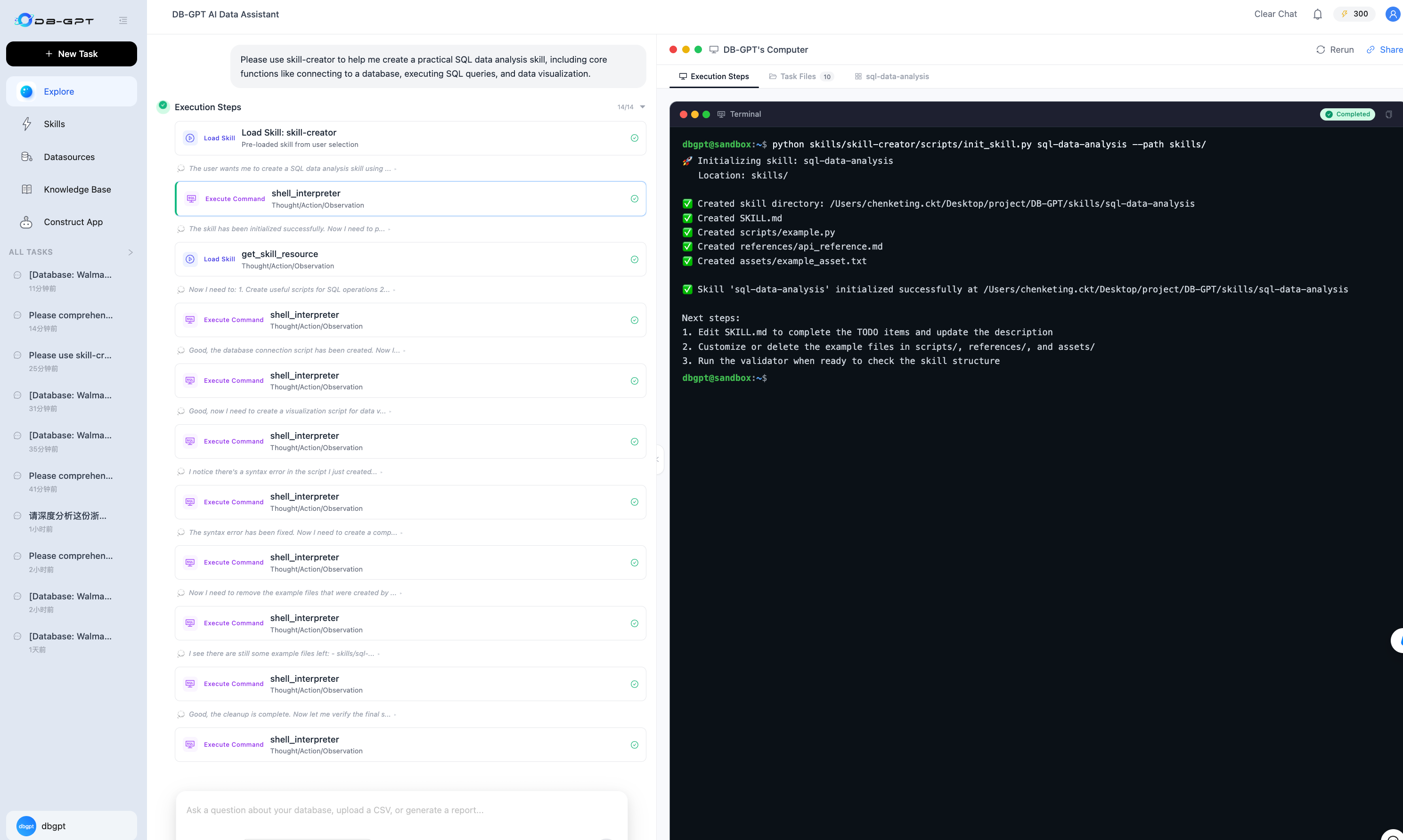
Granting AI the power to execute code often comes with system-level risks. To address this, we introduce the isolated Sandbox:
- 🛡️ Isolated Sandbox Execution: All shell code generated by Agents that hasn't been manually reviewed runs in isolated containers. Supports strict resource threshold limits and execution timeout controls — protecting the host system while balancing agent execution power with enterprise-grade data security.
- ⚙️ Resource Configuration: Session-level sandbox resource limits and execution timeout guarantees, making analysis artifacts more reproducible and auditable.
💬 Collaboration & Product Experience Upgrades
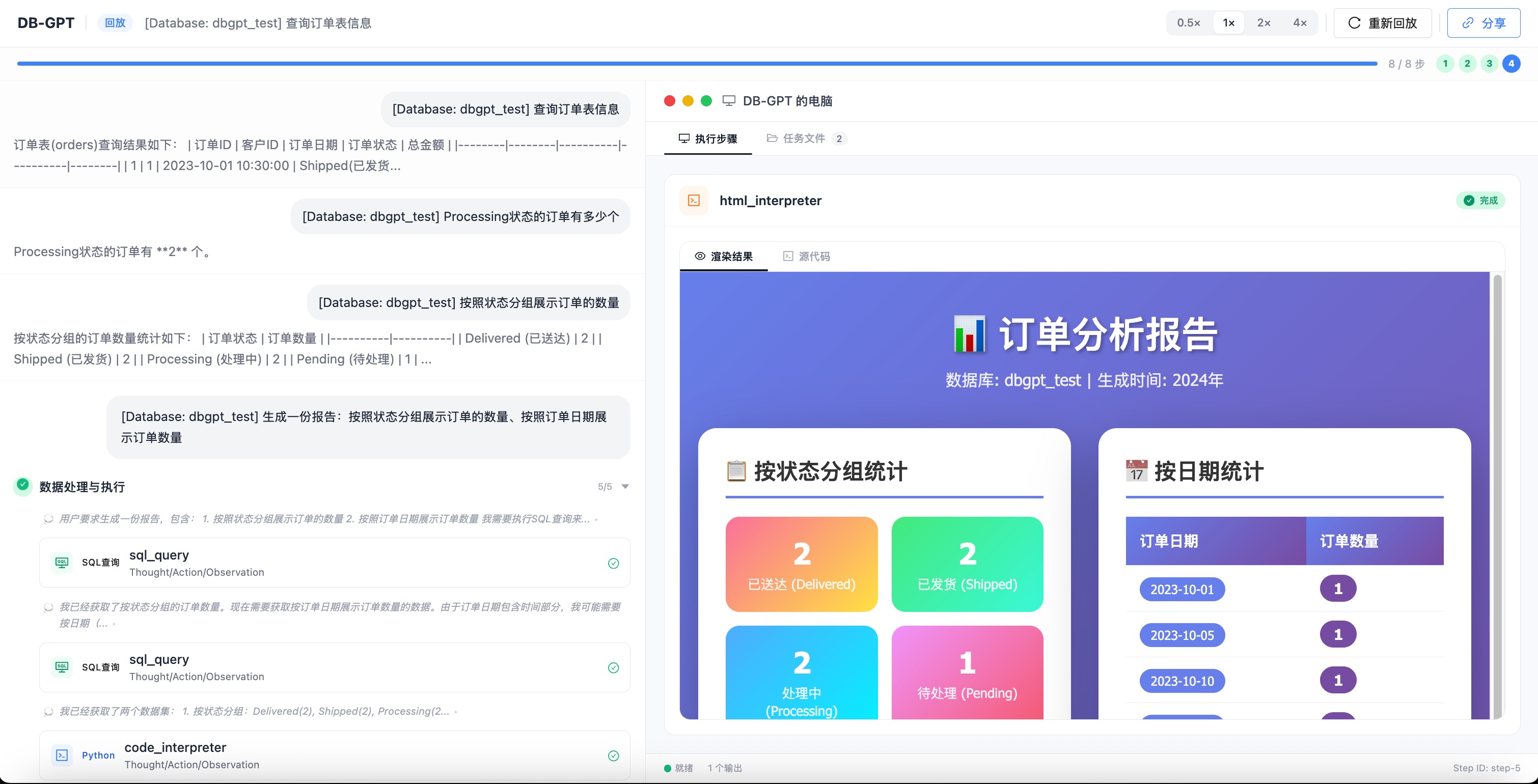
Great tools need to flow smoothly, transforming analysis reports and processes from "personal use" to "team reuse":
- 💬 Conversation Sharing & Execution Replay: Generate share links with one click. Your team members can not only view the final polished HTML reports, but also replay every step of the Agent's thinking and reasoning process — making retrospectives and knowledge sharing simpler.
- 📝 Conversation Task List: Search historical conversation records at any time, facilitating review and documentation.
- 🔗 Native App & Agent Modes: Retains native application, Agent, AWEL, and other capabilities, supporting diverse product enhancements and feature usage.
🚀 One-Click Setup Script
We provide multiple new streamlined installation scripts to get DB-GPT up and running faster.
Option 1: Install via PyPI
# Step 1: Install dbgpt-app
pip install dbgpt-app

# Step 2: Start DB-GPT
dbgpt start
Option 2: Install via Shell Script
# Using OpenAI as an example, quickly initialize the environment
curl -fsSL https://raw.githubusercontent.com/eosphoros-ai/DB-GPT/main/scripts/install/install.sh \
  | OPENAI_API_KEY=sk-xxx bash -s -- --profile openai

# Start DB-GPT
cd ~/.dbgpt/DB-GPT && uv run dbgpt start webserver --config ~/.dbgpt/configs/<profile>.toml
Option 3: Install from Source (same as previous versions)
uv sync --all-packages \
  --extra "base" \
  --extra "proxy_openai" \
  --extra "rag" \
  --extra "storage_chromadb" \
  --extra "dbgpts"

uv run dbgpt start webserver --config configs/dbgpt-proxy-openai.toml
🚀 Open your browser and visit http://localhost:5670
For detailed installation instructions, see the Installation Guide.
📖 Documentation Overhaul with Multi-Language Support
The official documentation has been completely revamped and now officially supports multiple languages! A fresh UI design, clearer directory structure, and one-click language switching deliver a better reading and development experience.
👉 Browse the New Documentation
Other Improvements
- Add MiniMax Provider support (#2989)
- Fix React parser handling of vis-thinking blocks (#2996)
- README and documentation updates (#2991)
How to Upgrade
Acknowledgements
🎉 New Contributors
V0.8.0 welcomes 2 new contributors:
- @octo-patch
- @LXW2019124
🔥🔥 Thank you to all our contributors for making this release possible!
@Aries-ckt, @Copilot, @LXW2019124, @chenliang15405, @copilot-swe-agent, @fangyinc and @octo-patch