Command Line Usage
In addition to interface usage, this project also provides a wealth of command line tools. It can realize model deployment, service deployment and start and stop, knowledge base operations (viewing, deleting, document loading), debugging and problem locating and other capabilities.
The following is a systematic introduction to the use of related command line tools.
Preparation
Before using the dbgpt command, you first need to complete the installation of the project. For detailed installation tutorial, please refer to: Source code installation
Usage
The command line provides a variety of capabilities, which we can view through the following commands.
As shown in the figure, we can see the command list of dbgpt, including install, knowledge, model, start, stop and trace
~ dbgpt --help
Already connect 'dbgpt'
Usage: dbgpt [OPTIONS] COMMAND [ARGS]...

Options:
  --log-level TEXT  Log level
  --version         Show the version and exit.
  --help            Show this message and exit.

Commands:
  install    Install dependencies, plugins, etc.
  knowledge  Knowledge command line tool
  model      Clients that manage model serving
  start      Start specific server.
  stop       Stop specific server.
  trace      Analyze and visualize trace spans.
Installation
install command provides installation and use of various dependency packages and plugins
The agents is currently under reconstruction, and related functions will be available in the next version
Knowledge Command
The dbgpt knowledge command mainly provides operations related to the knowledge base. The current main commands are delete, list, and load
~ dbgpt knowledge --help
Already connect 'dbgpt'
Usage: dbgpt knowledge [OPTIONS] COMMAND [ARGS]...

  Knowledge command line tool

Options:
  --address TEXT  Address of the Api server(If not set, try to read from
                  environment variable: API_ADDRESS).  [default:
                  http://127.0.0.1:5670]
  --help          Show this message and exit.

Commands:
  delete  Delete your knowledge space or document in space
  list    List knowledge space
  load    Load your local documents to DB-GPT
Load command
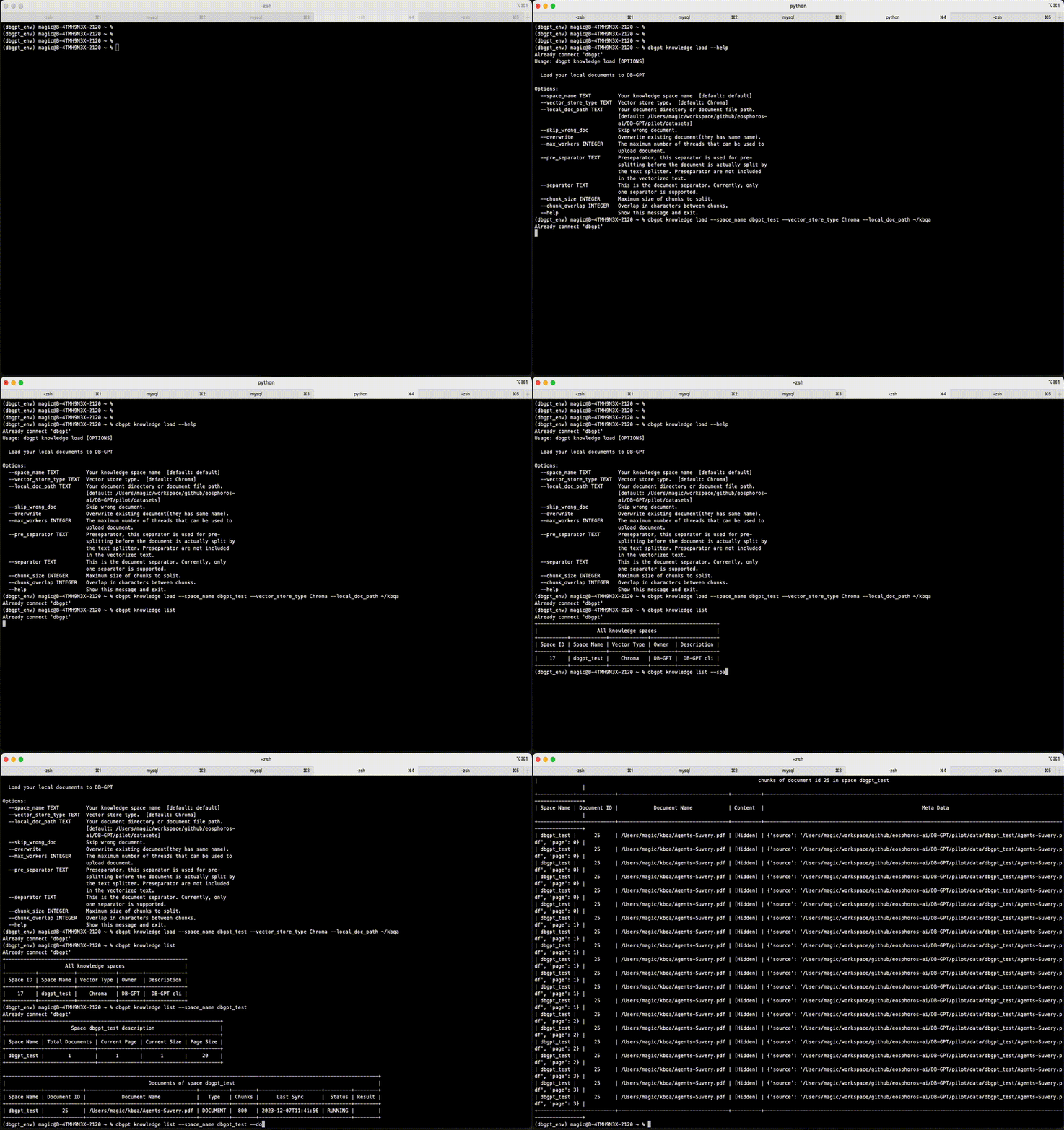
dbgpt knowledge load refers to the loading of knowledge base documents. You can load knowledge base documents in batches through the load command.
~ dbgpt knowledge load --help
Already connect 'dbgpt'
Usage: dbgpt knowledge load [OPTIONS]

  Load your local documents to DB-GPT

Options:
  --space_name TEXT         Your knowledge space name  [default: default]
  --vector_store_type TEXT  Vector store type.  [default: Chroma]
  --local_doc_path TEXT     Your document directory or document file path.
                            [default: /Users/magic/workspace/github/eosphoros-
                            ai/DB-GPT/pilot/datasets]
  --skip_wrong_doc          Skip wrong document.
  --overwrite               Overwrite existing document(they has same name).
  --max_workers INTEGER     The maximum number of threads that can be used to
                            upload document.
  --pre_separator TEXT      Preseparator, this separator is used for pre-
                            splitting before the document is actually split by
                            the text splitter. Preseparator are not included
                            in the vectorized text.
  --separator TEXT          This is the document separator. Currently, only
                            one separator is supported.
  --chunk_size INTEGER      Maximum size of chunks to split.
  --chunk_overlap INTEGER   Overlap in characters between chunks.
  --help                    Show this message and exit.
List command
dbgpt knowledge list command mainly displays information related to the knowledge base. Such as displaying knowledge space, document content, Chunk content, etc.
~ dbgpt knowledge list --help
Already connect 'dbgpt'
Usage: dbgpt knowledge list [OPTIONS]

  List knowledge space

Options:
  --space_name TEXT               Your knowledge space name. If None, list all
                                  spaces
  --doc_id INTEGER                Your document id in knowledge space. If Not
                                  None, list all chunks in current document
  --page INTEGER                  The page for every query  [default: 1]
  --page_size INTEGER             The page size for every query  [default: 20]
  --show_content                  Query the document content of chunks
  --output [text|html|csv|latex|json]
                                  The output format
  --help                          Show this message and exit.
Delete command
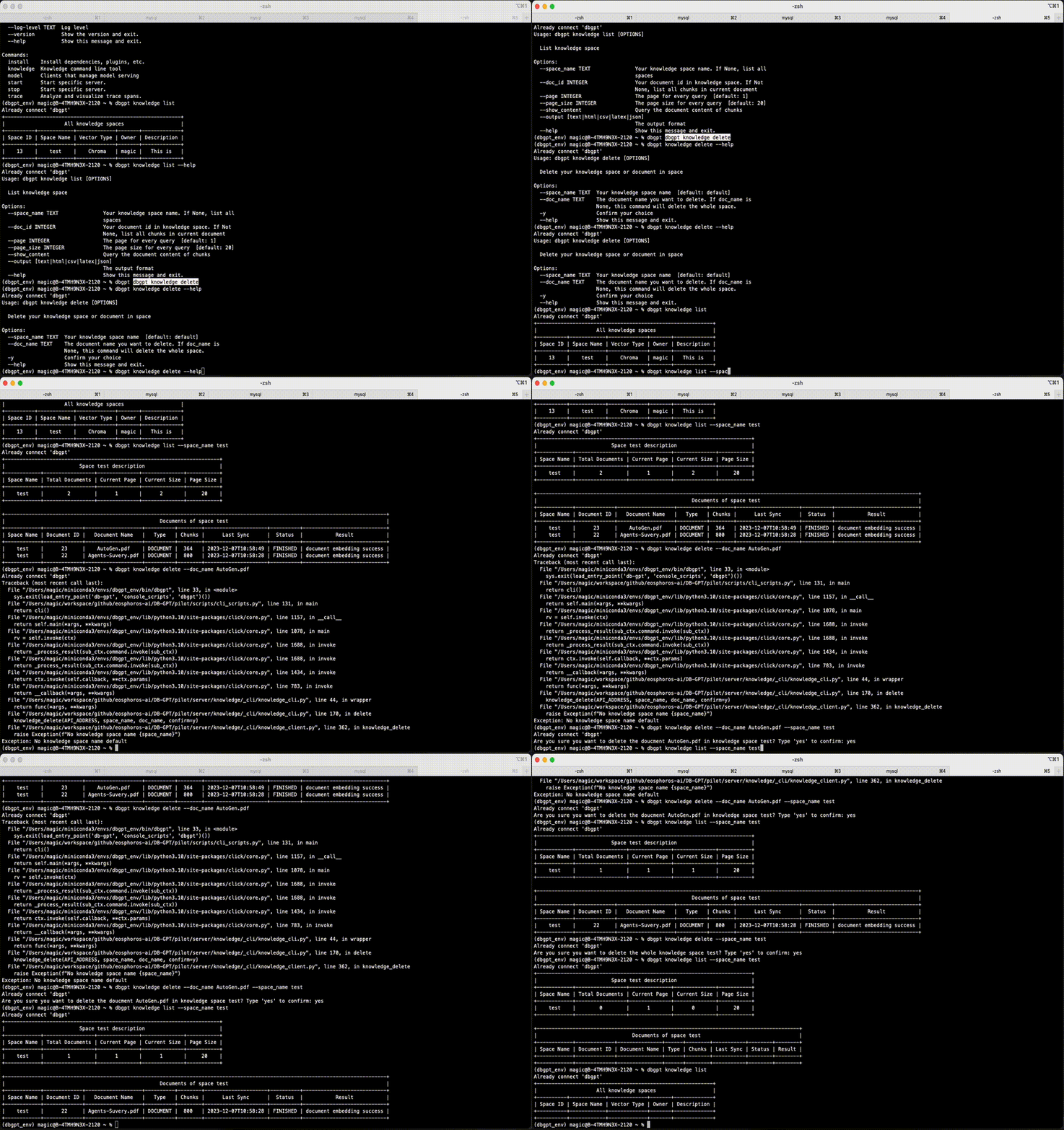
The delete command supports the deletion of knowledge base and documents. You can view related command details through dbgpt knowledge delete --help
~ dbgpt knowledge delete --help
Already connect 'dbgpt'
Usage: dbgpt knowledge delete [OPTIONS]

  Delete your knowledge space or document in space

Options:
  --space_name TEXT  Your knowledge space name  [default: default]
  --doc_name TEXT    The document name you want to delete. If doc_name is
                     None, this command will delete the whole space.
  -y                 Confirm your choice
  --help             Show this message and exit.
Model command
Model related commands are mainly used when deploying multiple models. For model cluster deployment, you can view the cluster deployment mode.
~ dbgpt model --help
Already connect 'dbgpt'
Usage: dbgpt model [OPTIONS] COMMAND [ARGS]...

  Clients that manage model serving

Options:
  --address TEXT  Address of the Model Controller to connect to. Just support
                  light deploy model, If the environment variable
                  CONTROLLER_ADDRESS is configured, read from the environment
                  variable
  --help          Show this message and exit.

Commands:
  chat     Interact with your bot from the command line
  list     List model instances
  restart  Restart model instances
  start    Start model instances
  stop     Stop model instances
Chat command
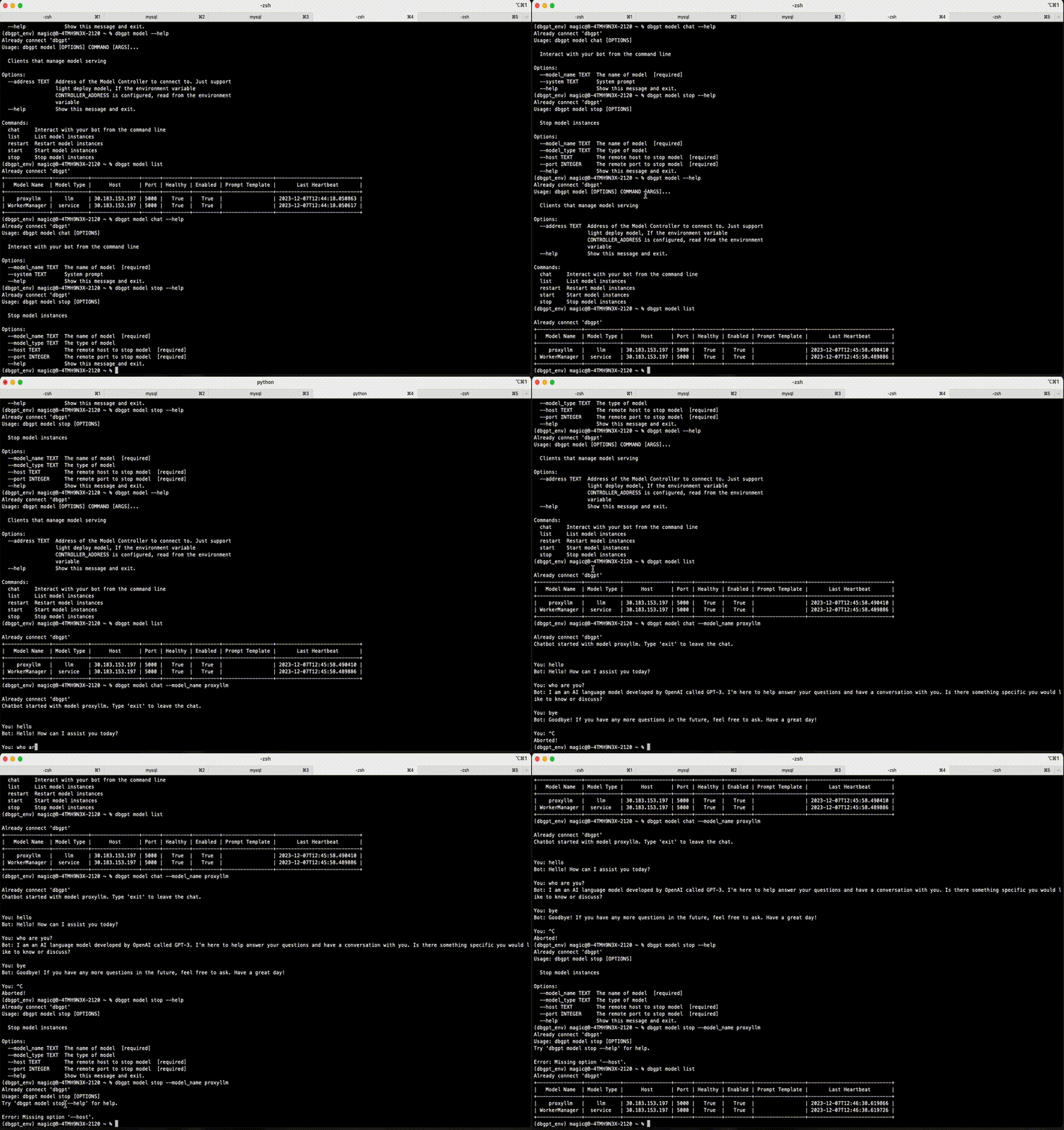
You can use the dbgpt model chat command to communicate with the model in the command line terminal
~ dbgpt model chat --help
Already connect 'dbgpt'
Usage: dbgpt model chat [OPTIONS]

  Interact with your bot from the command line

Options:
  --model_name TEXT  The name of model  [required]
  --system TEXT      System prompt
  --help             Show this message and exit.
List Command
~ dbgpt model list --help
Already connect 'dbgpt'
Usage: dbgpt model list [OPTIONS]

  List model instances

Options:
  --model_name TEXT  The name of model
  --model_type TEXT  The type of model
  --help             Show this message and exit.
Restart command
The model can be restarted through the dbgpt model restart command
~ dbgpt model restart  --help
Already connect 'dbgpt'
Usage: dbgpt model restart [OPTIONS]

  Restart model instances

Options:
  --model_name TEXT  The name of model  [required]
  --model_type TEXT  The type of model
  --help             Show this message and exit.
Start command
The model can be start through the dbgpt model start command
~ dbgpt model start  --help
Already connect 'dbgpt'
Usage: dbgpt model start [OPTIONS]

  Start model instances

Options:
  --model_name TEXT           The model name to deploy  [required]
  --model_path TEXT           The model path to deploy
  --host TEXT                 The remote host to deploy model  [default:
                              30.183.153.197]
  --port INTEGER              The remote port to deploy model  [default: 5000]
  --worker_type TEXT          Worker type  [default: llm]
  --device TEXT               Device to run model. If None, the device is
                              automatically determined
  --model_type TEXT           Model type: huggingface, llama.cpp, proxy and
                              vllm  [default: huggingface]
  --prompt_template TEXT      Prompt template. If None, the prompt template is
                              automatically determined from model path,
                              supported template: zero_shot,vicuna_v1.1,llama-
                              2,codellama,alpaca,baichuan-chat,internlm-chat
  --max_context_size INTEGER  Maximum context size  [default: 4096]
  --num_gpus INTEGER          The number of gpus you expect to use, if it is
                              empty, use all of them as much as possible
  --max_gpu_memory TEXT       The maximum memory limit of each GPU, only valid
                              in multi-GPU configuration
  --cpu_offloading            CPU offloading
  --load_8bit                 8-bit quantization
  --load_4bit                 4-bit quantization
  --quant_type TEXT           Quantization datatypes, `fp4` (four bit float)
                              and `nf4` (normal four bit float), only valid
                              when load_4bit=True  [default: nf4]
  --use_double_quant          Nested quantization, only valid when
                              load_4bit=True  [default: True]
  --compute_dtype TEXT        Model compute type
  --trust_remote_code         Trust remote code  [default: True]
  --verbose                   Show verbose output.
  --help                      Show this message and exit.
Stop command
The dbgpt model stop command is mainly responsible for stopping the model.
~ dbgpt model stop  --help
Already connect 'dbgpt'
Usage: dbgpt model stop [OPTIONS]

  Stop model instances

Options:
  --model_name TEXT  The name of model  [required]
  --model_type TEXT  The type of model
  --host TEXT        The remote host to stop model  [required]
  --port INTEGER     The remote port to stop model  [required]
  --help             Show this message and exit.
Start/Stop Command
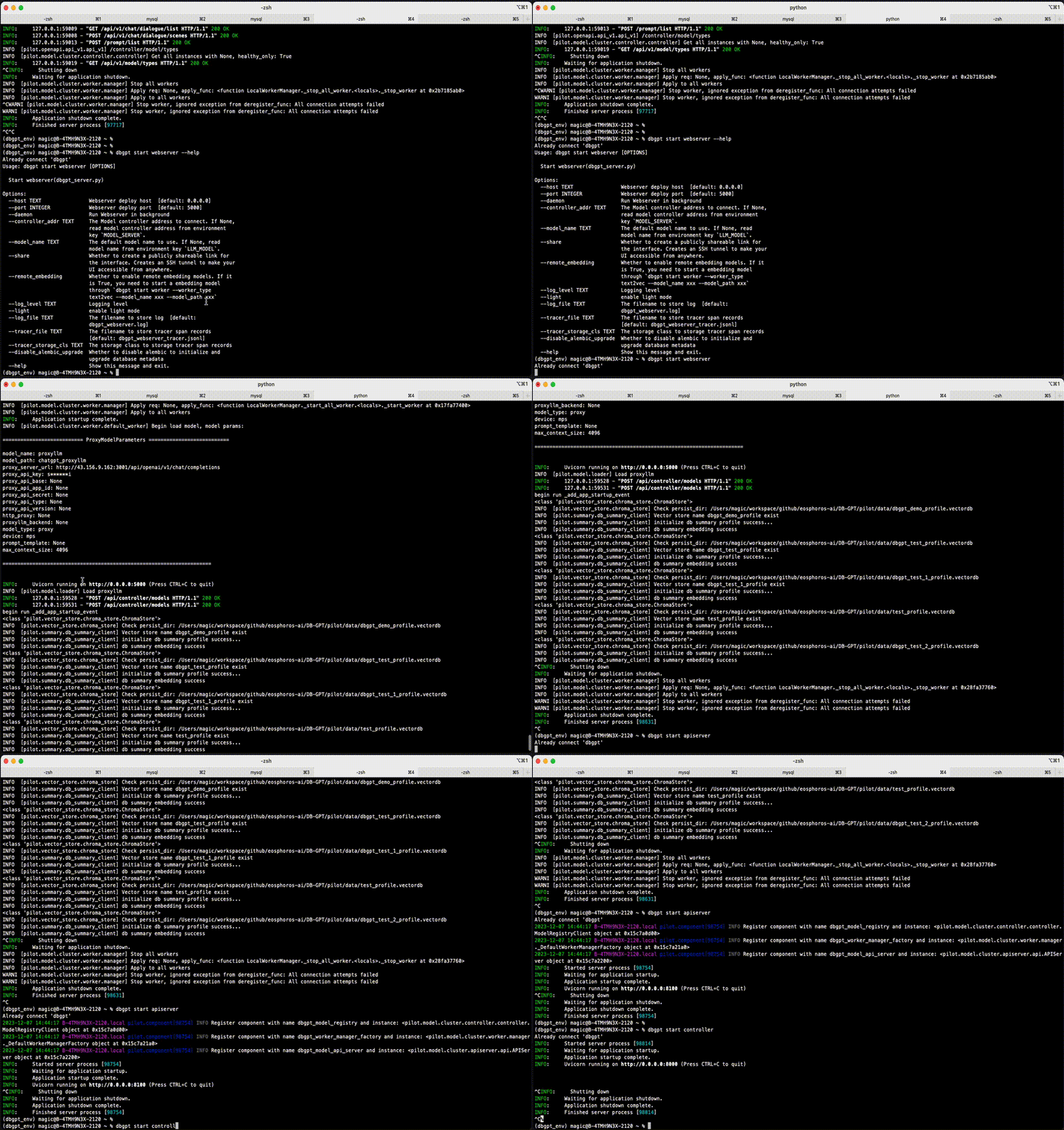
The commands related to dbgpt start and dbgpt stop are a set of interfaces related to service registration discovery. There are apiserver, controller, worker and webserver respectively.
~ dbgpt start --help
Already connect 'dbgpt'
Usage: dbgpt start [OPTIONS] COMMAND [ARGS]...

  Start specific server.

Options:
  --help  Show this message and exit.

Commands:
  apiserver   Start apiserver
  controller  Start model controller
  webserver   Start webserver(dbgpt_server.py)
  worker      Start model worker
Apiserver
You can start the model's API service through dbgpt start apiserver. The default startup port is 8100.
~ dbgpt start apiserver --help
Already connect 'dbgpt'
Usage: dbgpt start apiserver [OPTIONS]

  Start apiserver

Options:
  --host TEXT                Model API server deploy host  [default: 0.0.0.0]
  --port INTEGER             Model API server deploy port  [default: 8100]
  --daemon                   Run Model API server in background
  --controller_addr TEXT     The Model controller address to connect
                             [default: http://127.0.0.1:8000]
  --api_keys TEXT            Optional list of comma separated API keys
  --log_level TEXT           Logging level
  --log_file TEXT            The filename to store log  [default:
                             dbgpt_model_apiserver.log]
  --tracer_file TEXT         The filename to store tracer span records
                             [default: dbgpt_model_apiserver_tracer.jsonl]
  --tracer_storage_cls TEXT  The storage class to storage tracer span records
  --help                     Show this message and exit.
start apiserver
~ dbgpt start apiserver

    Already connect 'dbgpt'
    2023-12-07 14:35:21 B-4TMH9N3X-2120.local pilot.component[95201] INFO Register component with name dbgpt_model_registry and instance: <pilot.model.cluster.controller.controller.ModelRegistryClient object at 0x28f4e0c70>
    2023-12-07 14:35:21 B-4TMH9N3X-2120.local pilot.component[95201] INFO Register component with name dbgpt_worker_manager_factory and instance: <pilot.model.cluster.worker.manager._DefaultWorkerManagerFactory object at 0x28f4e2110>
    2023-12-07 14:35:21 B-4TMH9N3X-2120.local pilot.component[95201] INFO Register component with name dbgpt_model_api_server and instance: <pilot.model.cluster.apiserver.api.APIServer object at 0x28f4e2170>
    INFO:     Started server process [95201]
    INFO:     Waiting for application startup.
    INFO:     Application startup complete.
    INFO:     Uvicorn running on http://0.0.0.0:8100 (Press CTRL+C to quit)
    INFO:     127.0.0.1:56638 - "GET /docs HTTP/1.1" 200 OK
    INFO:     127.0.0.1:56665 - "GET /openapi.json HTTP/1.1" 200 OK
    ^CINFO:     Shutting down
    INFO:     Waiting for application shutdown.
    INFO:     Application shutdown complete.
    INFO:     Finished server process [95201]
Controller command
The management and control service can be started through dbgpt start controller. The default startup port is 8000
~ dbgpt start --help
Already connect 'dbgpt'
Usage: dbgpt start [OPTIONS] COMMAND [ARGS]...

  Start specific server.

Options:
  --help  Show this message and exit.

Commands:
  apiserver   Start apiserver
  controller  Start model controller
  webserver   Start webserver(dbgpt_server.py)
  worker      Start model worker
(dbgpt_env) magic@B-4TMH9N3X-2120 ~ % dbgpt start controller
Already connect 'dbgpt'
INFO:     Started server process [96797]
INFO:     Waiting for application startup.
INFO:     Application startup complete.
INFO:     Uvicorn running on http://0.0.0.0:8000 (Press CTRL+C to quit)
Webserver command
The front-end service can be started through dbgpt start webserver, the default port is 5670, and can be accessed through http://127.0.0.1:5670
~ dbgpt start webserver --help
Already connect 'dbgpt'
Usage: dbgpt start webserver [OPTIONS]

  Start webserver(dbgpt_server.py)

Options:
  --host TEXT                Webserver deploy host  [default: 0.0.0.0]
  --port INTEGER             Webserver deploy port  [default: 5000]
  --daemon                   Run Webserver in background
  --controller_addr TEXT     The Model controller address to connect. If None,
                             read model controller address from environment
                             key `MODEL_SERVER`.
  --model_name TEXT          The default model name to use. If None, read
                             model name from environment key `LLM_MODEL`.
  --share                    Whether to create a publicly shareable link for
                             the interface. Creates an SSH tunnel to make your
                             UI accessible from anywhere.
  --remote_embedding         Whether to enable remote embedding models. If it
                             is True, you need to start a embedding model
                             through `dbgpt start worker --worker_type
                             text2vec --model_name xxx --model_path xxx`
  --log_level TEXT           Logging level
  --light                    enable light mode
  --log_file TEXT            The filename to store log  [default:
                             dbgpt_webserver.log]
  --tracer_file TEXT         The filename to store tracer span records
                             [default: dbgpt_webserver_tracer.jsonl]
  --tracer_storage_cls TEXT  The storage class to storage tracer span records
  --disable_alembic_upgrade  Whether to disable alembic to initialize and
                             upgrade database metadata
  --help                     Show this message and exit.
worker command
dbgpt start worker is mainly used to start the working model. For detailed usage, cluster deployment
Debugging
The dbgpt project provides a wealth of debug commands. For detailed usage, debugging