🚀 DB-GPT V0.8.2 — A More Complete Agentic Data Workflow: Multi-File Analysis, Knowledge Retrieval, and Parallel Sub-Agents
In complex data-analysis tasks, business information is often distributed across multiple files and knowledge sources. The analysis may also include work that can proceed in parallel and critical conditions that require confirmation from business users. When file handling, knowledge retrieval, task execution, and human confirmation are disconnected, the Agent struggles to preserve context and the workflow is repeatedly interrupted.
V0.8.2 addresses this end-to-end workflow from input and retrieval through execution and confirmation. Multi-file Agentic analysis manages related inputs together, Agentic Knowledge-Base Search keeps looking for relevant information as the task develops, parallel sub-agent delegation advances independent work at the same time, and human-in-the-loop questions collect decisions that only the user can provide.
Key Highlights
- 📎 Multi-File Agentic Analysis — Upload, preview, and use multiple files as one session-scoped task context
- 🔎 Agentic Knowledge-Base Search — Let the Agent iteratively explore, search, and read knowledge sources instead of relying on one retrieval pass
- 🧩 Parallel Sub-Agent Delegation — Execute independent analyses concurrently and expose each sub-task's progress and artifacts
- 🙋 Human-in-the-Loop Questions — Let the Agent pause for structured user input when requirements or choices are unclear
- 🛡️ Security and Reliability Hardening — Sandbox Jinja2 rendering, constrain upload paths, remove shell interpretation from macOS TTS, and improve client, storage, and RAG reliability
Features
📎 Multi-File Analysis: Treat a File Set as One Task Context
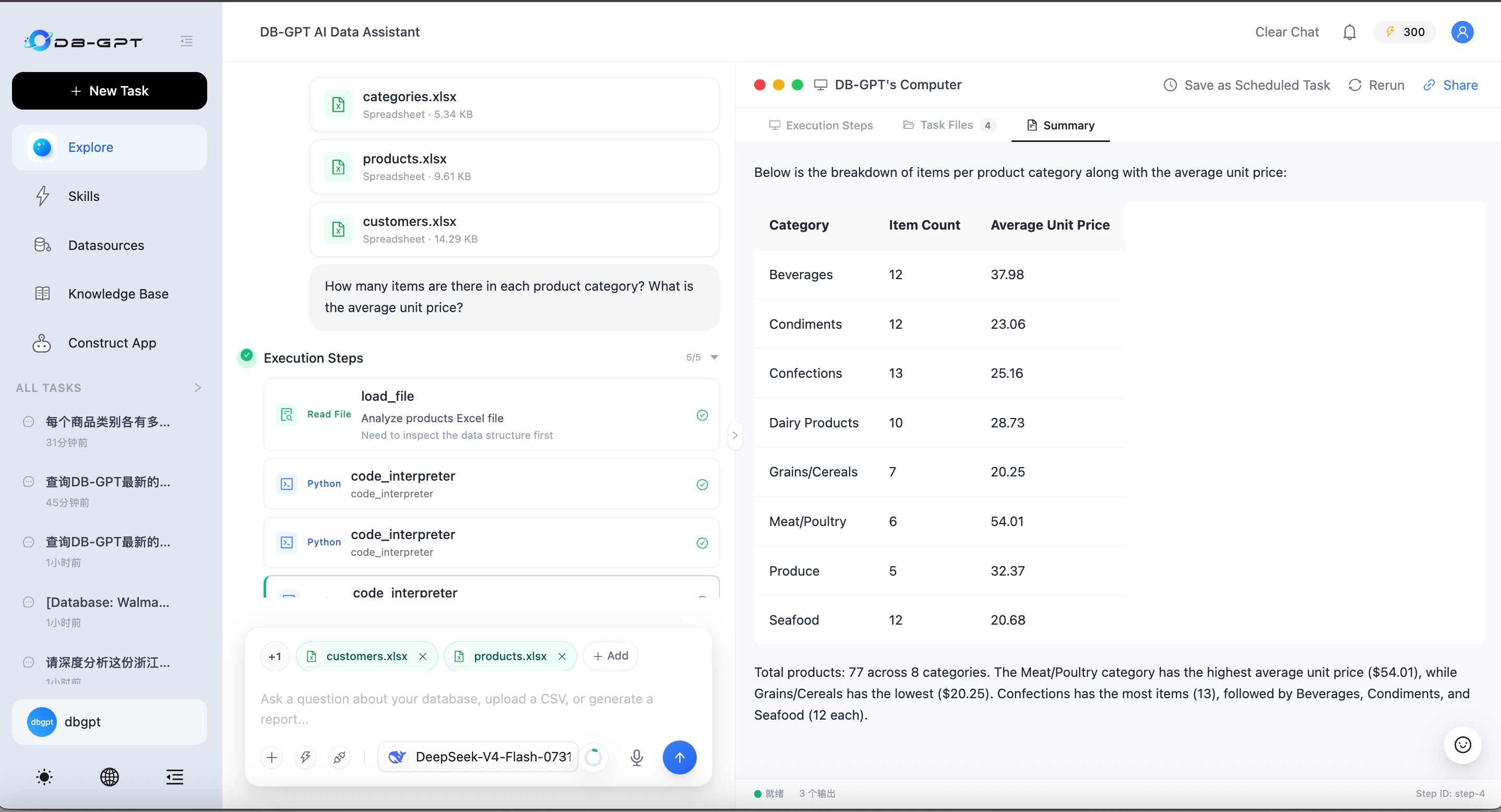
Data work often starts with a group of related files rather than one isolated spreadsheet: an orders table and a customer table, several monthly exports, or a report accompanied by supporting data. V0.8.2 lets users attach multiple files to one conversation and keeps that set available as part of the task context.
Upload, Inspect, and Manage Files in the Composer
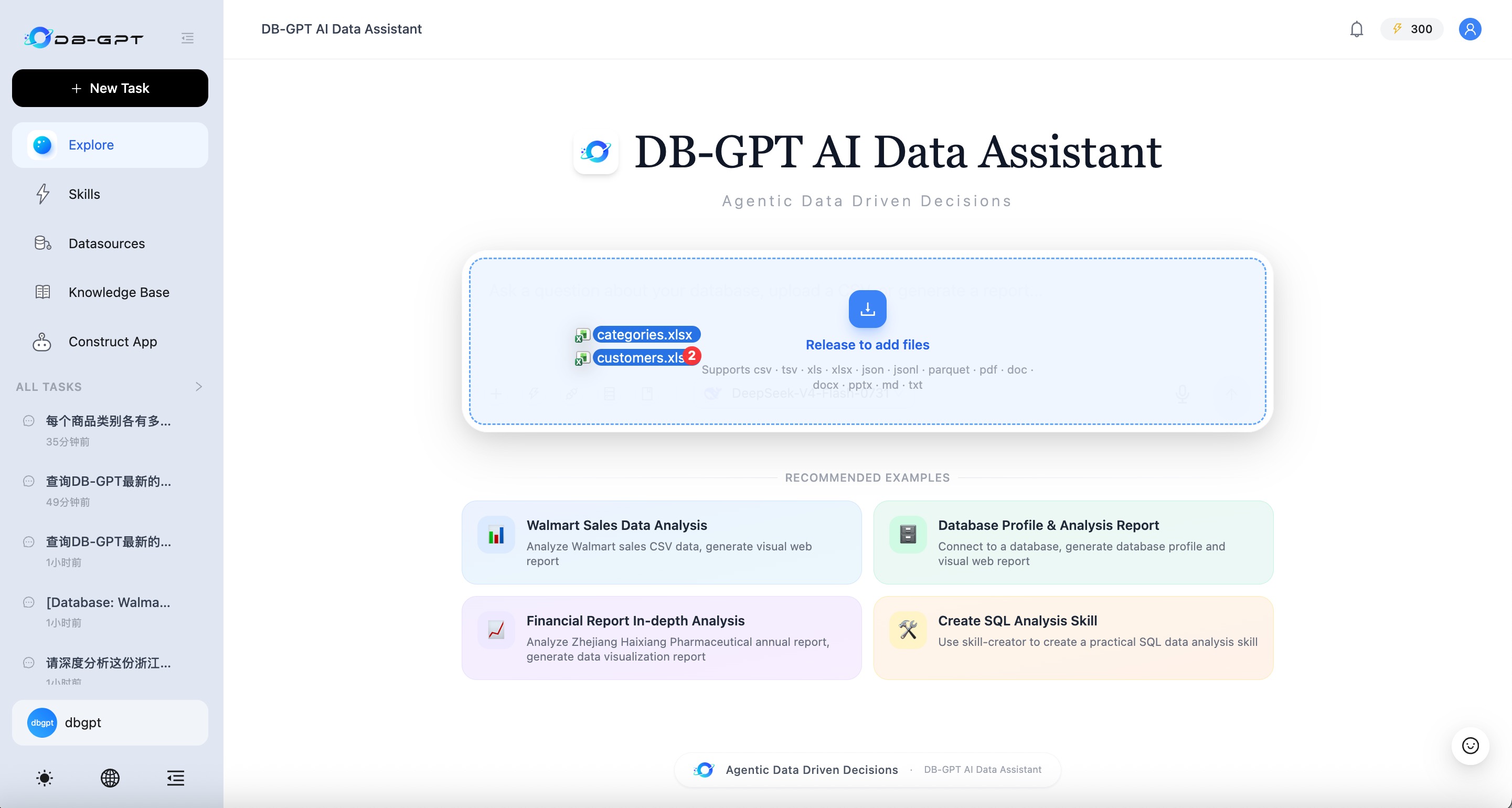
- Add several files at once through the file picker or drag and drop them into the composer.
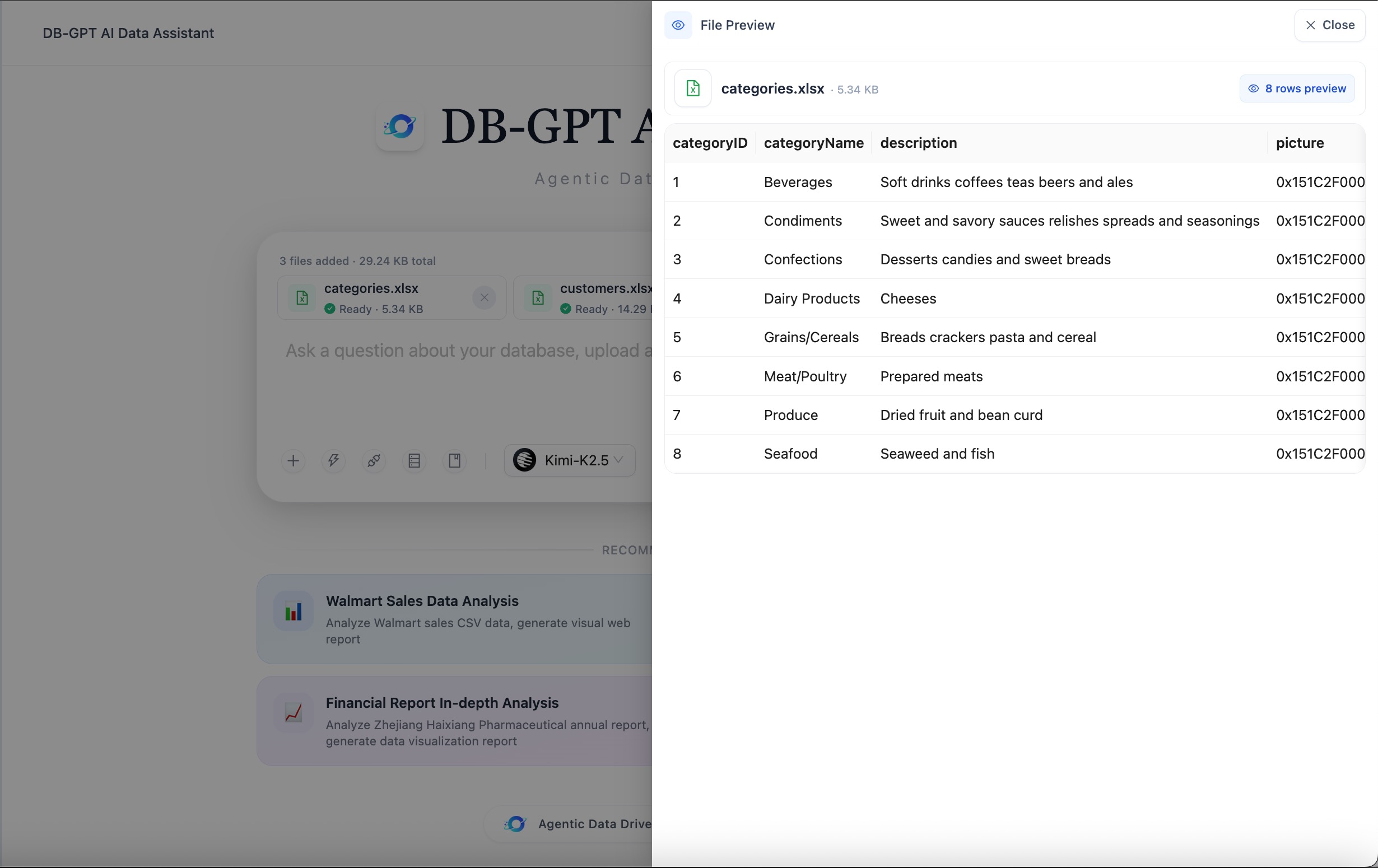
- Track each file independently through upload, inspection, ready, and failure states.
- Preview before running the task with bounded table or document previews; partial previews are marked explicitly.
- Add or remove attachments throughout the conversation without rebuilding the file set from scratch.
- Use server-advertised limits for file count, size, concurrency, timeout, and supported extensions, so deployments can tune the upload policy.
The default extension set covers CSV, TSV, Excel, JSON/JSONL, Parquet, PDF, Word, PowerPoint, Markdown, and plain text files. Availability of a preview parser still depends on the installed optional dependencies.
Analyze the Files Together
The Agent receives stable file identifiers rather than client-provided server paths. Files are scoped to the owning user and the current conversation, then materialized only when an execution tool needs them. This allows load_file, Code Interpreter, and analysis tools to work across the selected file set while keeping storage locations private.
When a conversation with attachments is saved as a Scheduled Task, DB-GPT freezes task-scoped copies of those files. Each scheduled run can therefore replay against the same file snapshot instead of depending on mutable session uploads.
🔎 Agentic Knowledge-Base Search: Retrieval as an Iterative Process
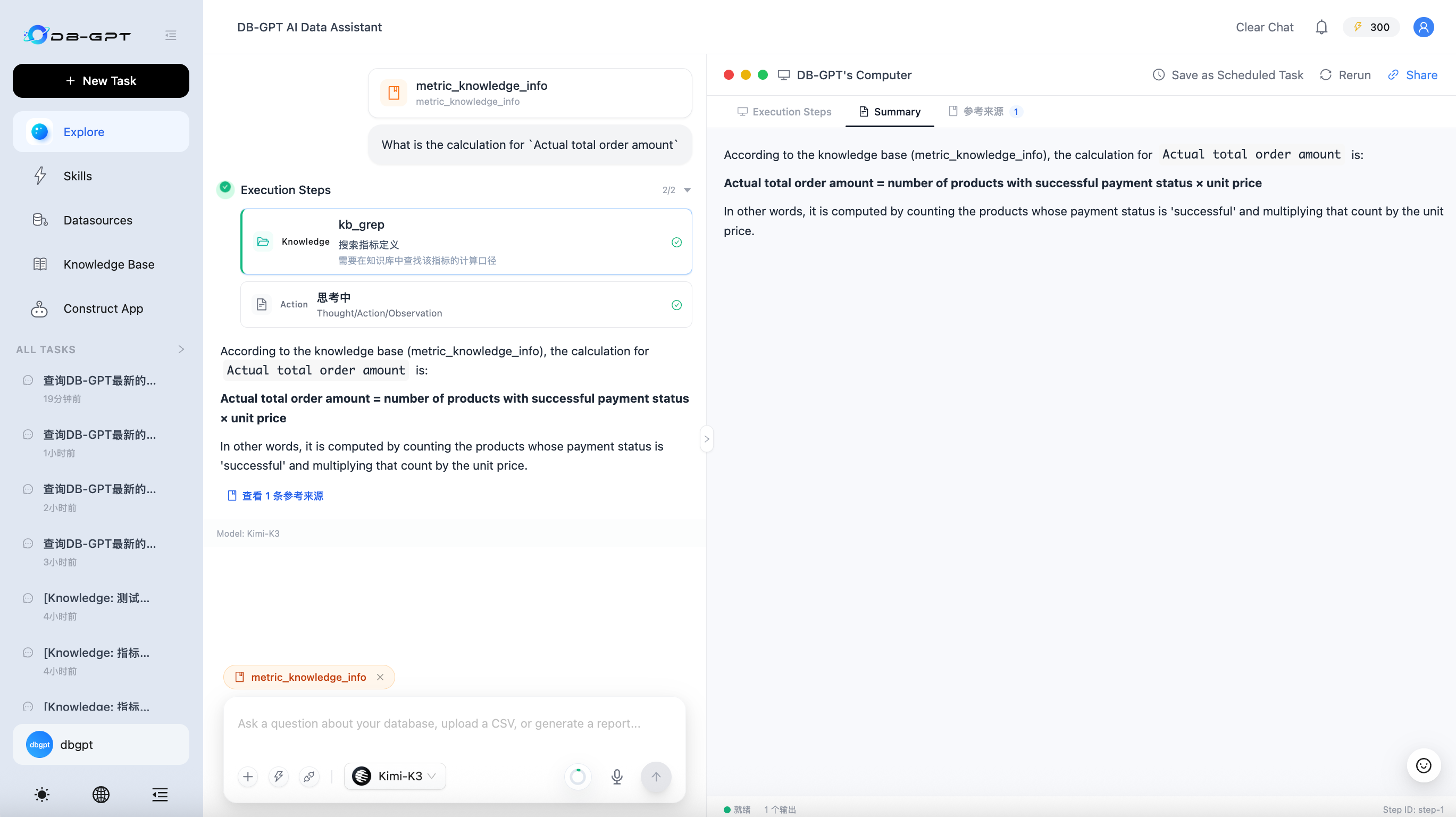
Traditional RAG usually retrieves once, builds a prompt, and generates an answer. That approach is efficient for simple questions, but it gives the model little room to recover when the first query is incomplete or the relevant evidence is spread across several sources.
V0.8.2 turns knowledge-base chat into an Agentic loop. The Agent can inspect the knowledge space, rewrite or narrow its search, retrieve more than once, open relevant files, and stop when it has enough evidence to answer. Knowledge-only chat receives a focused tool set such as semantic search, file listing, glob, grep, and file reading, reducing interference from unrelated tools.
Index Methods and Structural Views
| Capability | How it is used |
|---|---|
| Vector search | Semantic similarity over embedded chunks |
| File and exact search | File matching, keyword search, and bounded file reading within the selected knowledge space |
| Knowledge graph | Entity and structural relationships when the graph has been built |
| Structural view | Reconstructs heading and parent-child context at query time |
| Code graph | When available, indexes repositories, files, and symbol definitions for code-oriented exploration |
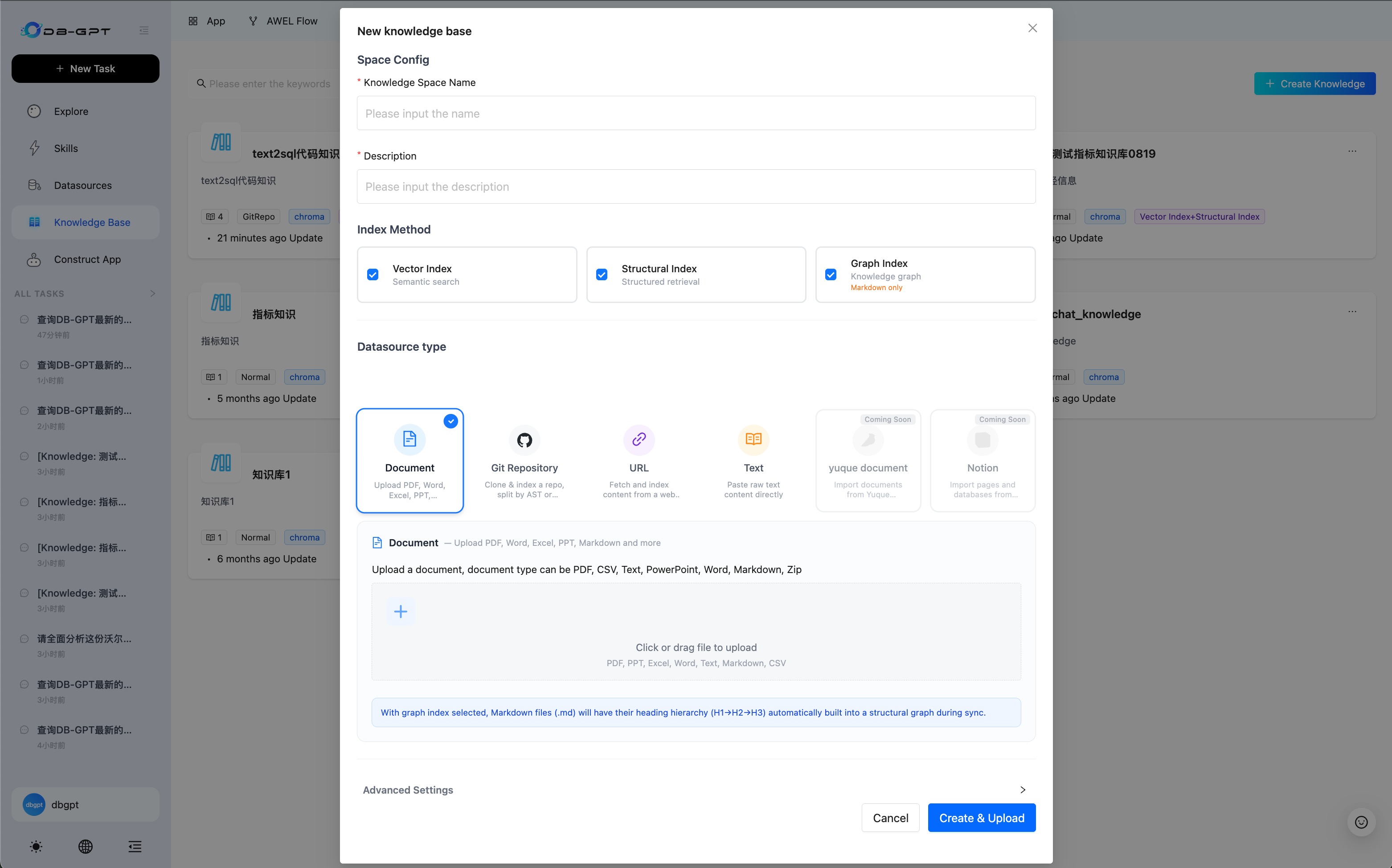
Knowledge-space configuration offers three index-method options: VectorStore, FullText, and KnowledgeGraph. Git repositories, when used as a knowledge source, support full and incremental synchronization. Once a code graph has been built for a Git repository or code files, code can be retrieved structurally by repository, file, class, and function.
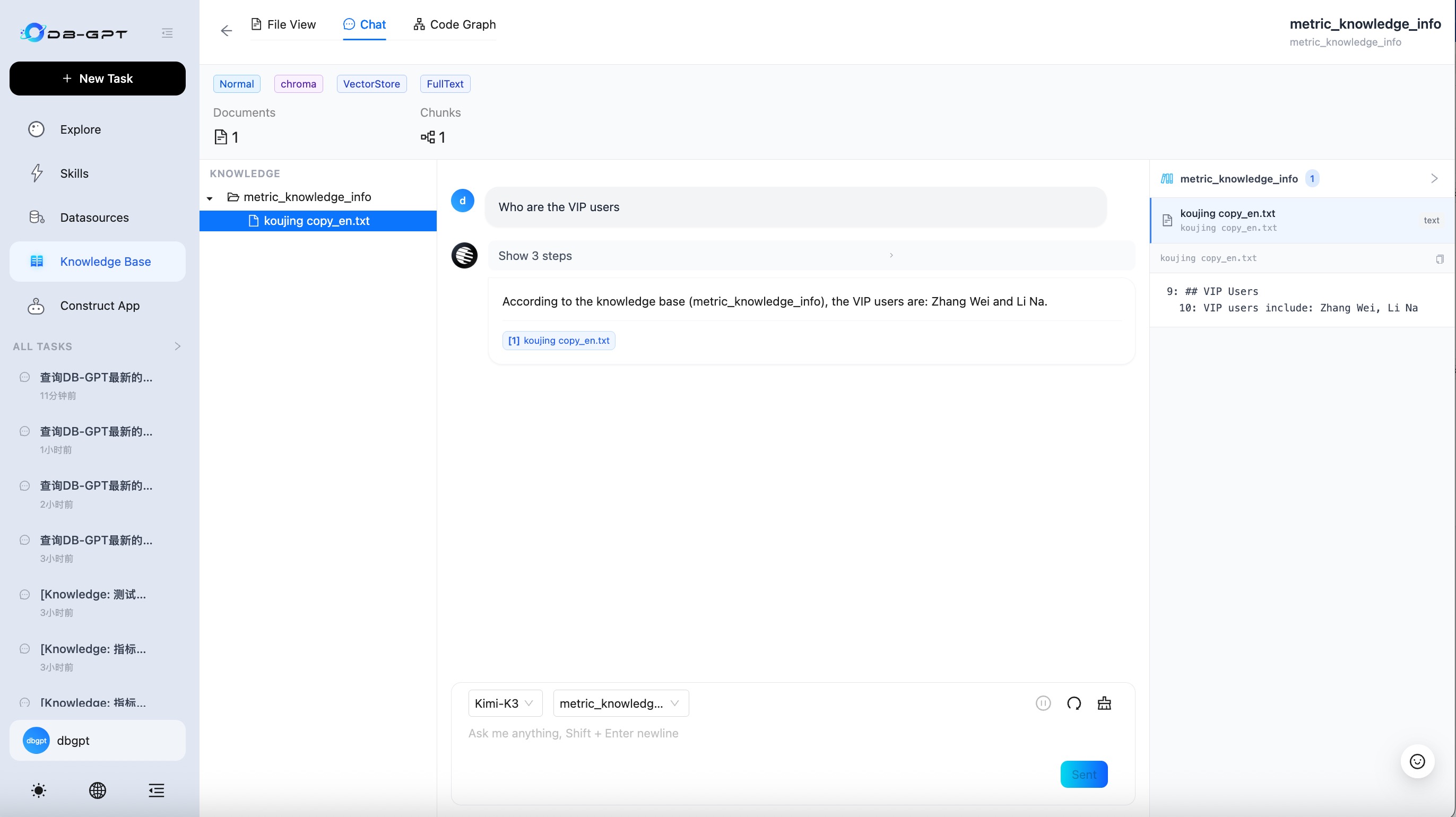
Large tool results no longer have to be discarded when they exceed the inline context budget. They can be persisted and read back through a bounded file-reading tool. Citations are also carried separately from the final answer as structured data, so the frontend can render traceable source excerpts without mixing reference payloads into the answer text.
🧩 Parallel Sub-Agents: Execute Independent Work Concurrently
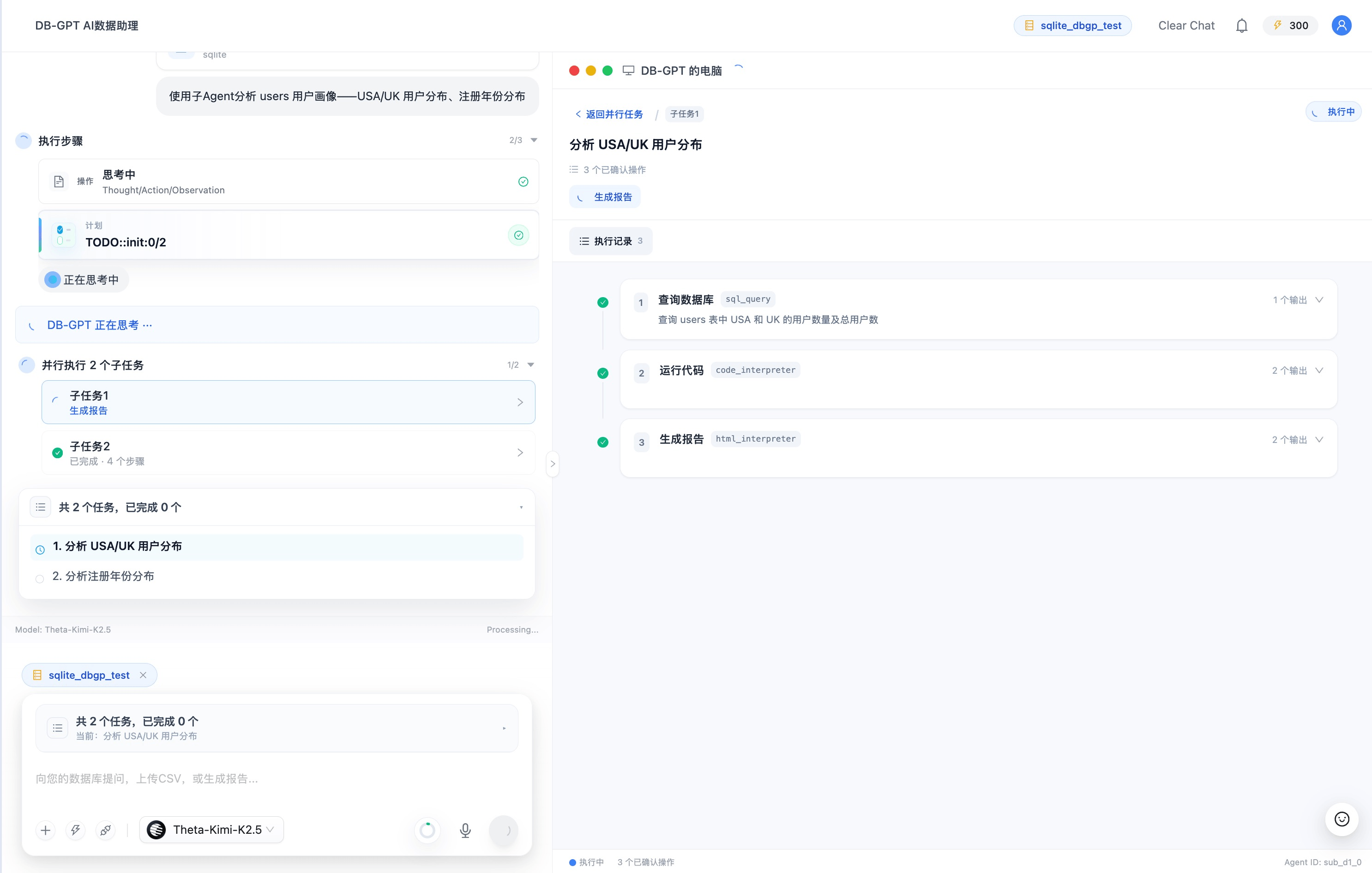
Complex tasks often contain independent branches: profile several datasets, compare multiple candidate approaches, or investigate unrelated causes before producing one conclusion. V0.8.2 lets the lead Agent delegate such branches to sub-agents and run them concurrently.
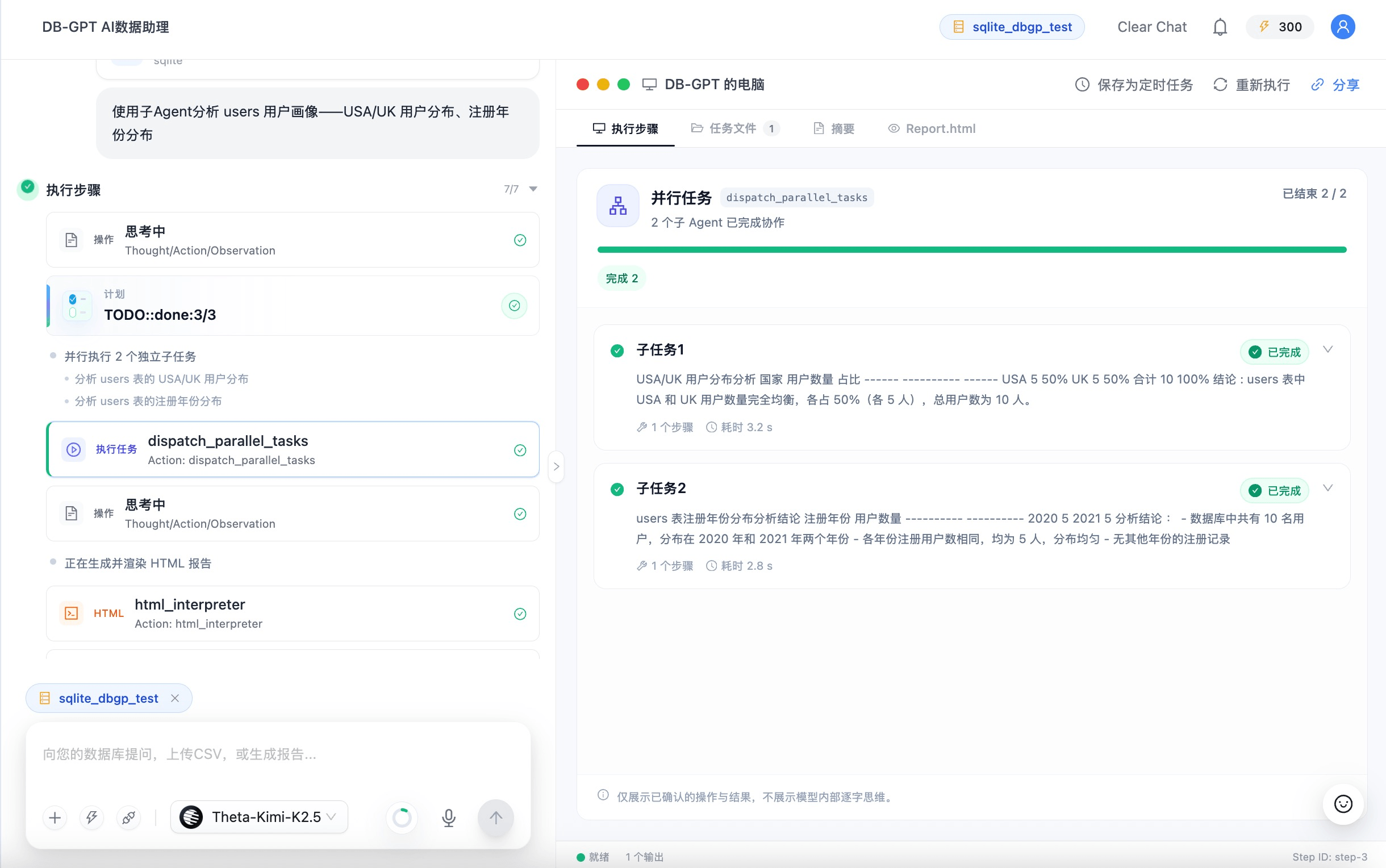
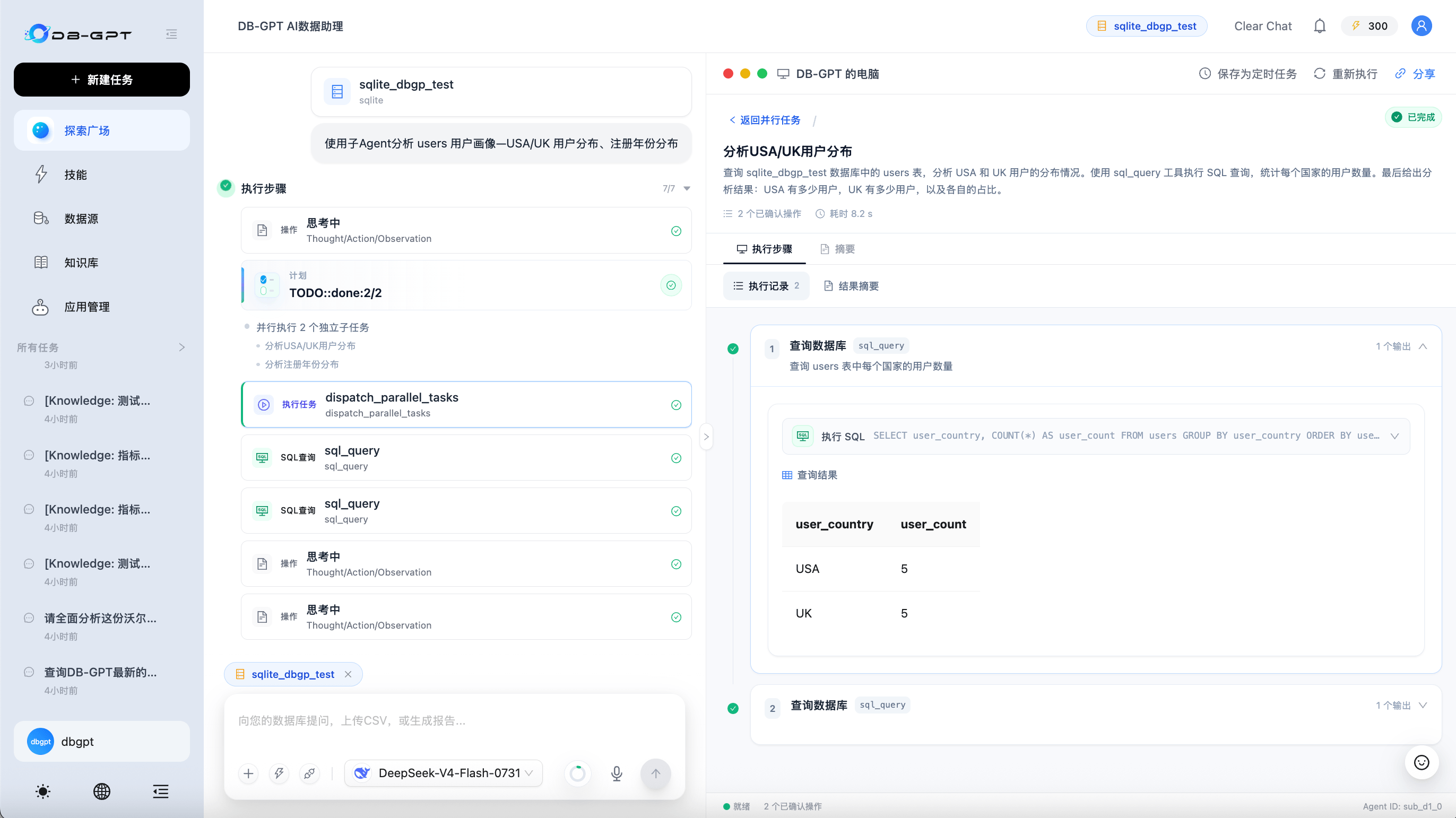
The lead Agent first records a task plan, then calls dispatch_parallel_tasks with independent work items. Each sub-agent runs with its own context, memory, conversation, and working directory. Database, knowledge-base, and read-only tool access can be inherited from the lead task, while recursive delegation is disabled.
| Capability | Description |
|---|---|
| Bounded concurrency | Runs up to three sub-agents per dispatch by default; the limit is configurable |
| Live progress | Streams running, completed, failed, and timed-out states to the frontend |
| Inspectable work | Shows each sub-agent's goal, verified steps, outputs, and artifacts |
| Final synthesis | Returns structured results to the lead Agent for one consolidated answer |
| Execution constraints | Keeps dependent work serial and prevents sub-agents from recursively delegating more work |
The per-dispatch limit can be set with service.web.agent_context.max_parallel_subagents or DBGPT_MAX_PARALLEL_SUBAGENTS. Increasing it also increases concurrent model calls and token consumption.
Parallel delegation reduces unnecessary serial waiting when work items are genuinely independent. It does not change the ordering requirements of steps that depend on one another.
🙋 Human-in-the-Loop Questions: Clarify Before Continuing
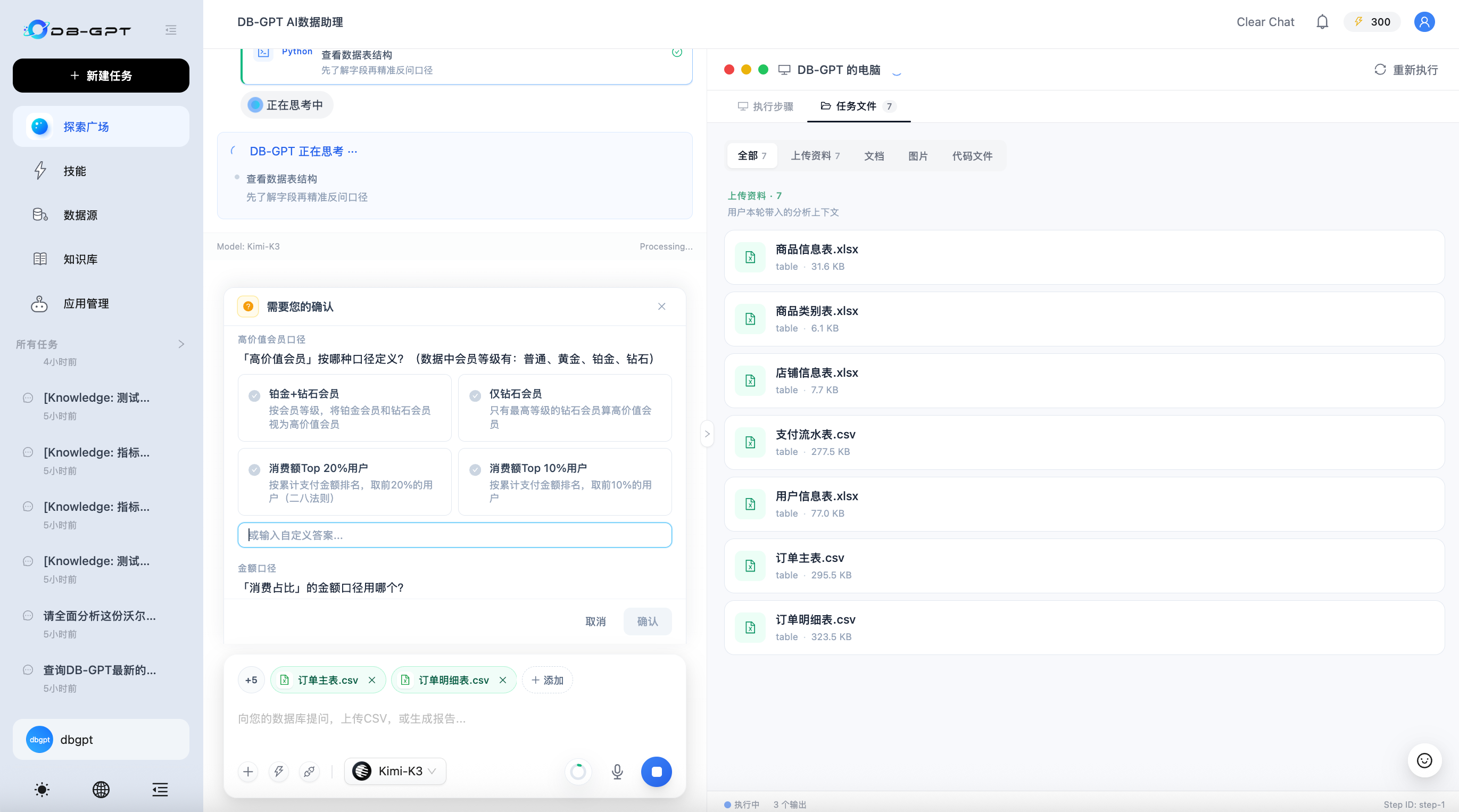
Some tasks cannot be completed responsibly without a user choice: which metric definition to use, which date range applies, whether an ambiguous field should be included, or which output format is preferred. V0.8.2 adds a standard interactive question flow for these cases.
The Agent can pause execution, present one or more structured questions, and continue in the same run after the user replies. The frontend supports single choice, multiple choice, custom input, confirmation, and cancellation. Waiting is bounded so an abandoned question does not leave an execution open indefinitely.
🛡️ Security and Reliability Hardening
V0.8.2 also tightens several boundaries used by Agentic workflows:
- Python file uploads validate
user_idand verify that resolved paths remain inside the managed upload directory. - macOS TTS passes text to
sayas an argument rather than through a shell command. - Agent Jinja2 prompt rendering uses a sandboxed environment.
- CORS allowed origins are configurable, and wildcard/credential handling is corrected.
- Only files named exactly
SKILL.mdare loaded as Markdown Skills. - Agent citations use a structured final-answer protocol instead of being appended to the answer body.
- MySQL uses a real
LONGTEXTvariant for large Agent messages and action reports at the ORM layer. - Excel knowledge loading handles headerless sheets and multi-sheet workbooks more reliably.
Enhancements
- Add session-scoped multi-file upload, preview, and Agentic analysis (#3206)
- Add Agentic Knowledge-Base Search with index-method configuration and iterative RAG (#3160)
- Add parallel sub-agent delegation and execution (#3161)
- Add interactive human-in-the-loop questions to the built-in Agent tools (#3107)
- Add the OrcaRouter proxy provider through an OpenAI-compatible endpoint (#3186)
- Add an Alibaba Cloud MaxCompute (ODPS) datasource backed by the PyODPS SQLAlchemy dialect and configurable from the Web UI (Fixes #3105) (#3178)
Bug Fixes
- Avoid a
KeyErrorwhen a chart or SQL run does not includedb_name(#3199) - Include the flow UID in the
update_flowPUT path (Fixes #3193) (#3196) - Use MySQL
LONGTEXTfor large Agent messages and action reports at the ORM layer (#3189) - Move
EXAMPLE_1database creation to the end of the schema file (#3183) - Separate citations from final answers with a structured final-answer protocol (#3182)
- Validate
user_idand constrain resolved paths for Python file uploads (Fixes #3104) (#3184) - Load only files named exactly
SKILL.mdas Markdown Skills (#3175) - Prevent command injection in macOS TTS by removing shell interpretation (Fixes #3129) (#3174)
- Handle LLM output containing multiple JSON code fences (#3117)
- Render Agent Jinja2 templates in a sandboxed environment (#3111)
- Stop
inner_copy_and_installfrom reporting a failed build as successful (#3141) - Deserialize table chunks when separated chunks are present (#3140)
- Use POST rather than GET in client
create_datasourceandcreate_flowcalls (#3138) - Make CORS allowed origins configurable and correct wildcard/credential handling (#3123)
- Honor negative read sizes and preserve the
SEEK_ENDposition inStreamedBytesIO(#3136) - Handle native Boolean values in
VariablesProvider._convert_to_value_type(#3135) - Preserve bucket names in simplified fsspec paths (#3134)
- Handle headerless sheets and multi-sheet workbooks in
ExcelKnowledge._load(#3137) - Correct the empty/non-list result guard in
TeiRerankEmbeddings._parse_results(#3133) - Avoid the
handleChattemporal dead zone in the frontend (#3132) - Allow the Milvus vector-store type in TOML configuration (#3127)
How to Upgrade
This guide applies to upgrades from v0.8.1 to v0.8.2.
The V0.8.2 incremental metadata script adds one table for session- and task-scoped file persistence, three code-graph tables, the knowledge-space index-method column, and a column-width fix for Agent messages. Upgrade scripts are available under assets/schema/upgrade/v0_8_2/:
upgrade_to_v0.8.2.sql: incremental script to run on top of a v0.8.1 database.v0.8.2.sql: full V0.8.2 schema for fresh installations.
As in previous releases, the incremental script targets MySQL. SQLite users should back up the metadata database before upgrading; ORM-managed tables are created when the service starts.
Prepare
Back Up the Database
To avoid data loss, back up the metadata database before upgrading. Choose the method that matches your database type, such as mysqldump for MySQL or copying the database file for SQLite.
Upgrade the Database
The V0.8.2 incremental upgrade applies the following metadata changes:
| Change | Description |
|---|---|
dbgpt_session_file | Stores owner-bound session and scheduled-task file metadata, stable public file IDs, managed storage URIs, inspection status, and task-file lineage. |
code_graph_vertex, code_graph_edge, code_graph_meta | Persist code-graph indexes (AST nodes, structural relationships, and per-space build metadata) for code-oriented knowledge retrieval. |
knowledge_space.index_methods | New nullable column storing the JSON list of selected index methods (for example ["VectorStore", "FullText", "KnowledgeGraph"]). |
gpts_messages.content | Widened to LONGTEXT so large Agent messages and action reports no longer fail to write. |
Apply the incremental script to your MySQL metadata database:
mysql -u <user> -p dbgpt < assets/schema/upgrade/v0_8_2/upgrade_to_v0.8.2.sql
Install Dependencies
Install or update dependencies according to your deployment method. For a source installation with the default setup:
uv sync --all-packages
Install optional extras as needed:
# Agentic Knowledge-Base Search and RAG dependencies
uv sync --all-packages --extra "rag"

# Milvus vector store
uv sync --all-packages --extra "storage_milvus"
Restart DB-GPT
Restart DB-GPT using your usual startup method. After startup, we recommend checking that:
- Existing conversations and knowledge spaces load correctly.
- Multiple files can be uploaded, previewed, removed, and analyzed in one conversation.
- Scheduled Tasks created from a conversation with attachments can access their frozen task files.
- Agentic Knowledge-Base Search can retrieve from the configured index methods and display source references.
- Parallel sub-agent tasks and interactive questions update correctly in the frontend.
Acknowledgements
Thank you to everyone who contributed to this release: @Aries-ckt, @Bartok9, @Carbene, @Dellorchid, @DreamZhongJu, @Osamaali313, @XiaoHuo888-hue, @chen-alan, @chenliang15405, @chuenchen309, @mumubuku, and @yyyCode.