🚀 DB-GPT V0.8.1 — Production-Ready AI Data Assistant: Scheduling, Connectors, and Long-Running Agents
V0.8.1 continues the direction introduced by the V0.8.0 AI Data Assistant. It turns one-off analysis into production-oriented workflows that are schedulable, connectable, observable, and easier to operate.
Introduction
DB-GPT V0.8.0 moved the product experience from "conversational Q&A" to "task delivery." V0.8.1 focuses on the practical questions teams face when they use the AI Data Assistant continuously in real environments:
- A successful analysis is valuable. How can it be rerun on a schedule without repeating the conversation each time?
- An agent connected only to databases is limited. How can it safely connect to external systems and business tools?
- Complex analysis often runs through many steps. How can it stay within the context window while letting users see what it is doing?
- Production databases can have large schemas. How can connector construction, schema indexing, and vector search become faster and more reliable?
To address these needs, this release introduces Scheduled Tasks, MCP Connectors, and context management with task-plan tracking. It also expands the model, datasource, vector-store, and cache ecosystem, and includes a set of production-focused performance, security, and compatibility fixes.
The core value of V0.8.1 is straightforward: DB-GPT AI Data Assistant moves from completing one complex analysis to supporting repeatable, long-running, team-ready workflows.
Key Highlights
- ⏰ Scheduled Tasks — Save a finished conversation as a recurring task and replay the Agent flow on a cron schedule
- 🔌 MCP Connectors — Connect Agents to external tools through the Model Context Protocol, with built-in templates and custom MCP server support
- 🧠 Context Management and Task-Plan Tracking — Keep long-running ReAct/Data Agent tasks within the context window and show progress in the frontend
- 🚀 Datasource Connector Cache — Add TTL caching for expensive connector construction, reducing warm connector lookup from about 63s to under 10ms in large-schema scenarios
- 🧱 Ecosystem Expansion — Add LiteLLM, Qdrant, Valkey for cache and vector storage, openGauss, StarRocks binary types, DeepSeek V4 Pro, and MiniMax-M3
- 🛡️ Security and Reliability Hardening — Tighten config-file permissions, validate uploaded filenames, restrict personal Skill execution, and improve indexing fault tolerance
Features
⏰ Scheduled Tasks: Turn a Successful Analysis into Continuous Output
Many data analysis jobs are naturally recurring: daily business reports, weekly risk checks, monthly financial summaries, or diagnostics repeated over fresh database snapshots. V0.8.1 introduces Scheduled Tasks, allowing a successful analysis conversation to become a repeatable task.
Run the analysis once, save the conversation as a task, and DB-GPT will replay the full ReAct Agent flow on a cron schedule. Each run creates a new conversation and report while preserving execution history for auditing, review, and team sharing.
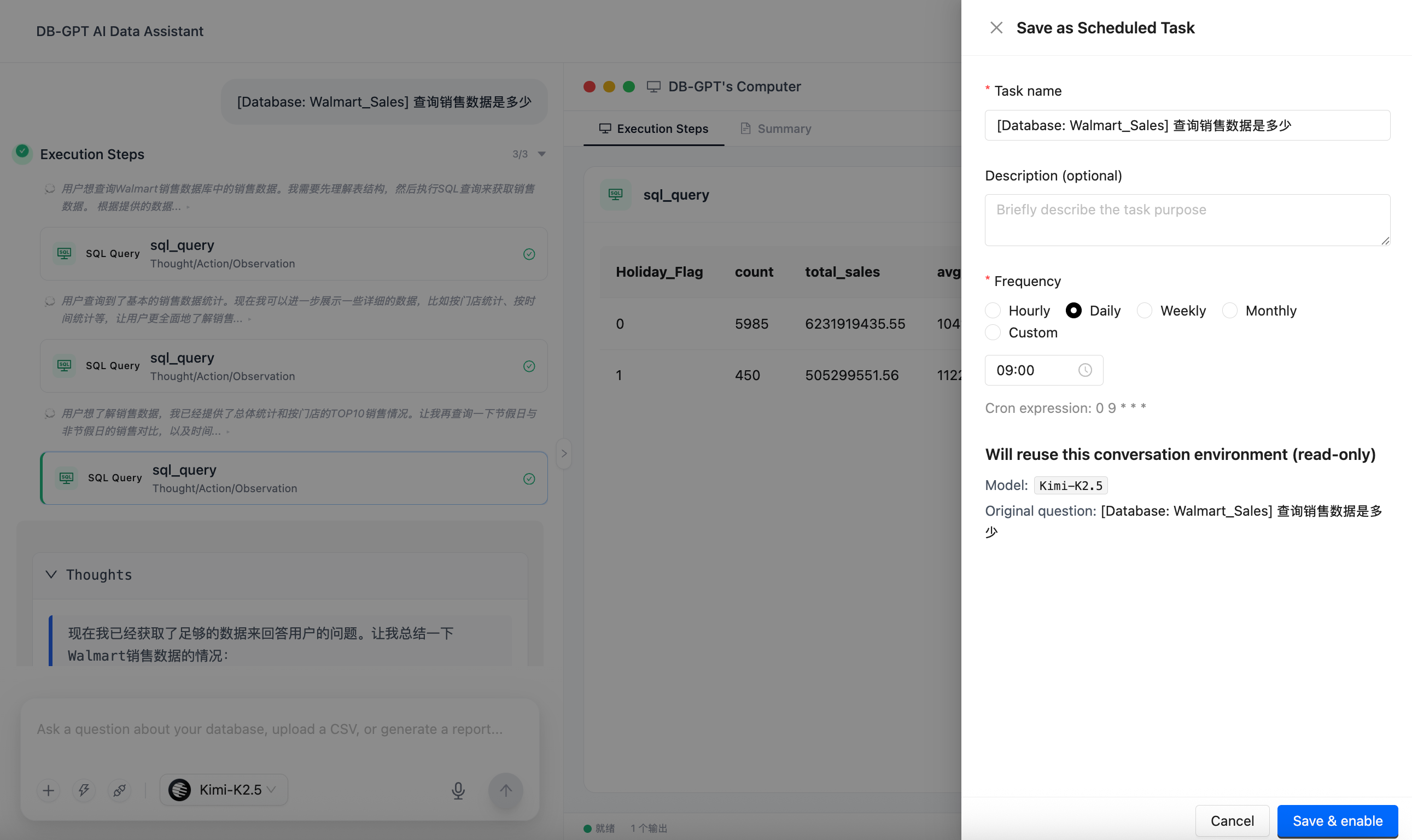
Save a Conversation as a Recurring Task
- Save finished conversations in one click: Turn any completed analysis conversation into a scheduled task.
- Use flexible schedules: Run hourly, daily, weekly, monthly, or with a custom cron expression.
- Freeze the execution context: The original question, model, selected Skill, and connector environment are stored in the task snapshot, so every replay runs under the same conditions.
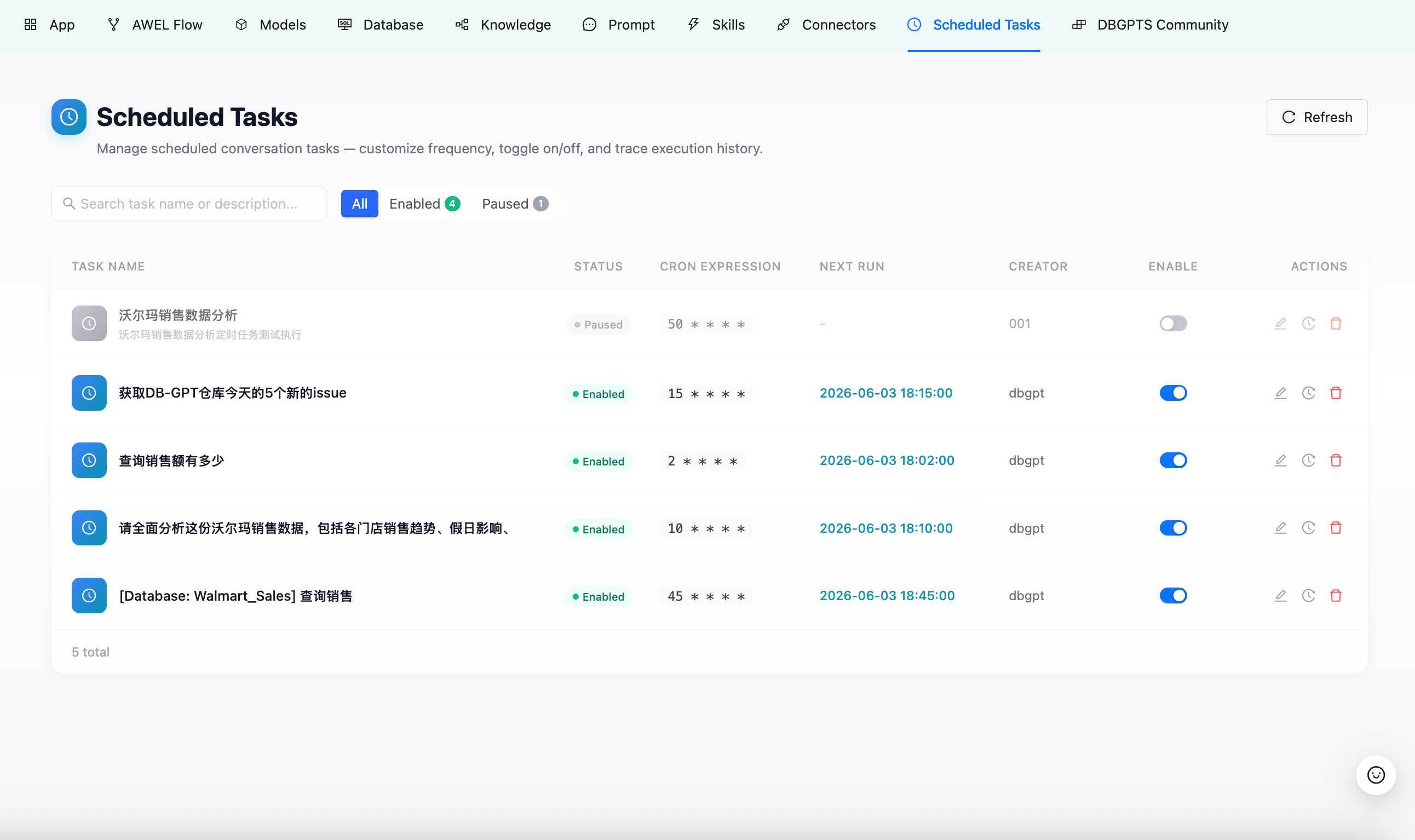
- Pause and resume tasks: Manage task status directly from the Scheduled Tasks page.
Run History and Read-Only Replay
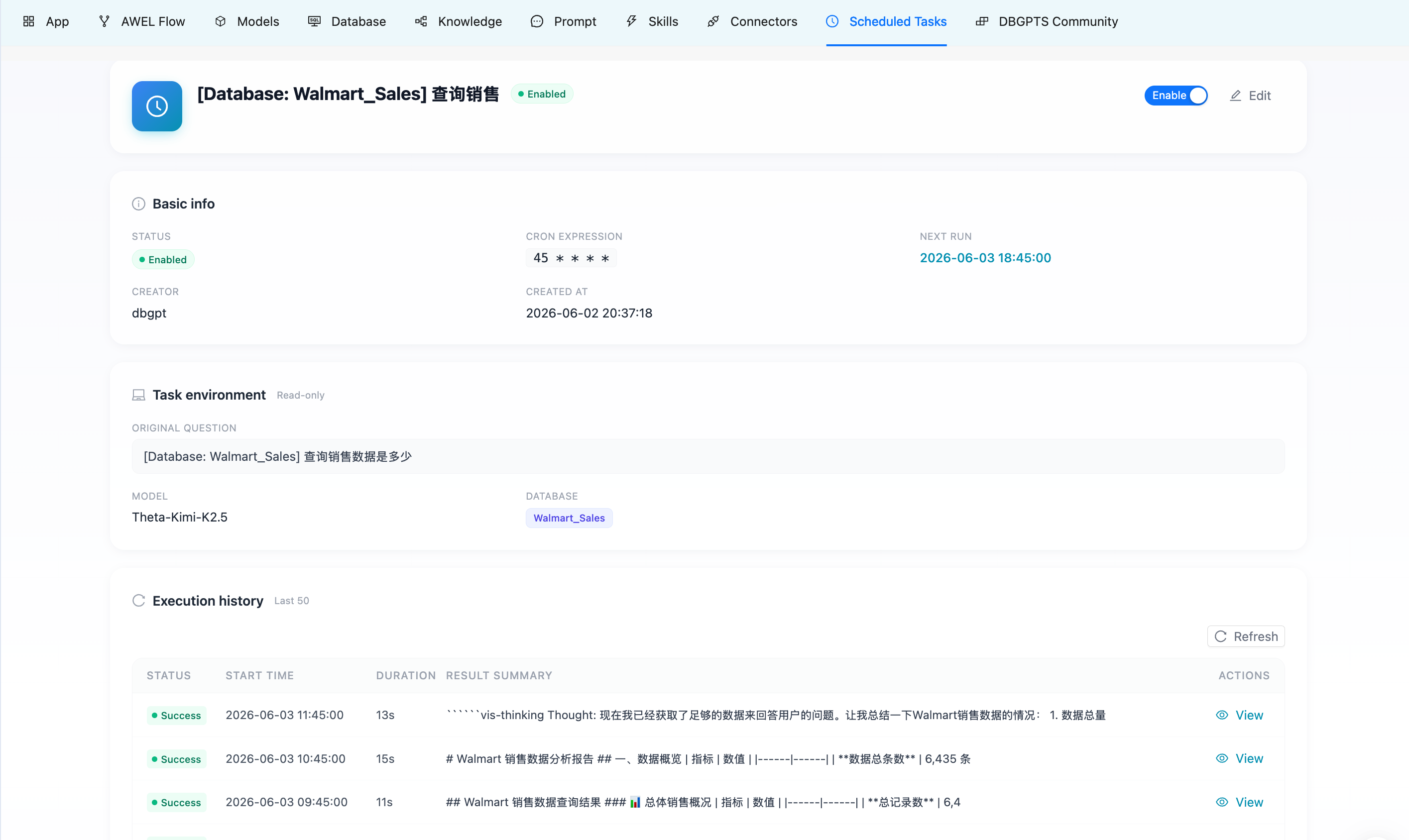
Every scheduled run records its status, duration, result summary, and generated conversation ID. You can open any historical run and replay the generated conversation directly from history. Replay does not trigger another LLM call, making review low-cost and reproducible.
🔌 MCP Connectors: Safely Connect Agents to External Tools
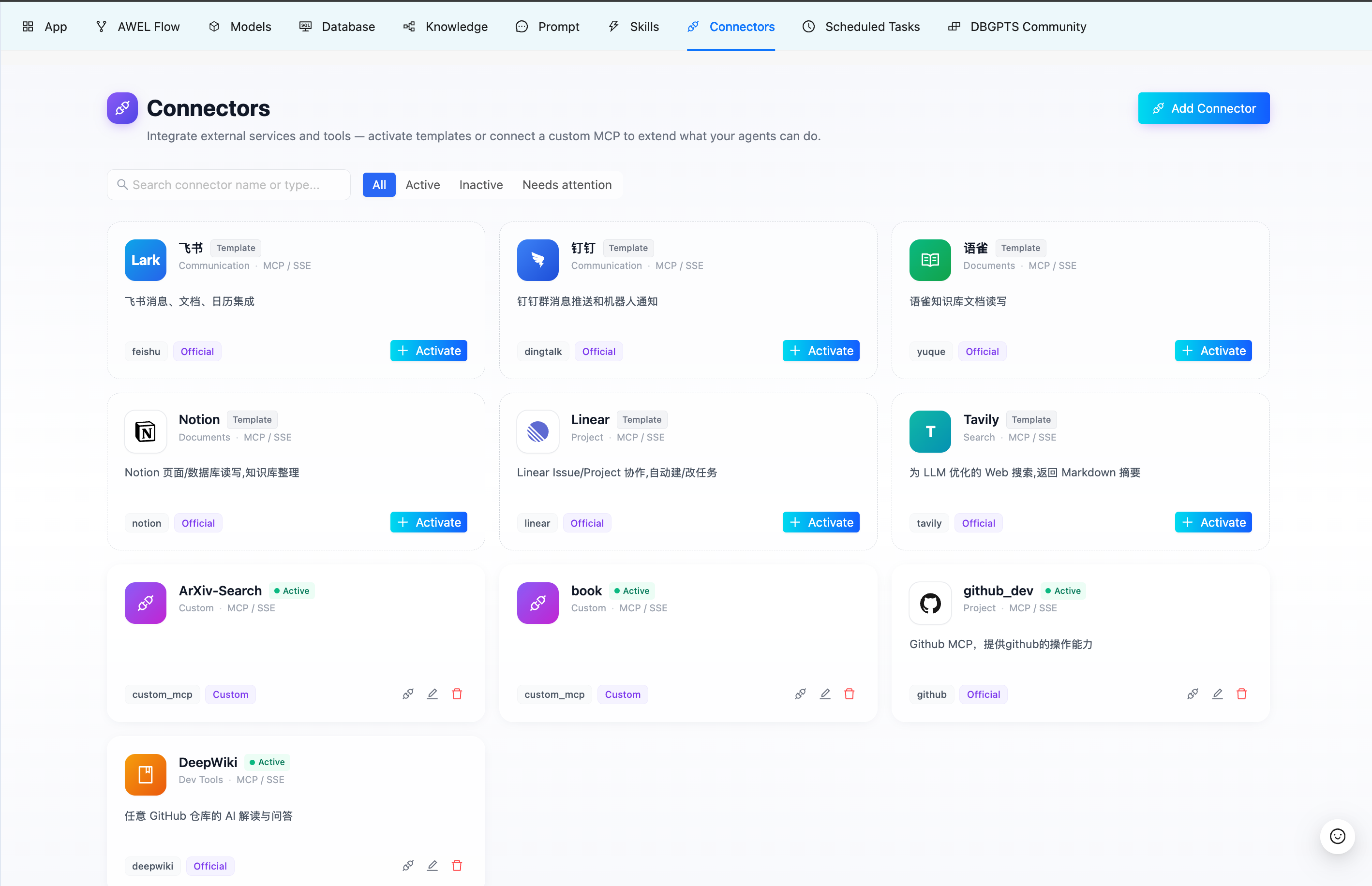
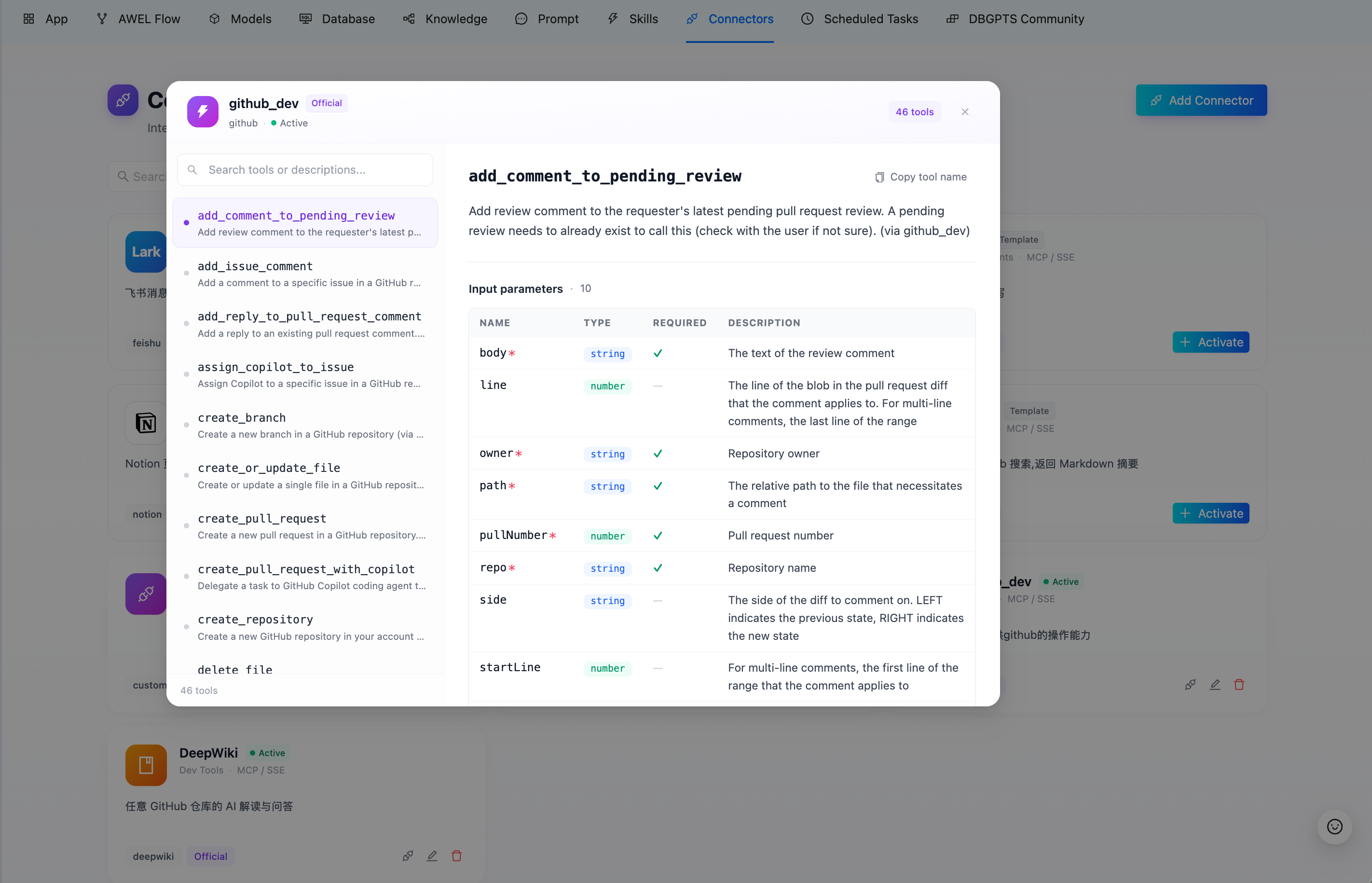
V0.8.1 extends DB-GPT Agents beyond databases and local Skills through MCP Connectors. Agents can now access external tools through the Model Context Protocol, while users control which connectors are attached to each conversation.
Built-in connector templates currently include Feishu, DingTalk, Yuque, GitHub, Notion, Linear, Tavily, and DeepWiki. You can also connect any custom MCP server that supports SSE or Streamable HTTP.
External Tool Access for Agentic Workflows
| Capability | Description |
|---|---|
| Built-in templates | Cover collaboration, documentation, project management, search, and developer-tool scenarios |
| Custom MCP servers | Configure endpoints, transport protocols, and authentication methods |
| Per-conversation connector selection | Agents only receive tools relevant to the current task, reducing noise and token usage |
| Tool transparency | Inspect each connector's tool names, descriptions, and input parameters |
| Human confirmation | Write actions from built-in connectors ask for confirmation before execution |
| Encrypted credentials | Connector credentials are encrypted in DB-GPT metadata and restored after service restart |
🧠 Context Management and Task-Plan Tracking: More Stable and Transparent Long-Running Tasks
Agentic data analysis is rarely a short conversation. It often involves multi-step exploration, retries, and intermediate artifacts. V0.8.1 adds context management and task-plan tracking to the ReAct/Data Agent flow, making long-running tasks more stable and easier to understand.
- Multi-layer context compaction keeps long tasks from exceeding the model context window.
- Live context-usage events stream context-window usage to the frontend in real time.
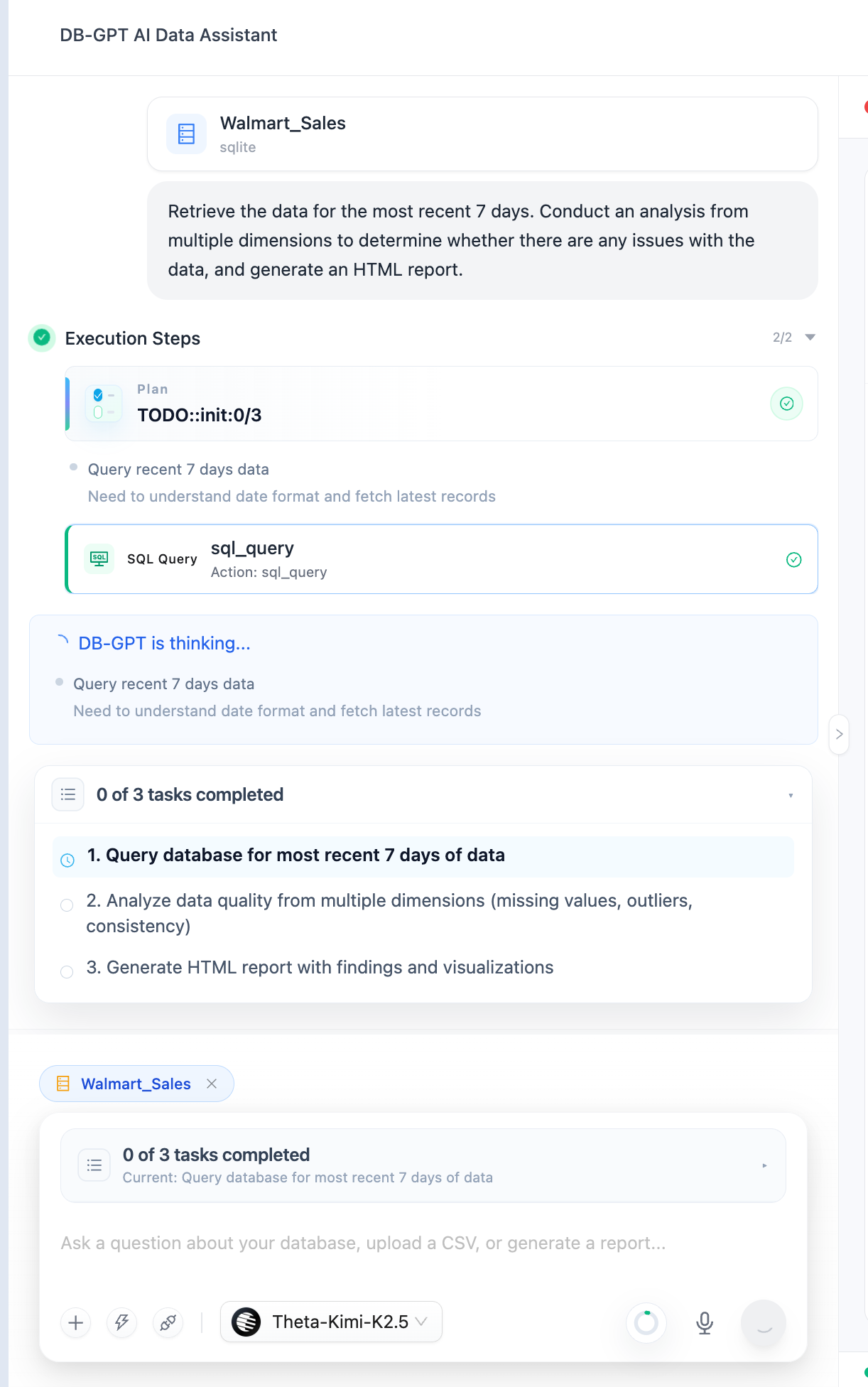
- Task-plan tracking lets the Agent maintain a structured todo list and push plan updates as steps progress.
- Clearer action explanations show what each step is doing and why it is needed.
- Frontend task-plan cards and context indicators make the execution process visible.
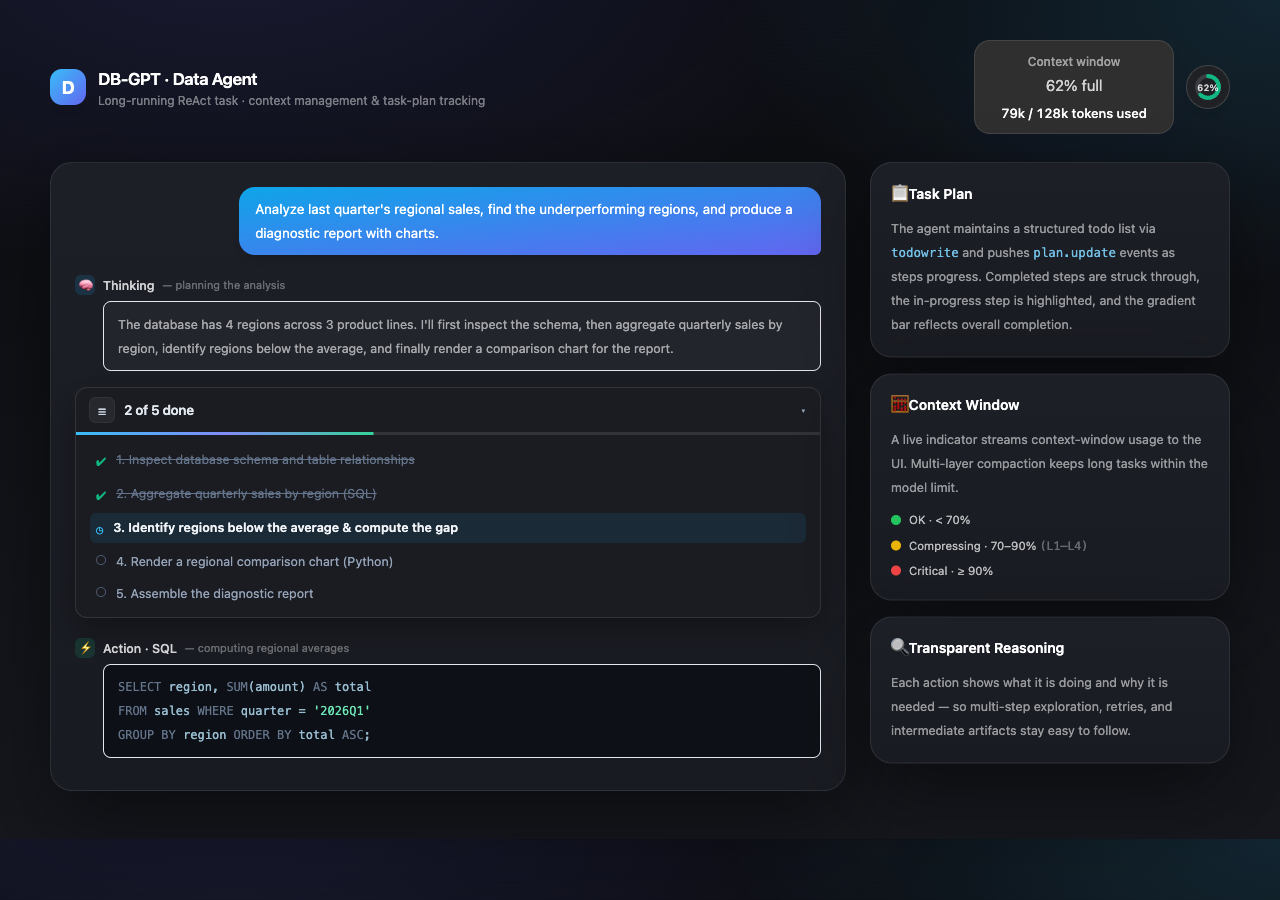
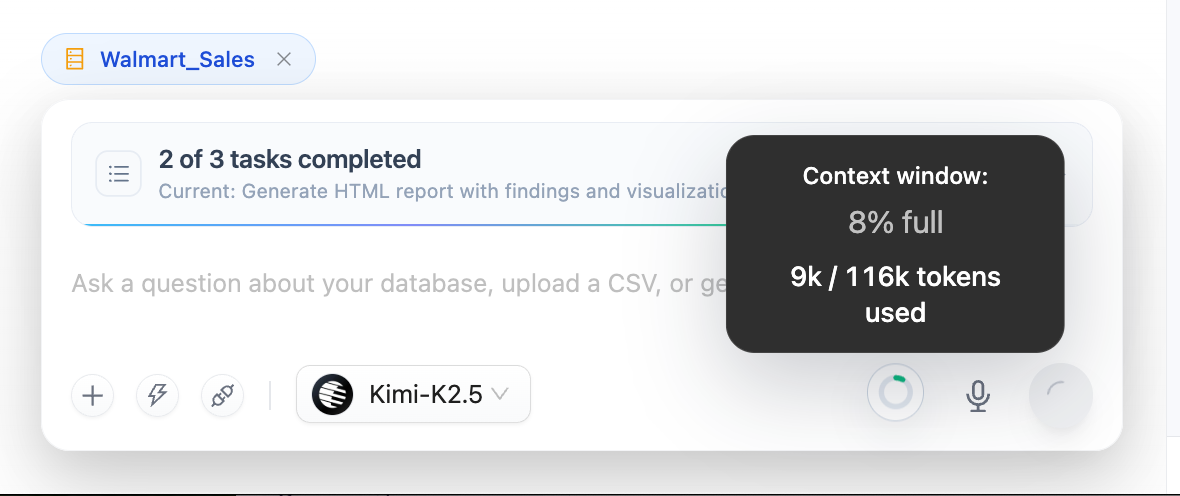
Under the hood, ContextManager orchestrates progressive multi-layer compaction driven by token-budget state. As usage crosses warning and error thresholds, compaction becomes more aggressive: from truncating earlier observations, to dropping earlier rounds, to generating structured summaries with an LLM. If the model still reports context_too_long, an emergency fallback layer is available.
These improvements make DB-GPT better suited for complex data analysis workflows that require multi-step reasoning, retries, and intermediate artifact management.
🧱 Broader Model, Datasource, and Storage Ecosystem
V0.8.1 expands the ecosystem around DB-GPT, making it easier for teams to reuse existing model, database, vector-store, and cache infrastructure.
LiteLLM Embedded AI Gateway
DB-GPT adds LiteLLM as an embedded proxy provider, registered as proxy/litellm. It is not a separate proxy service; DB-GPT calls LiteLLM in process, giving you a unified entry point to OpenAI, Anthropic, Vertex AI, Bedrock, Azure, Cohere, Mistral, Groq, Ollama, and other LiteLLM-supported backends.
[[models.llms]]
name = "anthropic/claude-3-5-sonnet-20241022"
provider = "proxy/litellm"
New Vector Search and Cache Backends
- Qdrant vector search: Support for high-performance vector search scenarios.
- Valkey vector store: Use Valkey and
valkey-searchto build vector retrieval pipelines. - Valkey cache storage: Support LLM response caching and embedding caching scenarios.
- Configurable distance metrics: Configure vector-search distance metrics as needed.
- Valkey vector client
CLIENT SETNAME: Make DB-GPT connections easier to identify in Valkey monitoring tools.
New Datasource and Model Support
- openGauss datasource: Adds connection, display, and documentation support.
- StarRocks
VARBINARYandBINARYtypes: Improves StarRocks type compatibility. - MiniMax-M3: Upgrades the MiniMax provider default model to M3 while keeping MiniMax-M2.7 available.
- DeepSeek V4 Pro: Adds model support.
🚀 Performance Improvements for Large Schemas and Production Databases
V0.8.1 includes important performance improvements for large schemas, production databases, and indexing pipelines.
- Datasource connector cache:
ConnectorManager.get_connector(db_name)now TTL-caches constructed connectors. In a production SQL Server database with nearly 900 tables, warm connector lookup improved from about 63 seconds to under 10ms. - Per-database indexing lock: Avoids concurrent competition between schema indexing and refresh operations, reducing the risk of empty indexes.
- Per-chunk fault tolerance: A single failed embedding chunk no longer fails the entire indexing task.
- MSSQL metadata compatibility: Uses SQL Server-compatible
INFORMATION_SCHEMAand extended-property queries for field metadata. - Milvus 2.5+ compatibility: Improves compatibility with newer Milvus vector-store versions.
🛡️ Security and Reliability Hardening
This release also includes several production-oriented security and reliability improvements:
- Local profile config files at
~/.dbgpt/configs/<profile>.tomlare written with stricter0o600permissions. - Knowledge module APIs add authentication dependencies.
- Skill upload filenames, example filenames, and Python upload filenames are validated more strictly.
- Personal Skill script execution is restricted to reduce uncontrolled execution risk.
- Code Interpreter temporary scripts are written with explicit UTF-8 encoding.
- Markdown knowledge uses size chunking by default, making indexing more predictable.
- The ReAct parser handles multi-step output more robustly.
- Chat DB prompts clarify that retrieved table schemas are a top-K subset, improving accuracy for whole-database meta questions.
Enhancements
- Support Scheduled Tasks and MCP Connectors (#3095)
- Add context management, task-plan tracking, and the corresponding frontend UI (#3053)
- Add LiteLLM as an embedded AI gateway provider (#3043)
- Add Qdrant vector search support (#3034)
- Add Valkey vector store integration (#3051)
- Add Valkey cache integration (#3057)
- Add
CLIENT SETNAMEto the Valkey vector client (#3090) - Support configurable vector-search distance metrics (#3044)
- Add TTL caching to
ConnectorManager.get_connector(warm cache from about 63s to under 10ms) (#3046) - Add openGauss datasource support (#3007)
- Implement
VARBINARYandBINARYtypes for StarRocks (#3062) - Upgrade the MiniMax default model to M3 (#3093)
- Harden
~/.dbgpt/configs/<profile>.tomlfile permissions to0o600(#3077)
Bug Fixes
- Fix DuckDB datasource creation from the Web UI (#3009)
- Support DeepSeek V4 Pro (#3079)
- Use size chunking by default for Markdown knowledge (Fixes #3030) (#3033)
- Restrict personal Skill script execution (#3071)
- Validate example filenames (#3066)
- Validate Skill upload filenames (#3065)
- Constrain Python upload filenames (#3064)
- Handle knowledge space ID responses (#3070)
- Tolerate multi-step ReAct output (#3074)
- Tell the LLM that the current table list is a top-K subset, not the full database table list (#3045)
- Expand the
gpts_messages.contentcolumn to hold longer Agent messages (#3055) - Make MilvusStore compatible with Milvus 2.5+ (#3042)
- Add per-chunk fault tolerance and a per-database indexing lock (#3040)
- Override MSSQL
get_fields()with SQL Server-compatibleINFORMATION_SCHEMAqueries (#3039) - Add authentication dependencies to knowledge module APIs (#3038)
- Fix BranchOperator incorrectly skipping shared downstream nodes (Fixes #2935) (#3035)
- Honor the configured Tongyi embedding model name (Fixes #3029) (#3032)
- Use explicit UTF-8 encoding when writing Code Interpreter temporary scripts (#3023)
How to Upgrade
This guide applies to upgrades from v0.8.0 to v0.8.1.
The V0.8.1 metadata changes include one column change and three new tables. Upgrade scripts are available under assets/schema/upgrade/v0_8_1/:
upgrade_to_v0.8.1.sql: incremental script to run on top of a v0.8.0 database.v0.8.1.sql: full V0.8.1 schema for fresh installations.
As in previous releases, the incremental script targets MySQL. SQLite users should back up the metadata database before upgrading; the new tables are created automatically when the service starts.
Prepare
Back Up the Database
To avoid data loss, back up the metadata database before upgrading. Choose the method that matches your database type, such as mysqldump for MySQL or copying the database file for SQLite.
Upgrade the Database
The V0.8.1 upgrade includes one column change and three new metadata tables:
| Change | Description |
|---|---|
gpts_messages.content -> longtext | Supports longer Agent messages and execution traces. |
connector_instance | Stores MCP connector instances, encrypted credentials, transport/extra config, and lifecycle status. |
dbgpt_serve_scheduled_task | Stores scheduled task definitions, cron expressions, and frozen conversation snapshots. |
dbgpt_serve_scheduled_run | Stores scheduled run history: status, summaries, error messages, and output conversation IDs. |
Apply the incremental script to your MySQL metadata database:
mysql -u <user> -p dbgpt < assets/schema/upgrade/v0_8_1/upgrade_to_v0.8.1.sql
Install Dependencies
Install or update dependencies according to your deployment method. For a source installation with the default setup:
uv sync --all-packages
Install optional extras as needed:
# LiteLLM proxy provider
uv sync --all-packages --extra "proxy_litellm"

# Qdrant vector store
uv sync --all-packages --extra "storage_qdrant"

# Valkey cache / vector store
uv sync --all-packages --extra "storage_valkey"
Restart DB-GPT
Restart DB-GPT using your usual startup method. After startup, we recommend checking that:
- Existing conversations load correctly.
- MCP Connector pages can list, activate, and test connectors.
- Scheduled Tasks can be saved from completed conversations and show run history.
- Long-running ReAct/Data Agent conversations show task-plan and context-usage status.