🚀 DB-GPT V0.8.3 — From Analysis to Trusted Delivery: Traceable Reports, Dashboards, and Agent Observability
V0.8.2 improved multi-file input, knowledge retrieval, parallel sub-agents, and human-in-the-loop interactions, enabling complex data tasks to run end to end. V0.8.3 goes further by focusing on how results can be verified, retained, and reused after execution: metrics, charts, and conclusions in reports must be traceable to the actual SQL, Python, and knowledge sources behind them; dashboards created from an analysis must be editable, saveable, and publishable; and Agent model calls, tool executions, token consumption, and latency must be clearly observable.
To achieve these goals, this release introduces structured, traceable analysis reports and a Dashboard Workspace, adds Agent observability, LLM-Wiki, a model provider configuration interface, and a configurable Sandbox runtime, and expands the search, model, and vector-store ecosystem. Together, these capabilities help the AI Data Assistant move beyond completing analyses toward delivering data products that can be reviewed and maintained.
Key Highlights
- 📊 Structured, Traceable Analysis Reports — Connect report content to actual execution artifacts, with source details, evidence graphs, saved versions, and HTML/PDF export
- 📈 Dashboard Workspace — Turn natural-language analysis into data dashboards that can be validated, edited, saved, published, and shared
- 🔭 Agent Observability — View Agent execution traces, model usage, token costs, P95 latency, and error rates in one interface
- 📚 LLM-Wiki and External Knowledge Sources — Automatically build continuously updated knowledge pages and link graphs, with new Feishu and Yuque knowledge sources
- ⚙️ Configurable Sandbox Runtime — Support Local, Docker, Podman, and Nerdctl with explicit execution boundaries and no silent fallback to the host when a container fails
- 🧩 Expanded Model, Search, and Storage Ecosystem — Add a model provider configuration UI, Synthorai, Serply, Keenable Search, and Qdrant metadata indexes
- 🛡️ Security and Reliability Hardening — Tighten file-access, knowledge-space, and connector API boundaries; fix path traversal and SQL injection risks; and resolve numerous report and dashboard reliability issues
Features
📊 Traceable Analysis Reports: Give Every Important Conclusion a Verifiable Source
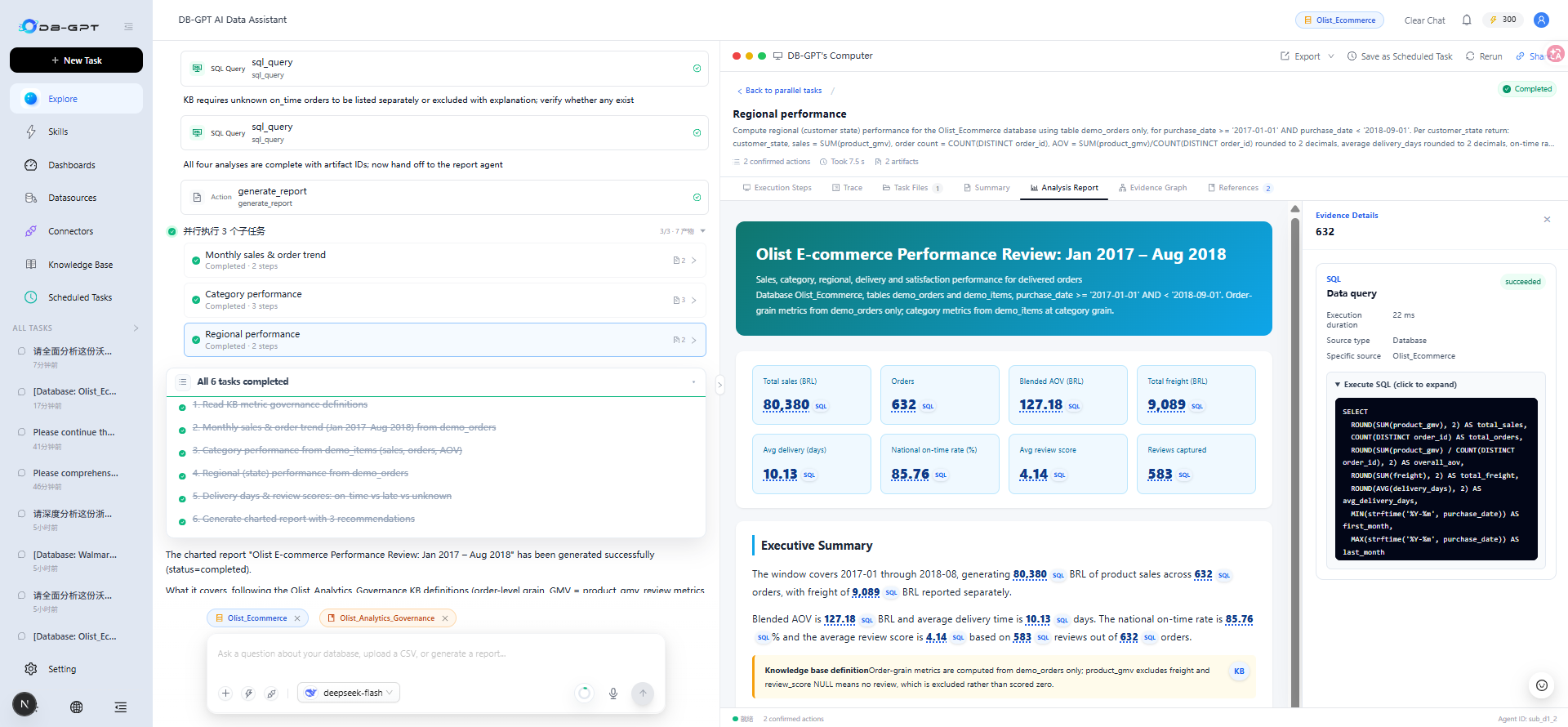
Delivering a data-analysis report should mean more than providing a few paragraphs and charts. Business users also need to know which query produced a metric, which fields a chart uses, which input files a calculation depends on, and which document defines a referenced business metric. V0.8.3 introduces structured, traceable data-analysis reports that connect report content to the actual results produced during task execution.
- Capture actual execution artifacts: Record results from SQL queries, Python analysis, knowledge-base retrieval, file reads, and Skill execution rather than retaining only the model-generated text.
- Bind evidence to reports: Associate metrics, charts, tables, and narrative content with their sources through stable artifact IDs, field paths, and content selectors.
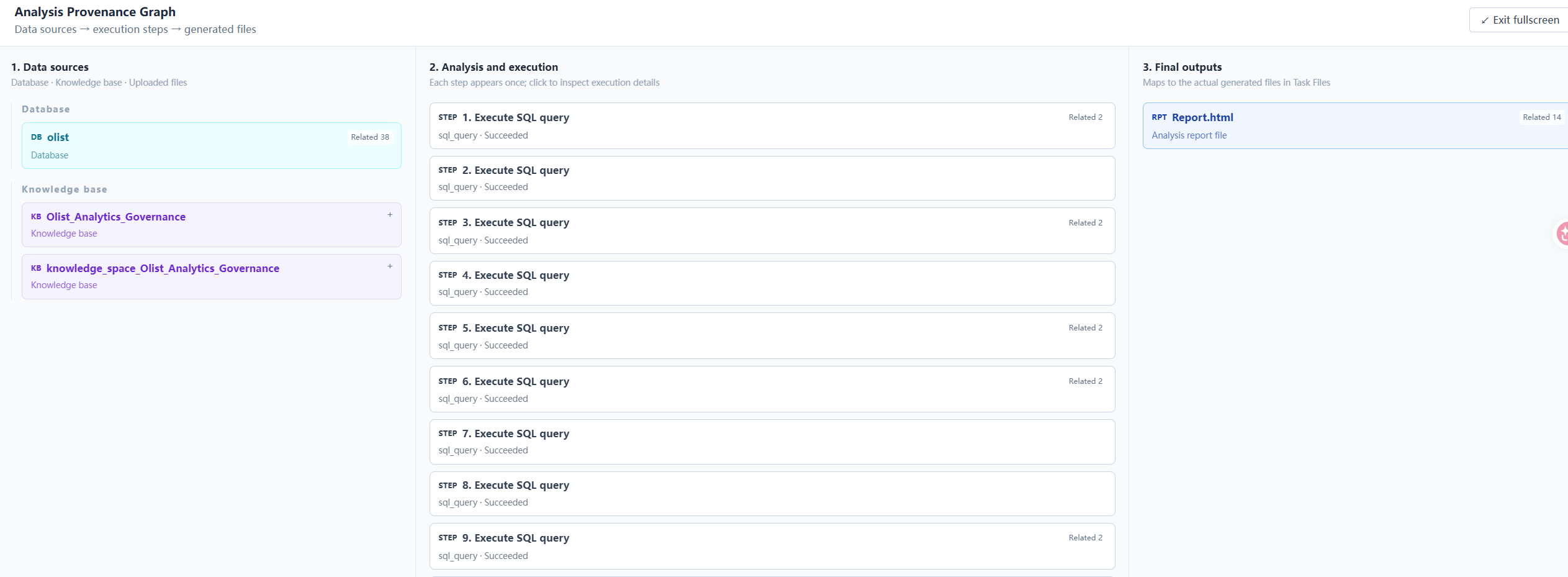
- Inspect upstream and downstream dependencies: Examine relationships among SQL, code, result summaries, knowledge citations, input files, and output files in source details and the evidence graph.
- Save immutable run snapshots: Persist reports, report versions, execution artifacts, dependencies, and evidence references so they remain reviewable when reopened.
- Improve validation and recovery: Provide known metrics, field paths, and business definitions through a session evidence catalog; prefer programmatic re-rendering for saved named-placeholder templates to reduce unnecessary model-repair calls.
- Support report delivery: Improve the report workspace, chart rendering, and HTML/PDF export workflow.
Evidence validation covers source identity, field paths, values, and chart bindings. When data can be uniquely matched to a captured result, the system can establish references programmatically. If a source cannot be determined or a value is inconsistent, validation is still retained, preventing uncertain content from being silently rendered as a trustworthy result.
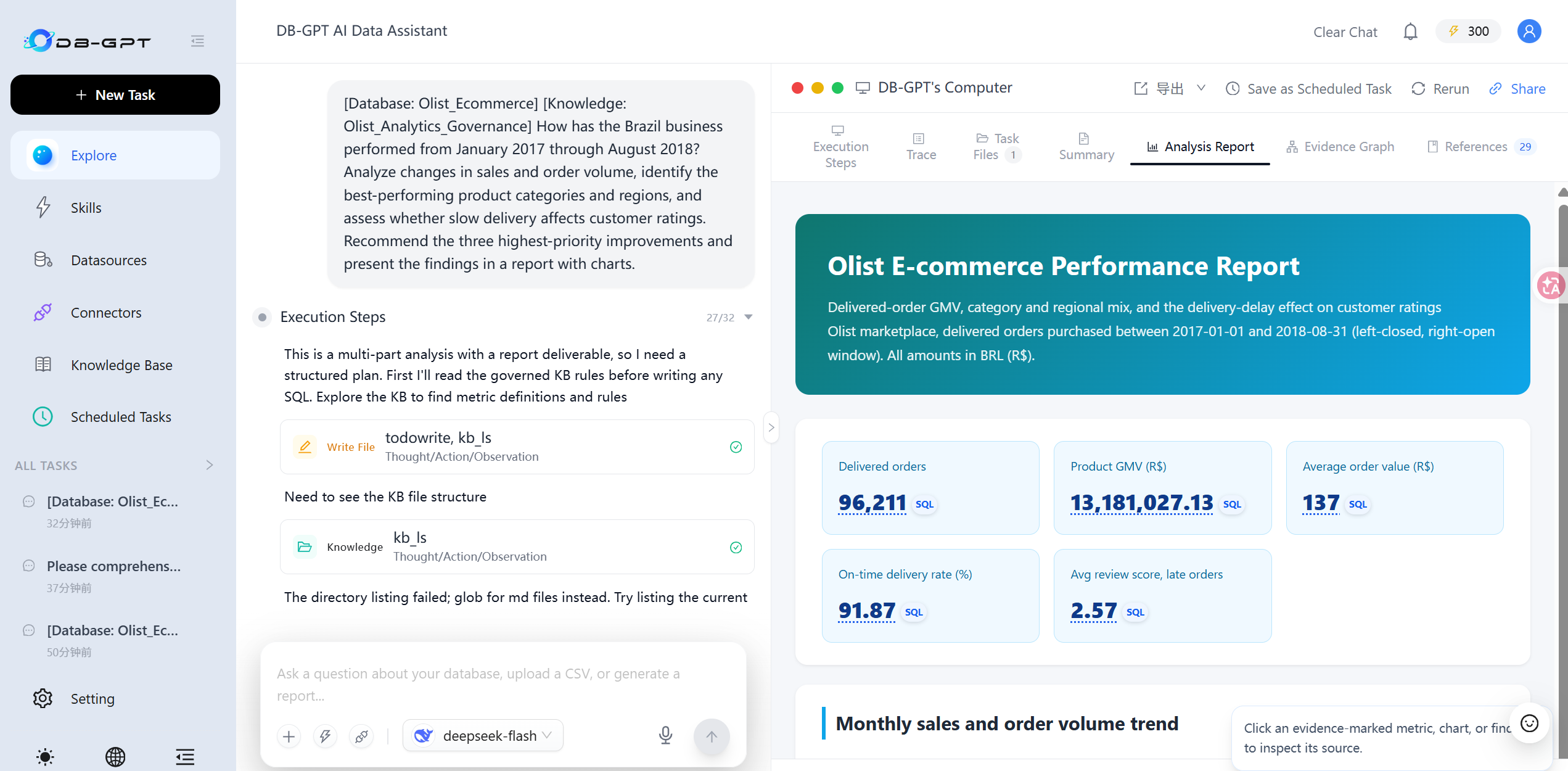
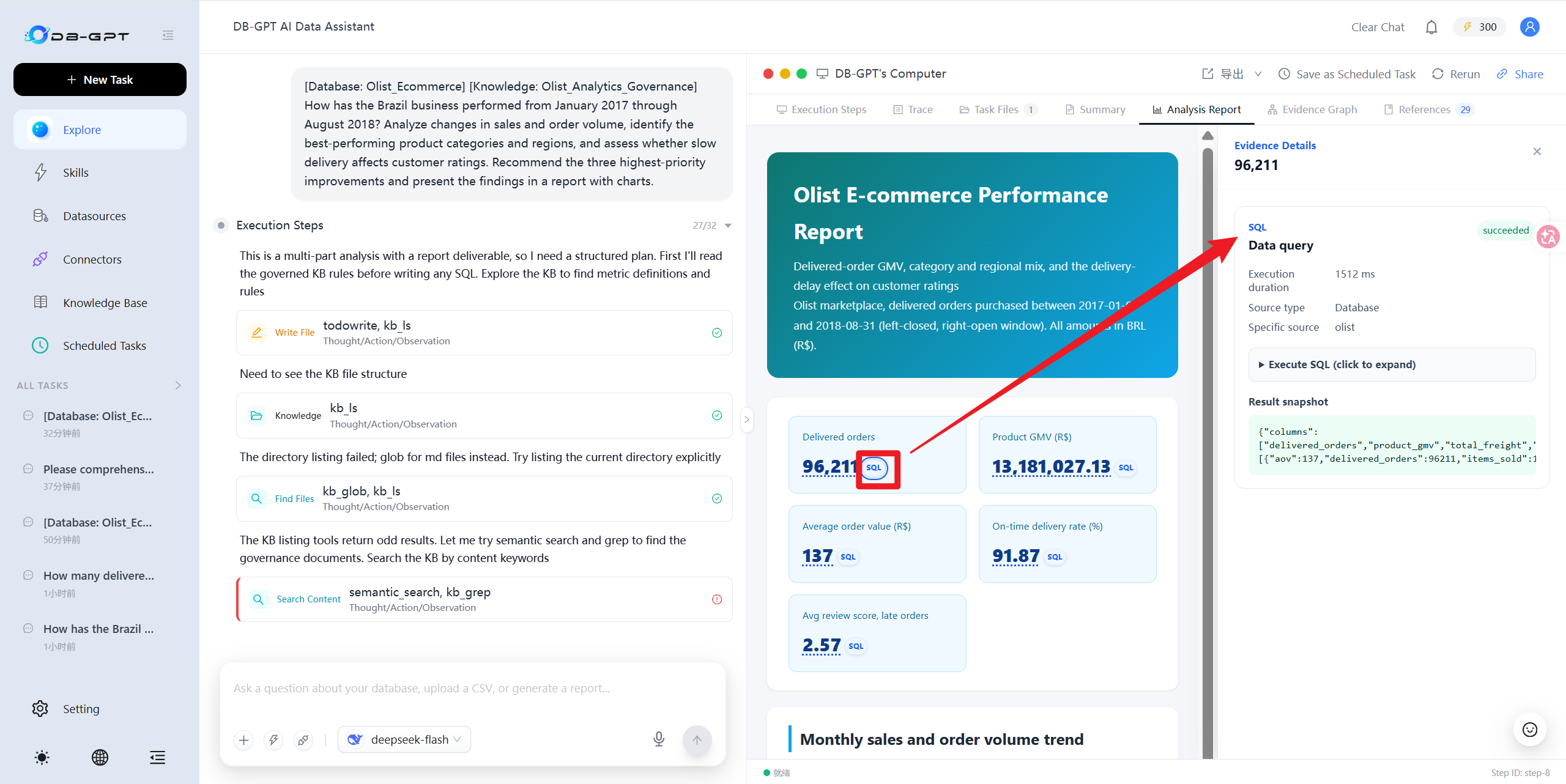
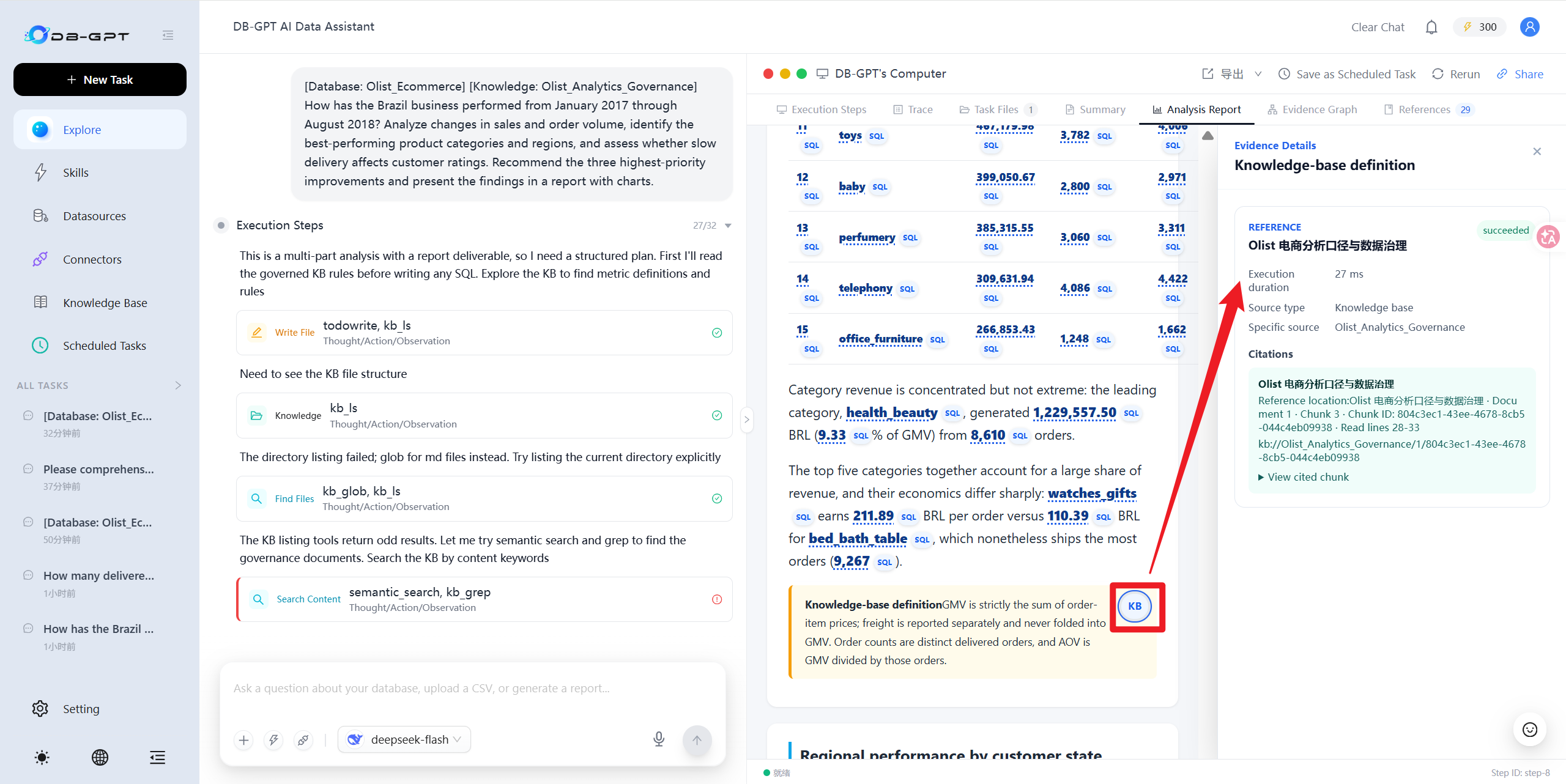
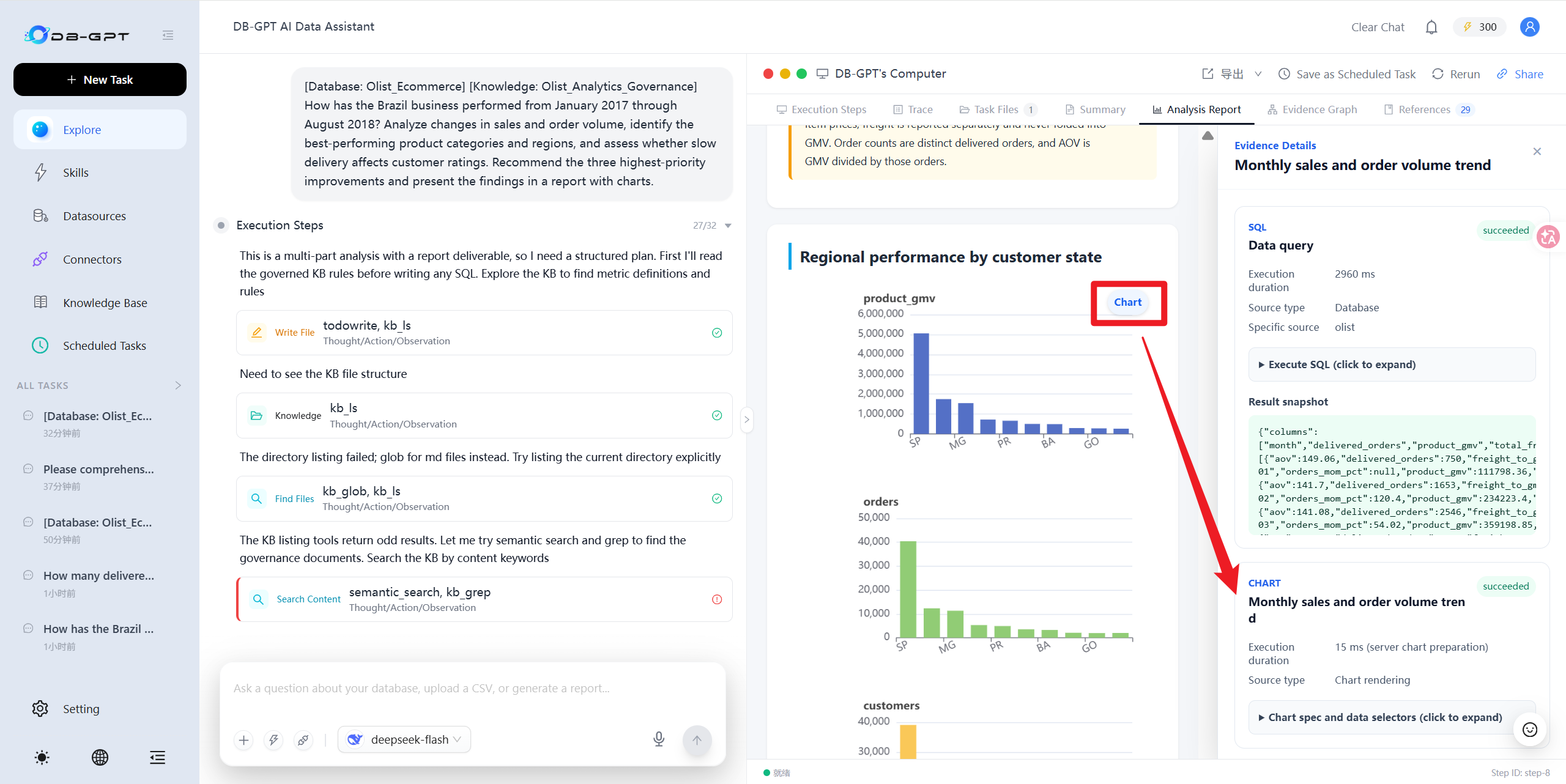
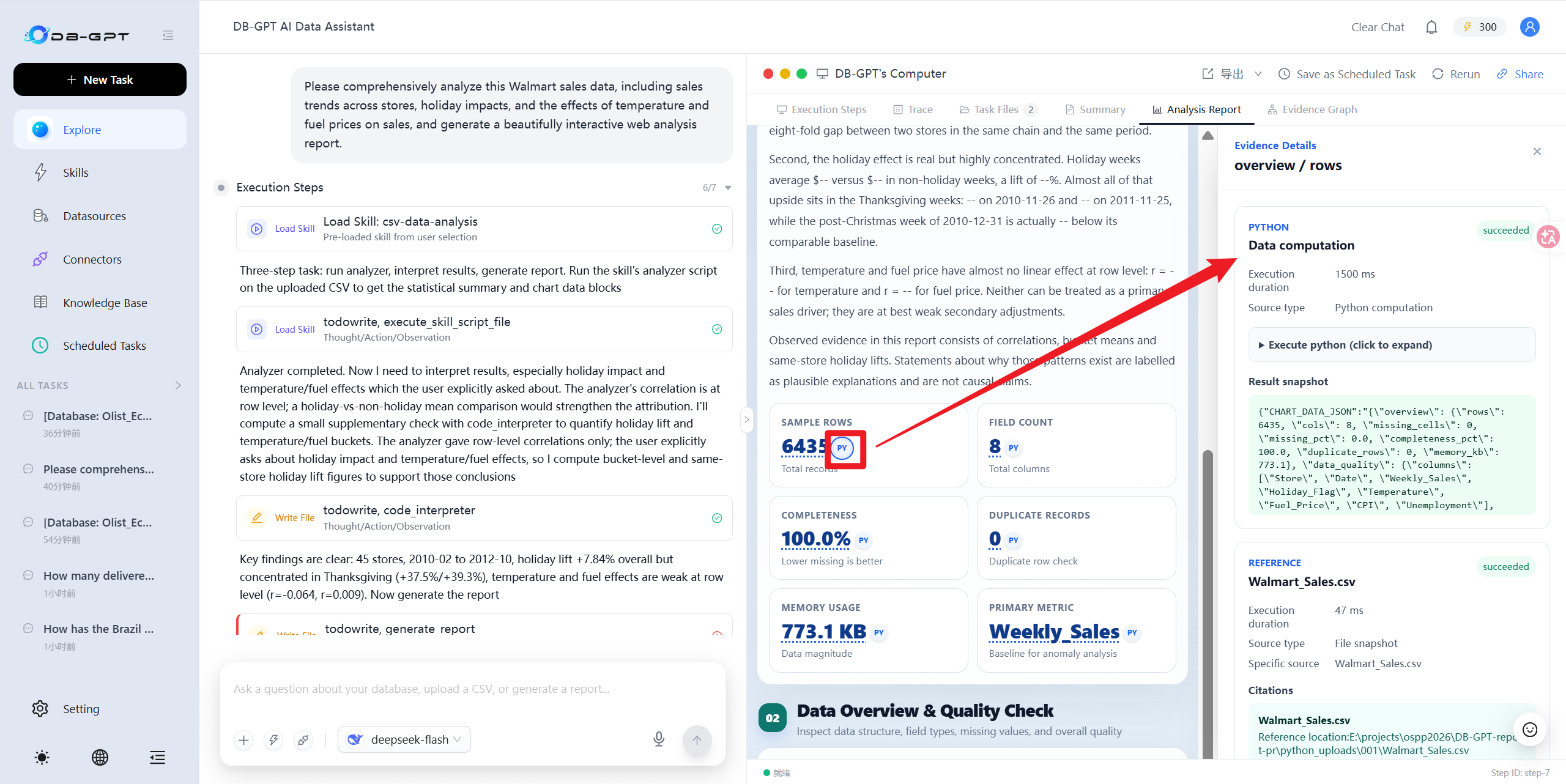
Evidence binding identifies the sources of report content; it does not mean the system has automatically verified the correctness of every natural-language conclusion. Business definitions, analytical assumptions, and recommendations still need to be reviewed in the context of the actual use case.
The home page also adds an Olist Brazilian E-commerce Business Diagnosis example, connecting data sources, metric-governance documents, knowledge indexes, and report generation in one complete workflow. The built-in database contains synthetic demonstration data rather than actual Olist transaction data. To analyze real data, download and import it separately by following the example instructions.
📈 Dashboard Workspace: Turn One Analysis into a Data Product You Can Keep Using
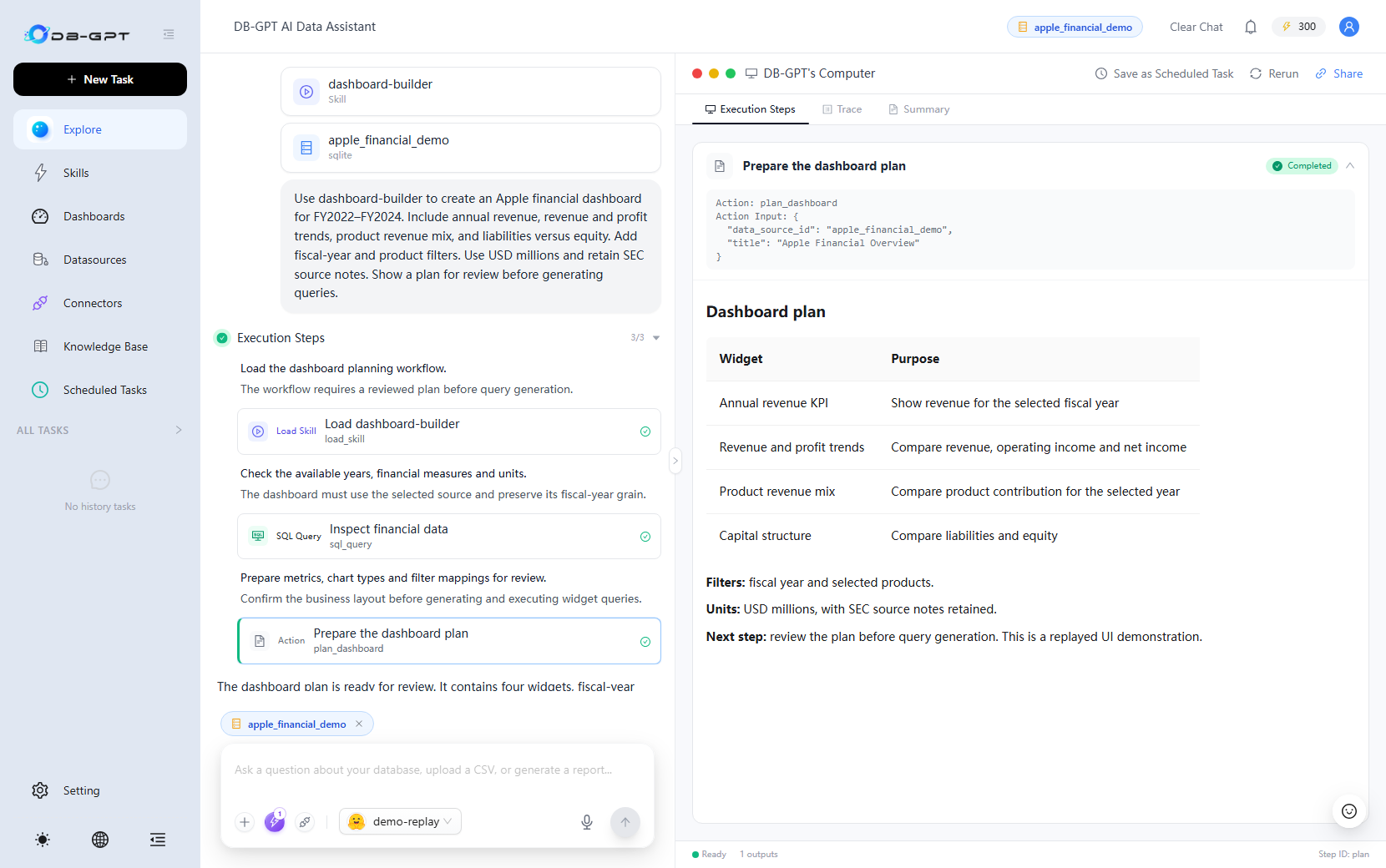
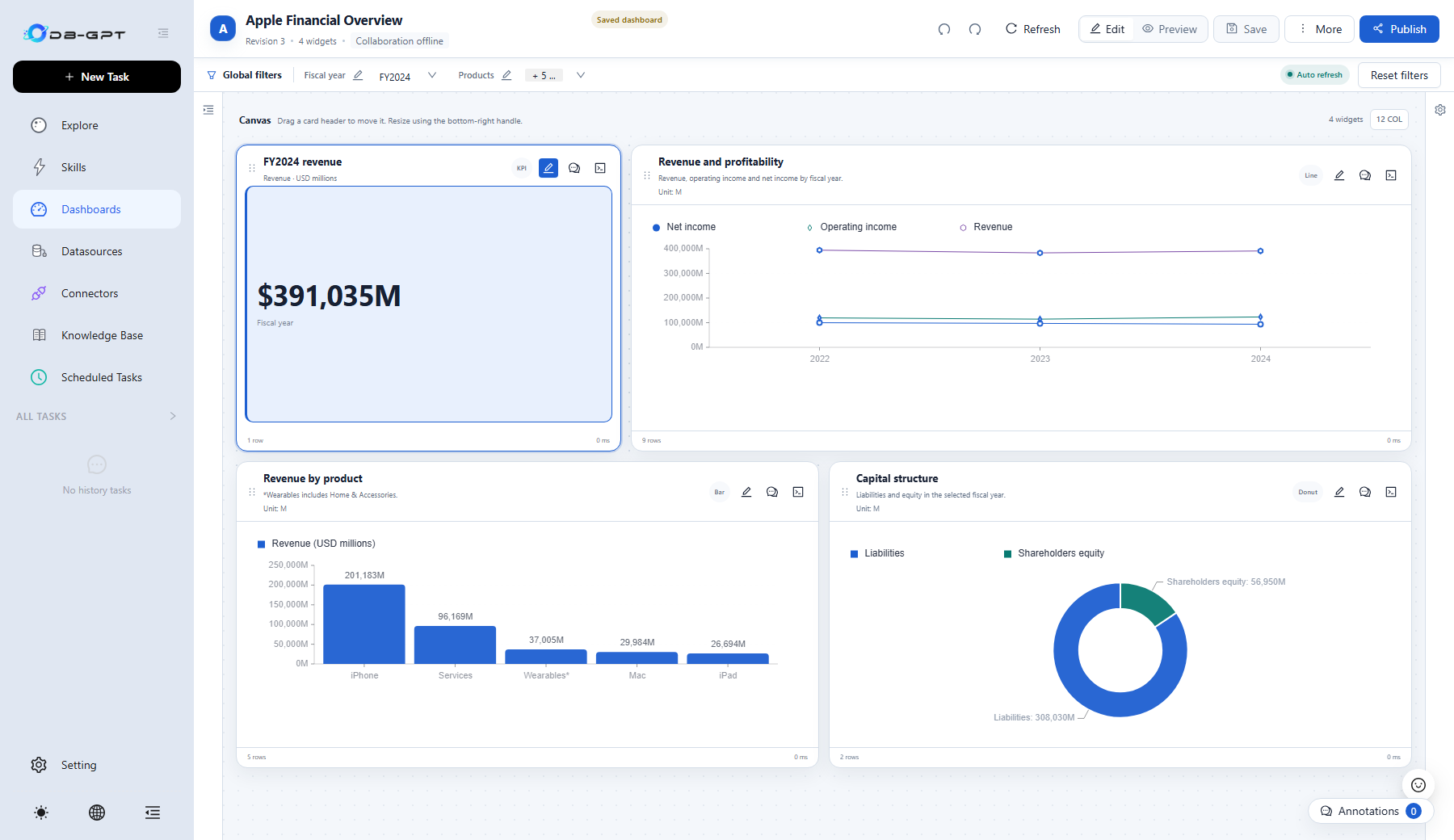
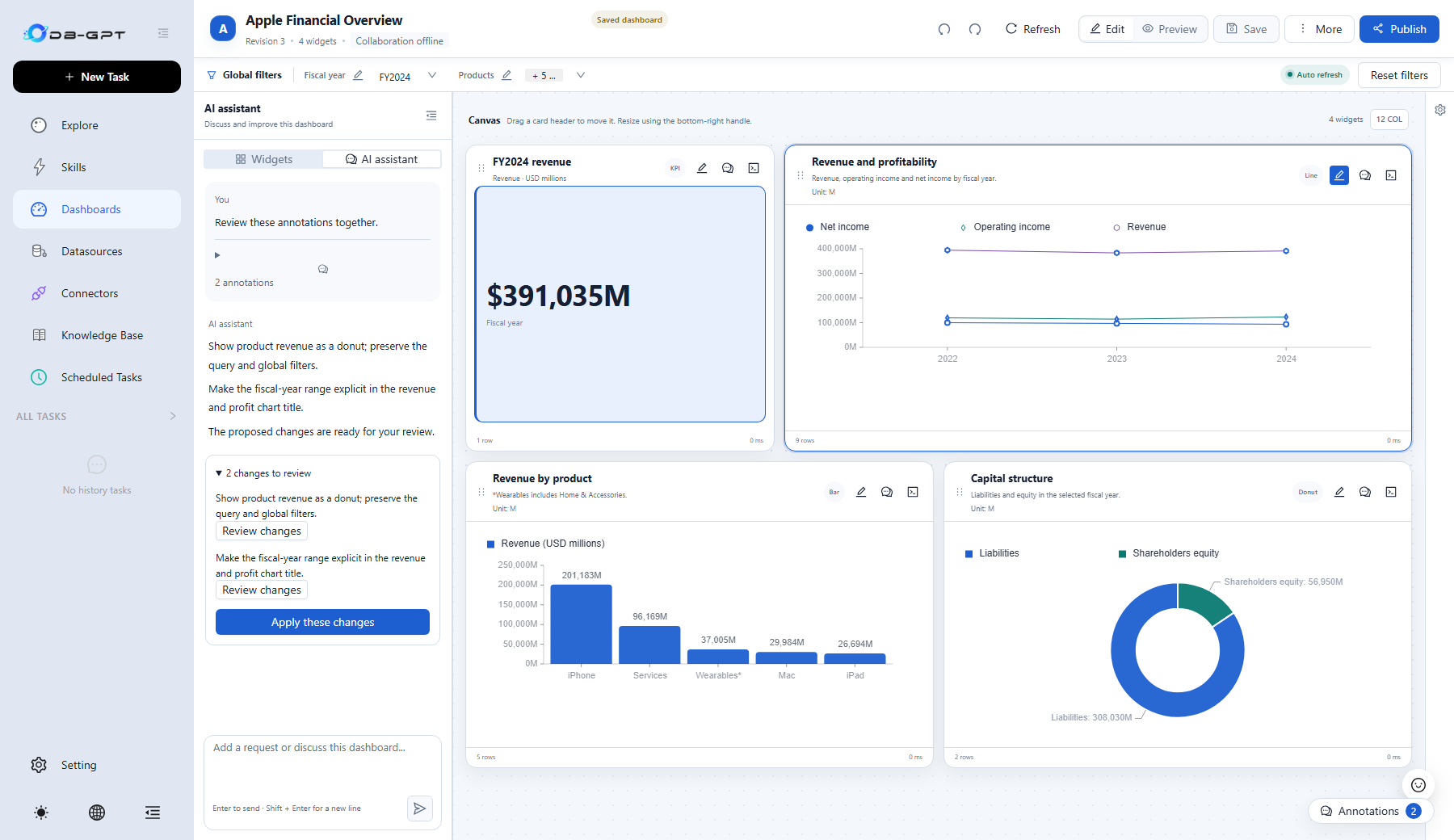
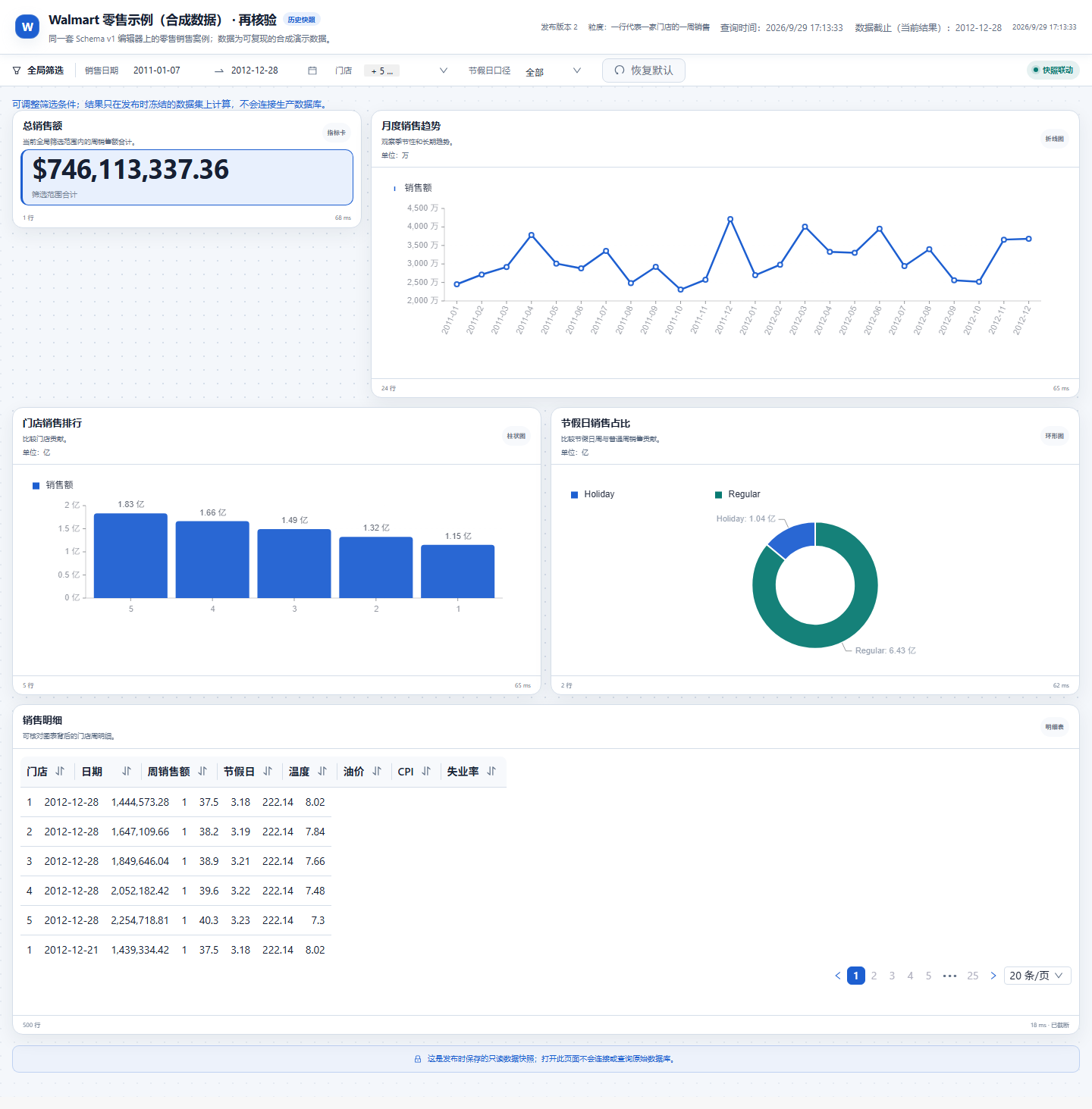
V0.8.3 introduces the Dashboard Workspace, connecting natural-language requirements, data exploration, dashboard planning, draft editing, and publishing and sharing in one complete workflow. The Agent explores the data and proposes a plan; the server handles authorization, validation, query execution, and persistence; and users review and modify the result in their browser instead of directly accepting an opaque, uninspectable output.
From Natural-Language Creation to Ongoing Maintenance
- Plan before creating: Select an authorized data source or associated files and let the Agent explore tables, fields, and samples. Generate a draft only after the user confirms the planned metrics, dimensions, filters, and components.
- Server-side validation: Validate the schema, cross-field references, read-only SQL, table and field allowlists, query parameters, and actual query results.
- Editable workspace: Use components such as KPIs, line charts, bar charts, pie charts, and tables, with date, single-select, multi-select, text, and numeric-range filters.
- AI annotations and change review: Request changes through natural-language annotations, review the proposed changes, and then decide whether to apply them. Explanations and anomaly analysis never silently modify the draft.
- Draft and revision management: Check the expected revision number on save to detect concurrency conflicts and prevent later submissions from overwriting content that someone else has already saved or published.
Publishing, Sharing, and Access Boundaries
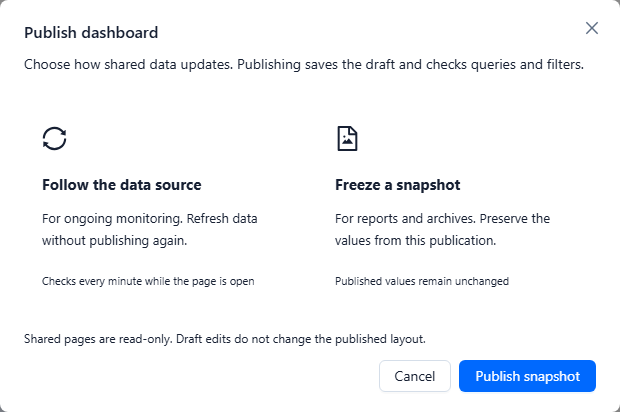
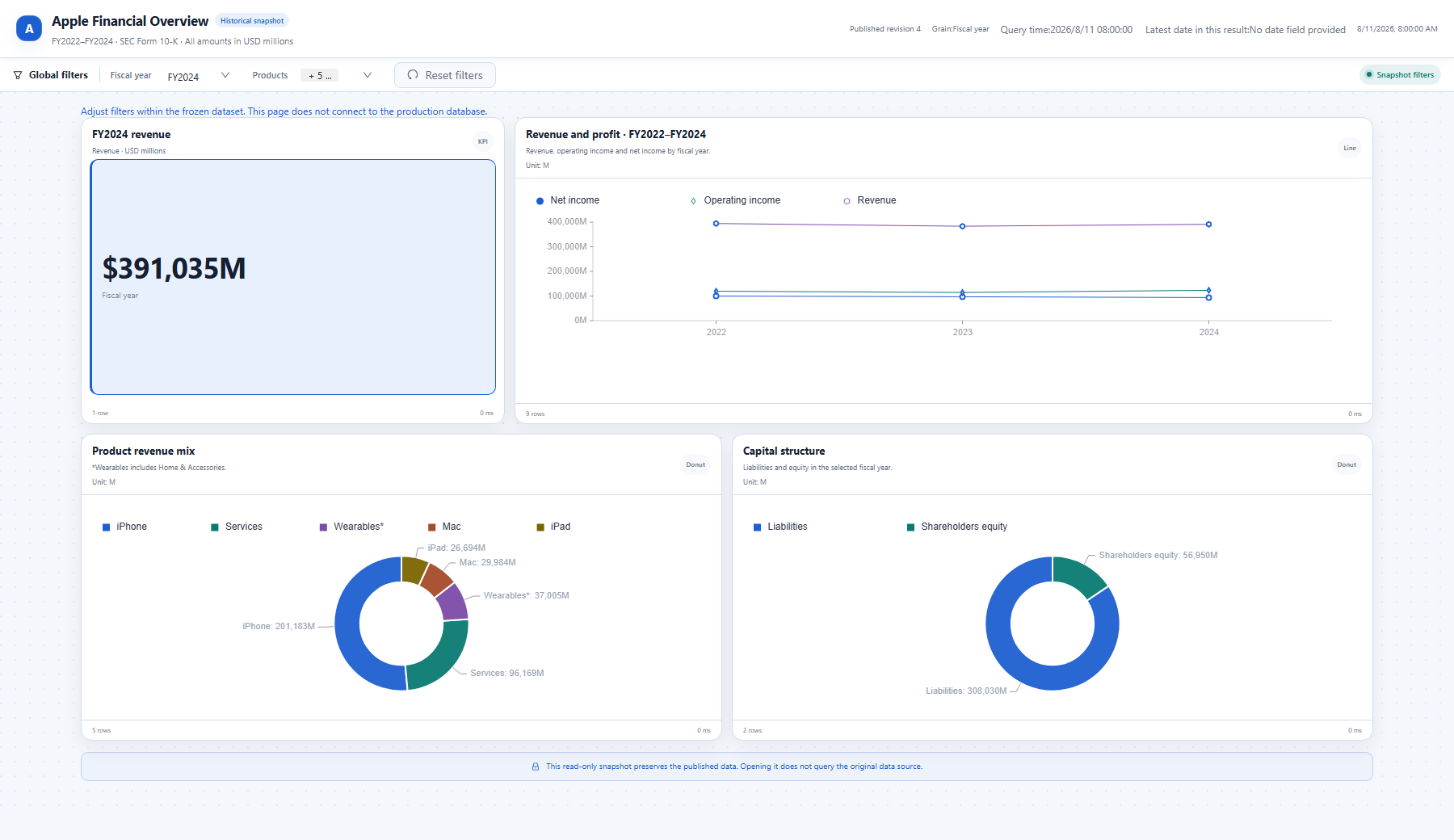
Dashboards distinguish between a Schema (query and presentation definitions) and a Snapshot (the results of one execution). A fixed historical publication freezes the Schema and data from that run; continuous sharing rematerializes data according to the published definition and is subject to expiration, revocation, and data-source permissions. Editing a draft does not automatically replace published content.
Public visitors can only view the dashboard and use permitted filters. They cannot submit arbitrary SQL, replace data sources, or modify drafts. Permission to edit a dashboard also does not imply permission to access its underlying data sources: the primary data source and every data source referenced by federated queries must pass server-side authorization checks.
🔭 Agent Observability: See Every Model and Tool Call
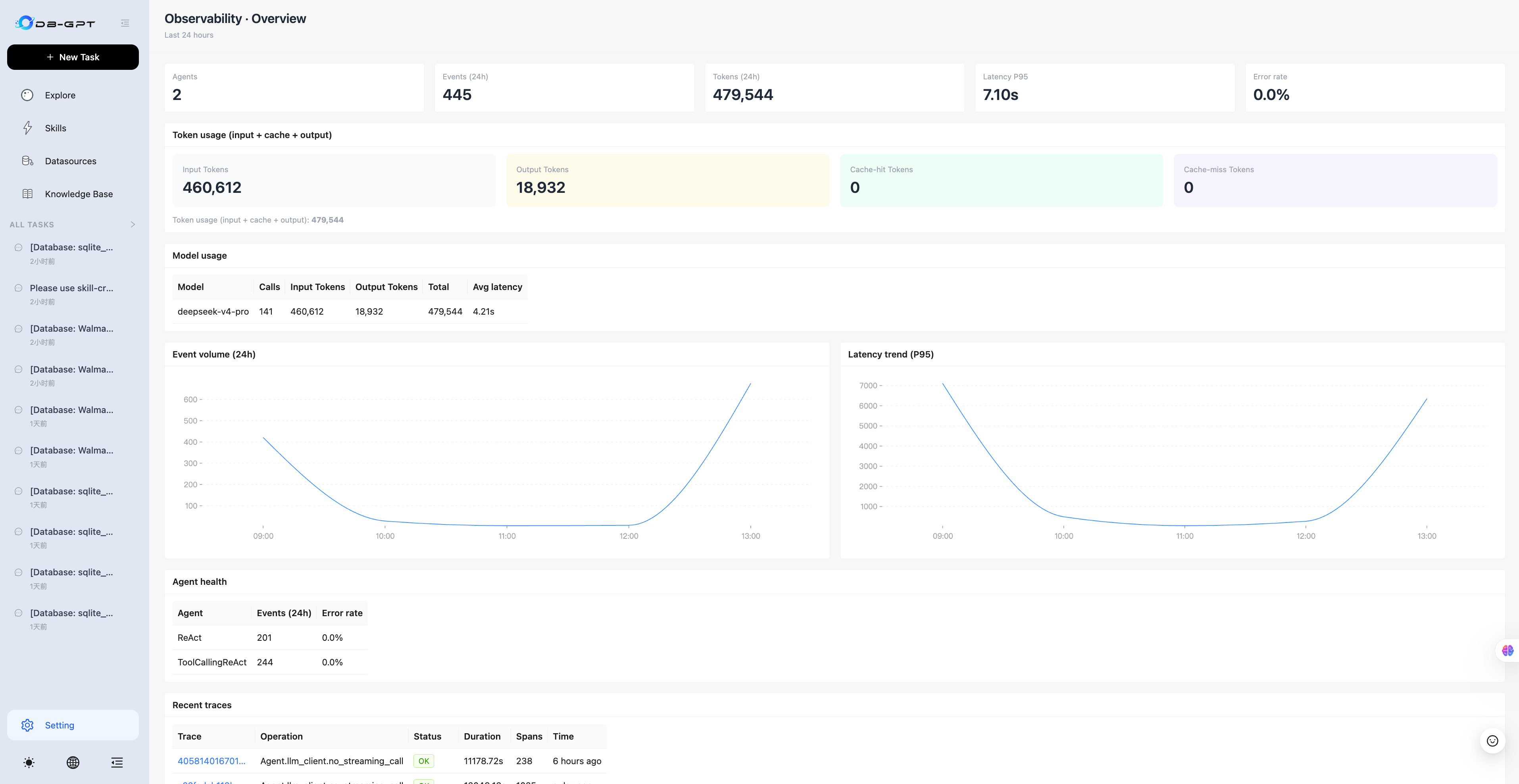
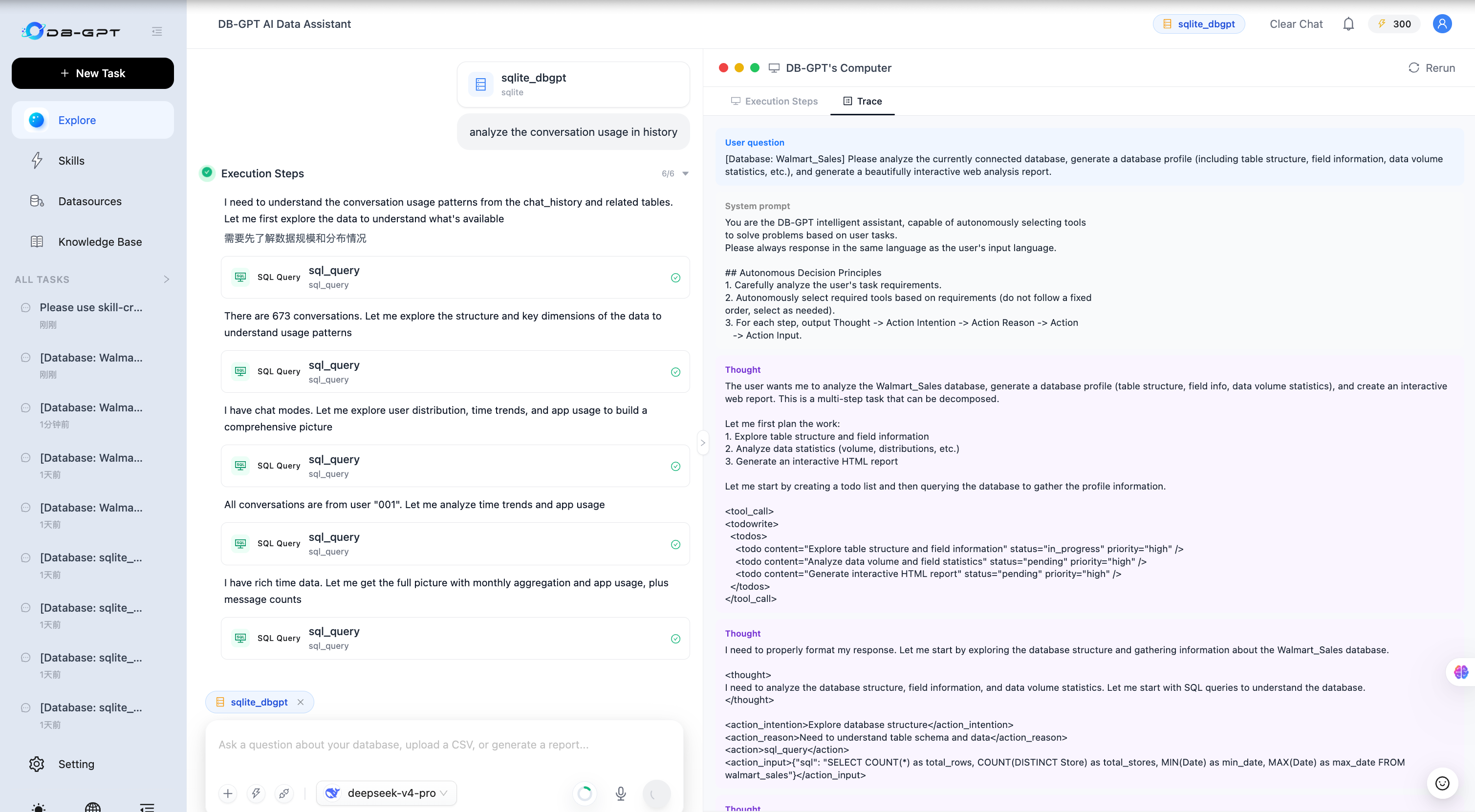
When a complex Agent task goes wrong, the final response alone often does not reveal the cause. V0.8.3 adds built-in observability that records Agent turns, LLM calls, and tool executions as correlated Spans and connects them to conversation messages through trace_id, without requiring a switch to an external tracing system.
- Overview dashboard: View the number of Agents, events, total tokens, P95 latency, and error rate for the last 24 hours, with calls, input/output tokens, and average latency aggregated by model.
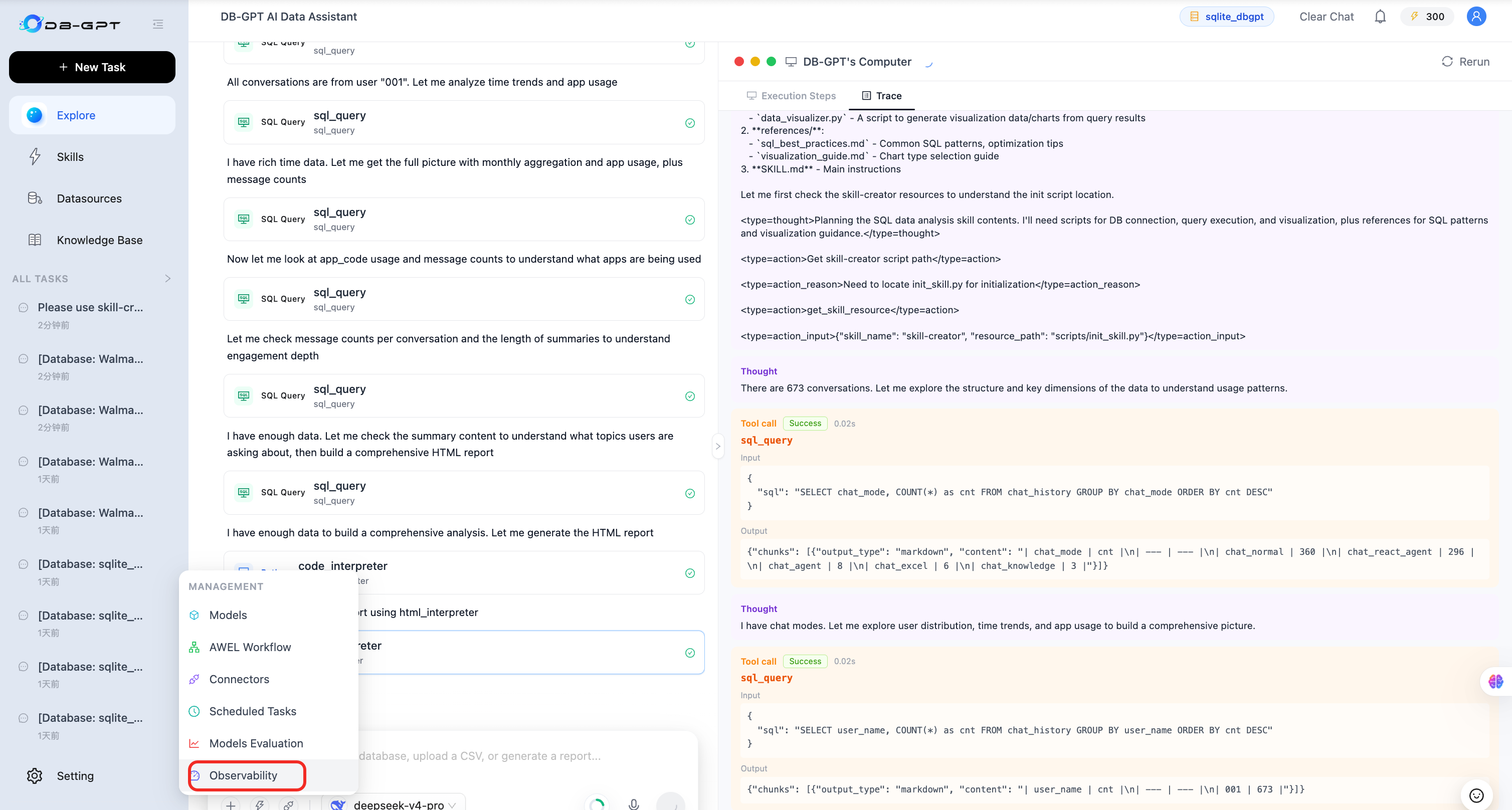
- Trace list and details: Inspect the complete Trace for an Agent execution and use a collapsible Span tree to examine the Agent, models, costs, duration, status, and raw metadata.
- In-conversation Trace: Reconstruct the current conversation as a message-flow timeline: user question → system prompt → reasoning → tool calls and results → response.
- Ready to use: Store telemetry in a separate SQLite file,
logs/observability.db, by default so high-throughput telemetry does not consume the primary business database. A pluggable Provider protocol supports additional read-side backends.
📚 LLM-Wiki: Grow Knowledge Spaces into Maintainable Knowledge Networks
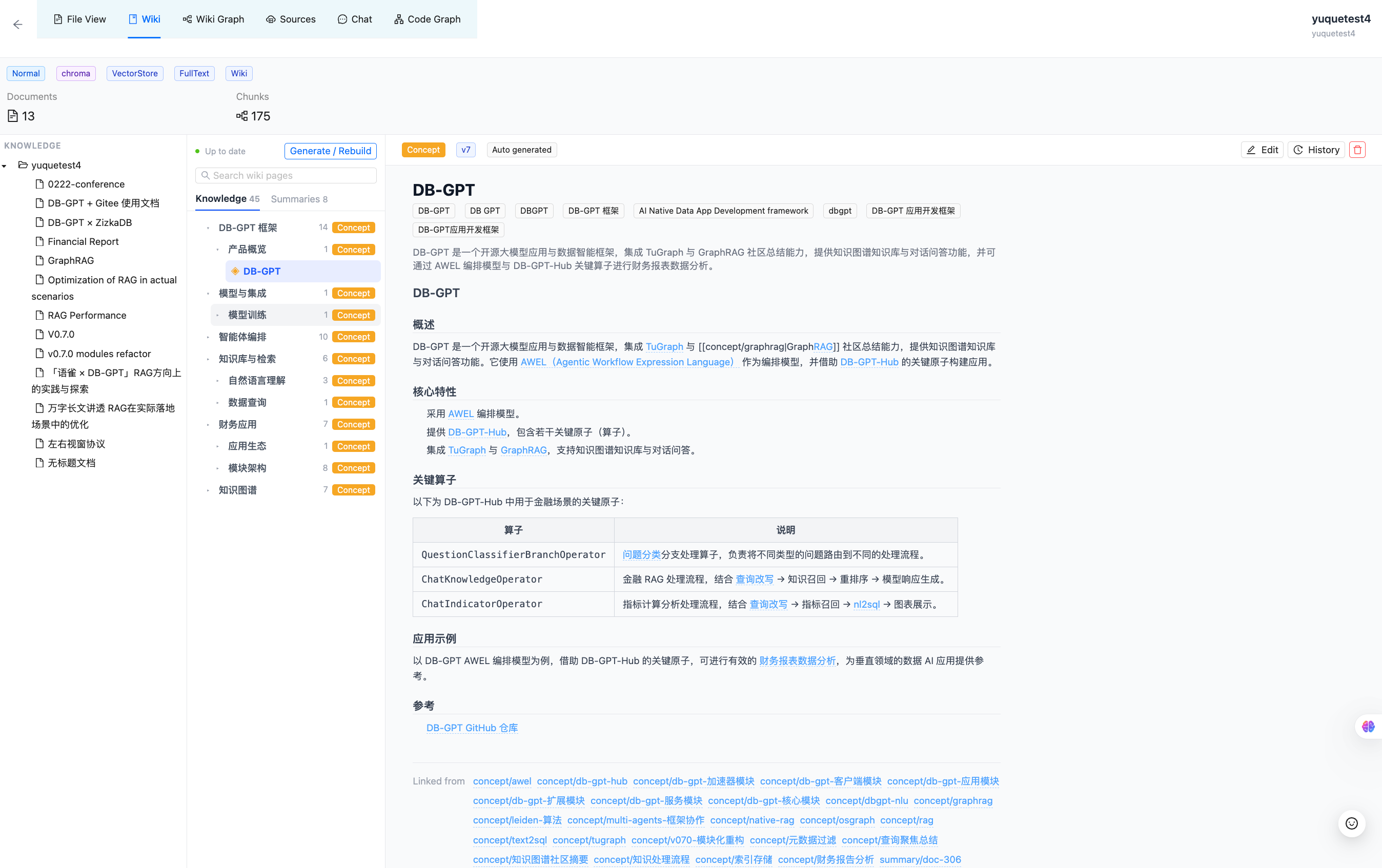
Traditional knowledge bases are organized primarily around documents and chunks. This works well for retrieving passages but does not always make entities, concepts, and cross-document relationships easy to understand. V0.8.3 introduces the LLM-Wiki index: an Agent reads the documents in a knowledge space and automatically generates interlinked Markdown pages, including entities, concepts, document-by-document summaries, and a table of contents, while also building a visual link graph.
- Incremental updates: When new documents arrive or content changes, regenerate only the affected Wiki pages instead of rebuilding the entire knowledge space every time.
- Multiple ways to browse: Explore knowledge structures and page relationships through a directory tree, page reader, and Wiki graph.
- Editing and version history: Continue maintaining generated knowledge pages while retaining their version history.
- Direct Agent access: After binding a knowledge space with Wiki enabled, the Agent automatically receives read-only
kb_wiki_*tools; standard knowledge retrieval also uses Wiki content.
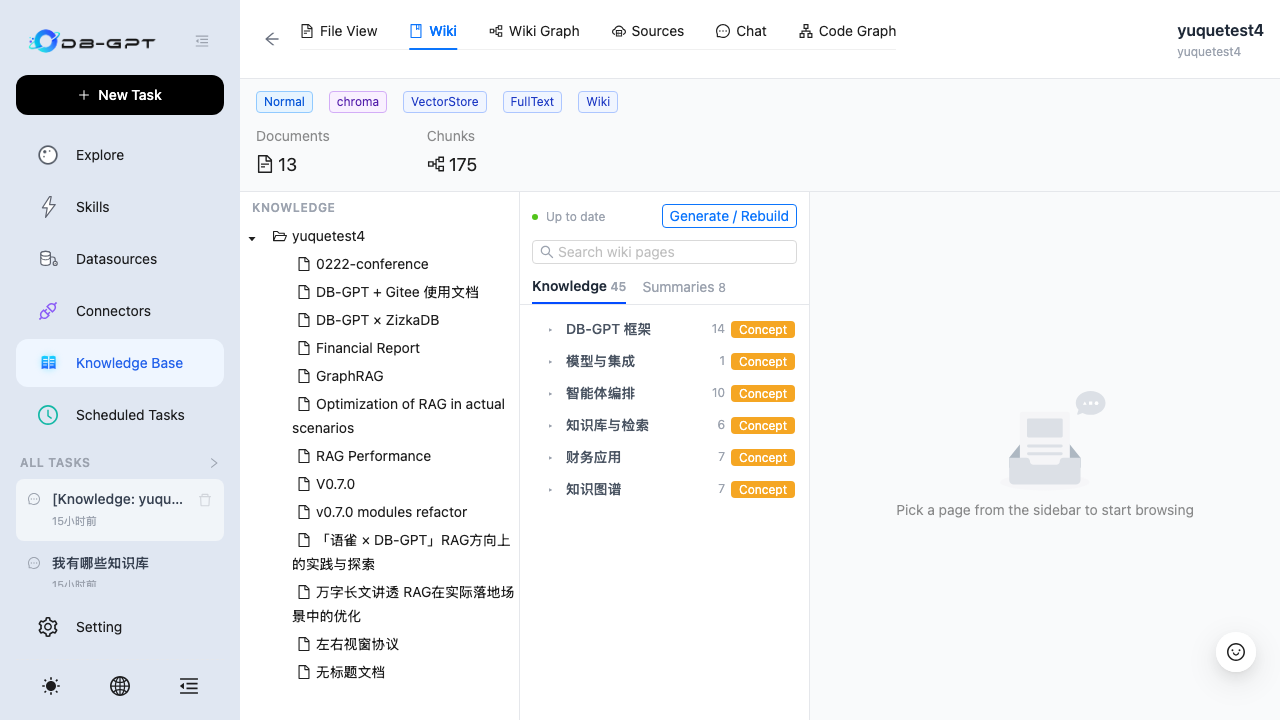
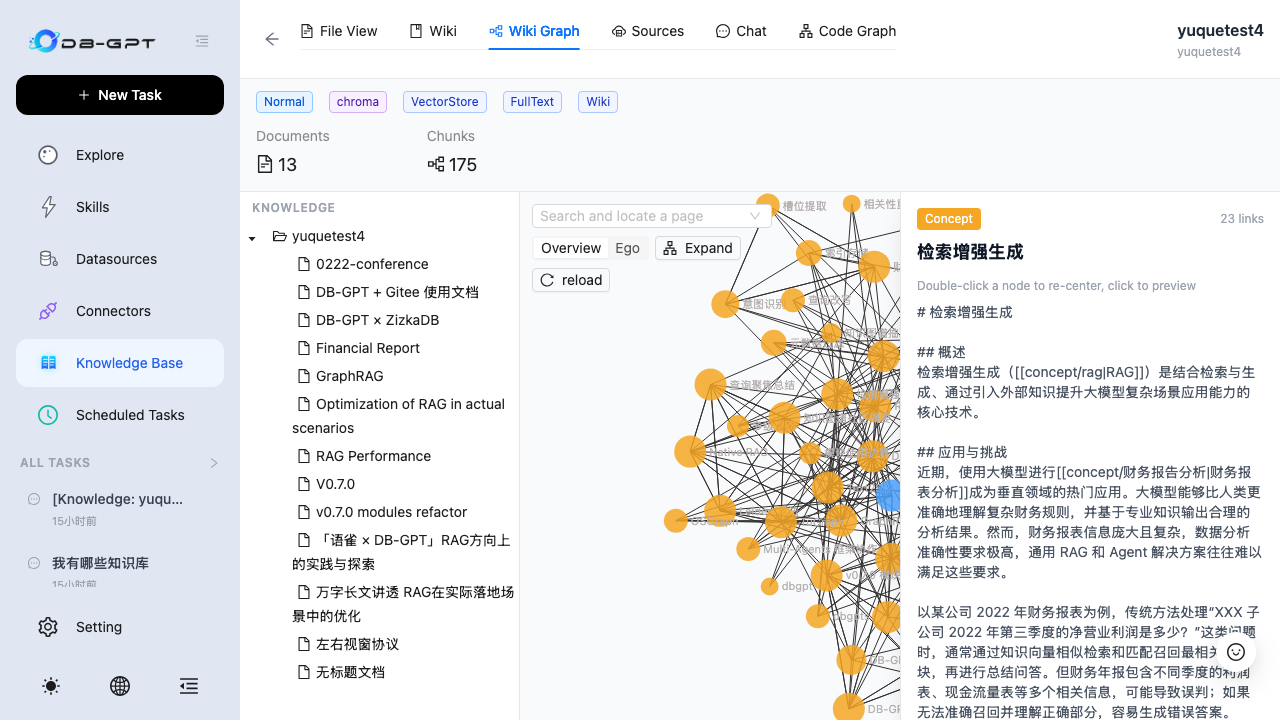
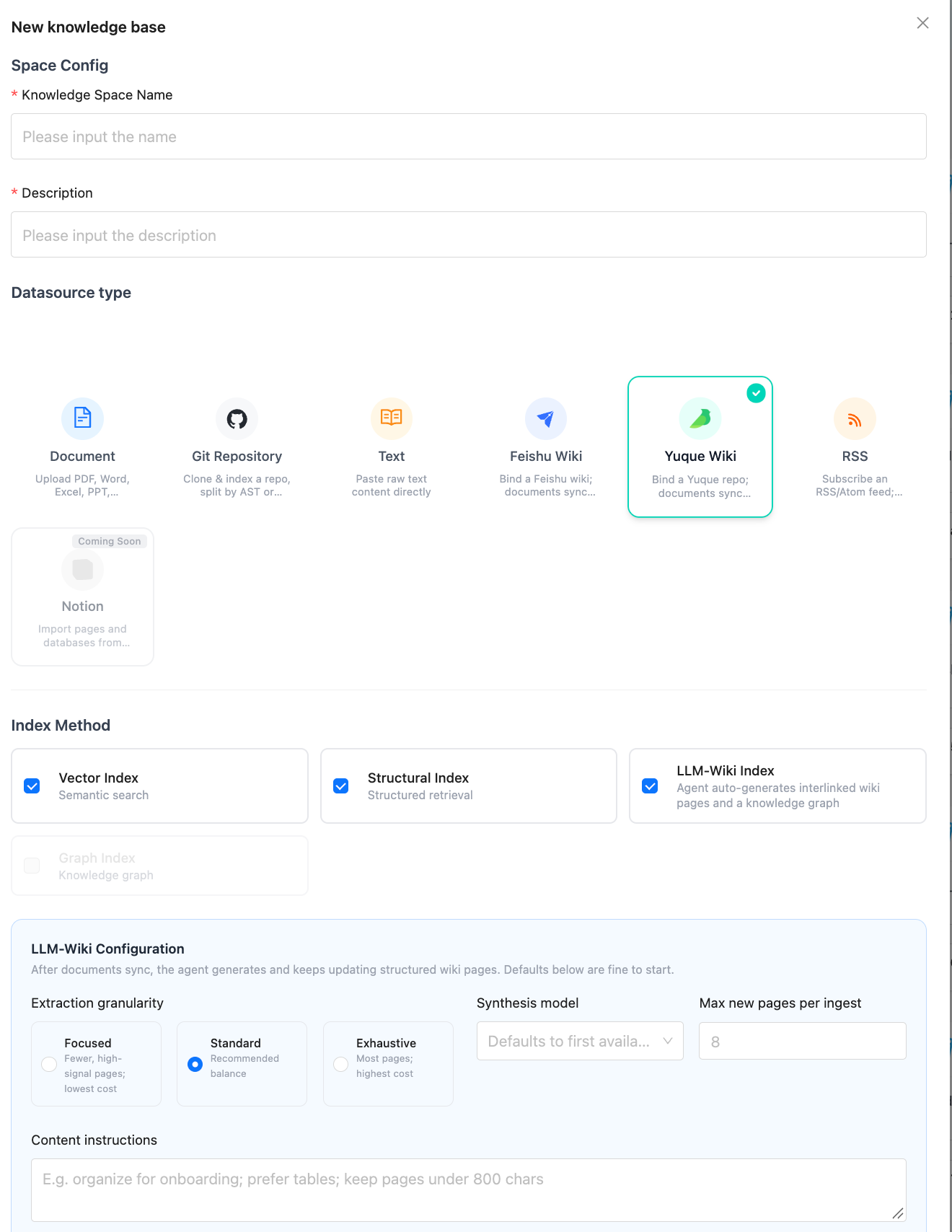
Knowledge sources now also include Feishu and Yuque. Once external documents enter the unified knowledge pipeline, they can be chunked, retrieved, and used for incremental LLM-Wiki updates without maintaining a separate ingestion workflow for each platform.
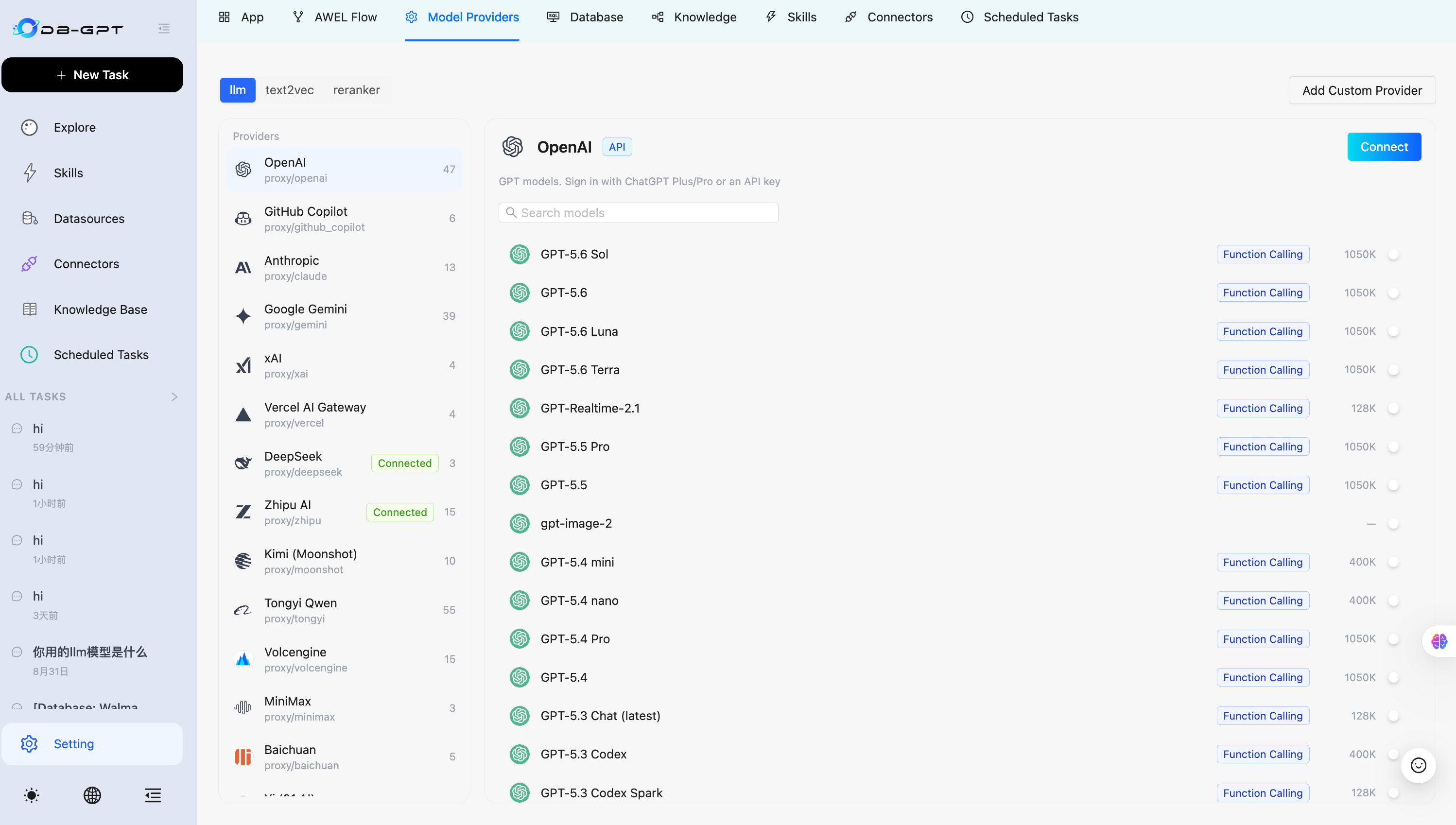
🧩 Model Provider Configuration: From Editing Configuration Files to Visual Management
V0.8.3 adds a model provider configuration page, allowing provider integration and model management in the UI and reducing the need to manually edit TOML files and restart services.
- Manage models across three Worker types:
llm,text2vec, andreranker. - Save credentials by provider and enable or disable each model independently. Enabling a model starts its corresponding Worker; disabling it releases its concurrency slots.
- Perform real credential or connectivity validation when connecting built-in providers. Connected providers and enabled models are restored automatically after a service restart.
- Add any OpenAI-compatible endpoint to integrate vLLM, a LiteLLM gateway, one-api, FastChat, Xinference, or an internal enterprise gateway.
- Add a Synthorai proxy Provider to access its model catalog through one OpenAI-compatible endpoint and key. Models not listed in the built-in metadata catalog can still be routed using their actual model IDs.
⚙️ Configurable Sandbox Runtime: Make Code Execution Location Explicit
V0.8.3 connects application-side Python and Shell Agent tools to a unified runtime-selection mechanism, with the main Agent and sub-agents sharing the same execution entry point. Users can explicitly select local, docker, podman, or nerdctl through SANDBOX_RUNTIME.
| Runtime | Behavior and boundaries |
|---|---|
LocalRuntime | The default runtime. Uses DB-GPT's current Python environment and executes Shell on the host running the service. No container image is required, but no container isolation is provided. |
DockerRuntime | Executes using an accessible Docker daemon and the image specified by SANDBOX_AGENT_IMAGE. |
PodmanRuntime | Executes using an available Podman backend. |
NerdctlRuntime | Executes using an available Nerdctl backend. |
DB-GPT does not automatically enable containers even when Docker is installed on the machine. After a container runtime is explicitly selected, failures to pull the image, initialize the session, or transfer input files cause the tool to return an error directly; code is never silently executed on the host. Errors, timeouts, or cancellations after code execution begins also do not trigger a retry on another runtime.
Container mode uses short-lived execution sessions: the working directory and explicit input files are passed in as needed, ordinary files and artifacts are collected after execution, and the container is cleaned up. Dependencies that must persist should be preinstalled in the Agent image.
🔎 Search and Storage Ecosystem Expansion
- Serply search tool: Add
serply_searchto retrieve Google search results through the Serply API. OnceSERPLY_API_KEYis configured, it can be used as an Agent search resource. - Keenable Search MCP connector template: Provide a built-in Streamable HTTP connection with two read-only tools,
search_web_pagesandfetch_page_content. A public quota is available without an API Key, and a Bearer Key can be configured for higher limits. - Configurable Qdrant metadata Payload indexes: Use
metadata_indexes/QDRANT_METADATA_INDEXESto index filtering fields such assession_idand page numbers, with support forkeyword,integer,float,bool,datetime, anduuidtypes. The default is empty, preserving existing deployment behavior. - Valkey client identification: Mark Valkey connections with
lib-nameclient information so DB-GPT clients can be identified in monitoring tools.
In the PR's validation scenario using Qdrant 1.20.0, 200,000 chunks, and filtering by session_id, a single query dropped from approximately 138 ms to 1.4 ms, with results identical to exact search. Actual improvements depend on collection size, data distribution, and filter conditions.
🛡️ Security and Reliability Hardening
V0.8.3 continues to tighten security boundaries across Agents, knowledge bases, connectors, and the file system:
- Restrict
get_fileto the session working directory, Agent file downloads to the Agent output directory, andFileClientreads and deletions to the upload directory. - Fix path traversal risks in Flow ZIP import filenames and the knowledge-space deletion API, as well as a SQL injection risk in the connection configuration DAO.
- Fix knowledge-space scoping and Benchmark security issues, and strengthen Skill upload and Dashboard template creation validation.
- Require an API Key for connector confirmation APIs to prevent unauthorized confirmation operations.
- Explicitly reject requests when graph configuration is missing instead of continuing with incomplete configuration.
- Increase the default Agentic completion budget to 16,384 tokens and connect it to the UI, environment variables, and TOML configuration. Increase the default Dashboard generation timeout from 180 seconds to 600 seconds to reduce complex dashboard plans being truncated during the confirmation stage.
- Read calculated formula results when loading Excel knowledge instead of treating formula text as cell values.
- Fix issues including
BaseOutputParserreturning no text during streaming calls, container timezone configuration, Spark table-information queries, and session state when creating new tasks.
Enhancements
- Improve report evidence verification, the evidence catalog, chart binding, and the report recovery workflow (#3348)
- Add configurable Qdrant metadata Payload indexes (#3305)
- Add structured, traceable data-analysis reports and a report workspace (#3295)
- Add the Dashboard Workspace and upgrade to the Next.js 16 toolchain (#3278)
- Add a Keenable Search MCP connector template (#3227)
- Mark Valkey connections with
lib-nameclient information (#3282) - Add the LLM-Wiki knowledge index and Feishu and Yuque knowledge sources (#3276)
- Add a configurable Agent Sandbox runtime (#3272)
- Add the Serply search tool (#3243)
- Add a model provider configuration UI (#3241)
- Add the Synthorai proxy LLM Provider (#3210)
- Add Agent observability Traces, an overview dashboard, and an in-conversation Trace timeline (#3212)
Bug Fixes
- Fix
BaseOutputParserreturning no text during streaming calls (#3363) - Restrict
get_filefile access to the session working directory (#3357) - Fix popular-app sorting not using the pagination offset (#3324)
- Limit SQL comment cleanup to
<sql>tags within api-call blocks to avoid affecting other content (#3274) - Explicitly reject requests when graph configuration is missing (#3352)
- Increase the Agentic completion budget and default Dashboard generation timeout, and connect them to the UI, environment variables, and TOML configuration (#3341)
- Unify the Dashboard Builder Skill and strengthen template creation validation (#3298)
- Fix path traversal risks in Flow ZIP imports and knowledge-space deletion, and a SQL injection risk in the connection configuration DAO (#3339)
- Install
tzdatain container images and support configurable container timezones (#3219) - Make the Markdown heading splitter correctly recognize
```code fences without a language tag as code blocks (#3273) - Fix knowledge-space scope isolation and Benchmark security issues (#3271)
- Strengthen Skill upload security validation (#3270)
- Add missing imports to the Skill implementation guide (#3226)
- Add API Key validation to connector confirmation APIs (#3264)
- Read calculated formula results instead of formula text when loading Excel knowledge (#3266)
- Restrict Agent file downloads to the Agent output directory (#3257)
- Remove a repeated word from Tokenizer error messages (#3246)
- Fix garbled localized text for
double_click_open(#3250) - Restrict
FileClientread and delete operations to the upload directory (#3237) - Add the missing
agent_errorsmodule and related tests (#3224) - Return view metadata from the Flow compatibility migration function (#3221)
- Return the configuration dictionary from the Worker configuration handler (#3220)
- Fix a
TypeErrortriggered when callingSparkConnector.table_simple_info(#3213) - Avoid creating an empty parent directory for SQLite (#3218)
- Fix a
TypeErrortriggered when runningretriever_evaluation_example.py(#3216) - Reset session state when creating a new task to avoid carrying over context from the previous task (#3214)
- Correctly parse
LOCAL_DB_SSL_VERIFYas a Boolean (#3211)
Documentation and Other Improvements
- Correct spelling in the Quick Start, installation, AWEL, and module documentation (#3286)
- Correct parameter descriptions in docstrings for Excel knowledge, evaluation modules,
add_command,ReduceStreamOperator, and others (#3248) (#3253) (#3252) (#3260) (#3261) - Correct the outdated
community_summaryimport path (#3254) - Align stale-bot messages with the configured timeout (#3251)
- Update Web build files (#3230)
How to Upgrade
This guide applies to upgrades from v0.8.2 to v0.8.3. If you are using an earlier version, first follow the historical upgrade documentation to upgrade sequentially to v0.8.2.
The V0.8.3 incremental metadata script adds 19 tables and 10 fields, together with related indexes, to 3 existing tables for Dashboards, traceable reports, scheduled-task resource associations and execution leases, run idempotency, and message tracing. Upgrade scripts are available under assets/schema/upgrade/v0_8_3/:
upgrade_to_v0.8.3.sql: the incremental script to run on top of a v0.8.2 database.v0.8.3.sql: the complete V0.8.3 schema for fresh installations. After running the full script in a new environment, you do not need to run the incremental script.
As in previous releases, the incremental script targets MySQL. SQLite users should back up the metadata database before upgrading; ORM-managed tables and fields are handled through table creation and migration entry points when the service starts. Observability data is written to the separate
logs/observability.dbby default, not to the primary business database.
Prepare
Back Up the Database
To avoid data loss, back up the metadata database before upgrading. Choose the method that matches your database type, such as mysqldump for MySQL or copying the database file for SQLite.
Confirm the Frontend Build Environment
If you build the frontend from source, we recommend Node.js 20.19. Next.js 16 requires Node.js >= 20.9.0. The frontend build baseline for this release is Node.js 20.19, with Webpack used consistently.
Upgrade the Database
Existing MySQL deployments must complete the incremental upgrade before starting the new version. Skipping the script leaves scheduled tasks without fields such as owner_id, resource_*, and lease_*, as well as the run-record idempotency index. This can cause errors such as Unknown column and affect existing scheduled tasks and Dashboard functionality.
The V0.8.3 incremental upgrade includes the following metadata changes:
| Change | Description |
|---|---|
dbgpt_serve_scheduled_task | Adds owner_id, resource_type, resource_id, lease_owner, and lease_expires_at for stable authorization identities, resource associations, mutually exclusive execution, and lease renewal. |
dbgpt_serve_scheduled_run | Adds output_resource_id, attempt_count, result_json, and idempotency_key, plus a unique (task_id, idempotency_key) index, to record result resources, retries, and structured results and prevent duplicate execution. |
chat_history_message | Adds trace_id and an index to associate chat messages with Agent execution traces. |
| 14 tables related to Dashboards and uploaded datasets | Store dashboard drafts, editing revisions, AI annotations, operation records, published snapshots, continuous sharing, member permissions, audits, covers, uploaded datasets, and related information. |
| 5 tables related to traceable reports | Store report identities, immutable run snapshots, execution artifacts, artifact dependencies, and report evidence bindings. |
Apply the incremental script to your MySQL metadata database:
mysql -u <user> -p dbgpt < assets/schema/upgrade/v0_8_3/upgrade_to_v0.8.3.sql
If your metadata database is not named dbgpt, first adjust USE dbgpt; in the script and the connection command. The script uses direct ALTER TABLE ... ADD COLUMN / ADD INDEX statements on existing tables and should be run only once. If you previously ran an older Dashboard SQL script or manually applied part of the DDL, first check which fields and indexes already exist, apply only the missing items, and do not run the entire incremental script again.
Install Dependencies
Install or update Python dependencies according to your deployment method. For a source installation with the default setup:
uv sync --all-packages
To use the Qdrant vector store and metadata Payload indexes, install the corresponding extra:
uv sync --all-packages --extra "storage_qdrant"
When building the frontend from source, reinstall dependencies and run the production build:
cd web
yarn install
yarn build
Adjust Runtime Configuration as Needed
LocalRuntime remains the default Sandbox runtime. Explicitly select a container backend only when container isolation is required, and prepare an available daemon and Agent image in advance:
export SANDBOX_RUNTIME=docker
export SANDBOX_AGENT_IMAGE=dbgpt-sandbox-agent:latest
To create Payload indexes for Qdrant metadata filtering fields, configure them as needed. No additional indexes are created when this setting is unset:
export QDRANT_METADATA_INDEXES="session_id,page:integer"
Acknowledgements
The release of V0.8.3 would not have been possible without the community developers' continued contributions.
🎉 New Contributors
V0.8.3 welcomes 22 new contributors:
- @Anai-Guo
- @yetuge
- @AvAl4nch
- @Goodnight77
- @Jonathan-Improving
- @L4XB
- @LostSnowfluff
- @MindOfqc
- @MohammadHijjawi97
- @bosprimigenious
- @cuihuan
- @drakeo338
- @gaurav0107
- @googio
- @ilya-bogin-keenable
- @jcsdxhe
- @simpleqt
- @someorz
- @toyeshhm
- @ump45nose
- @xiaoyvhuv
- @yetuge
🔥🔥 Thank you to all the contributors who made this release possible! @Anai-Guo, @Aries-ckt, @AvAl4nch, @Goodnight77, @Jonathan-Improving, @L4XB, @LostSnowfluff, @MindOfqc, @MohammadHijjawi97, @bosprimigenious, @chen-alan, @chenliang15405, @cuihuan, @drakeo338, @gaurav0107, @googio, @ilya-bogin-keenable, @jcsdxhe, @simpleqt, @someorz, @toyeshhm, @ump45nose, @xiaoyvhuv and @yetuge